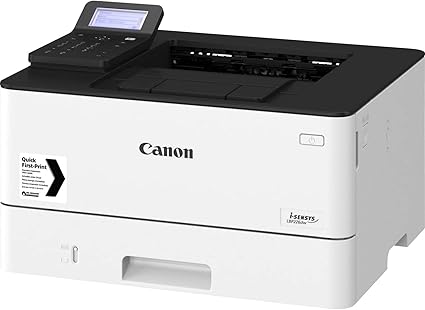
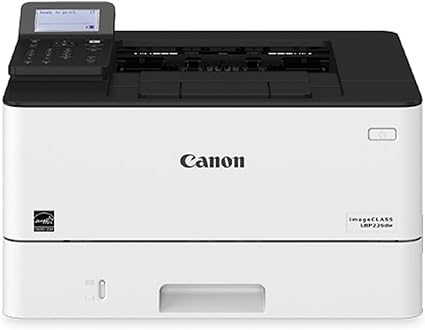
The Canon imageCLASS LBP226dw is a monochrome laser printer designed for small to medium-sized businesses and offices, providing high-quality, efficient, and fast printing. This printer is part of Canon’s imageCLASS series and features a compact design with advanced connectivity options, making it a reliable option for those looking to enhance productivity.
Key Features:
Monochrome Printing:
The imageCLASS LBP226dw is a monochrome printer, meaning it prints in black and white only. It’s designed for high-volume text-heavy document printing.
Fast Printing Speed:
The printer offers a printing speed of up to 40 pages per minute (ppm), making it highly efficient for medium to high-volume printing in a busy office environment.
Wireless and Mobile Printing:
Wi-Fi and Wi-Fi Direct capabilities allow for wireless printing from mobile devices, laptops, and desktops. You can print from various devices using Apple AirPrint, Google Cloud Print, and the Canon PRINT Business app.
Automatic Duplex Printing:
The printer supports automatic duplex printing (two-sided printing), which helps save paper and is an eco-friendly feature for businesses that print large volumes of documents.
High Paper Capacity:
The imageCLASS LBP226dw comes with a 250-sheet front-loading paper tray, making it suitable for businesses that require large volumes of printing with fewer interruptions for reloading paper.
User-Friendly Interface:
It includes a 5-line LCD display that provides easy access to printer settings and status updates. The user-friendly interface simplifies navigating through the printer’s features.
High-Quality Prints:
The printer is designed to produce sharp and clear prints with a print resolution of up to 600 x 600 dpi, ensuring high-quality output for text and images.
Energy-Saving Features:
The Canon imageCLASS LBP226dw includes energy-saving features such as Quiet Mode, which reduces noise levels during printing, and Energy Star certification for energy-efficient operation.
Security:
The printer includes various security features like Secure Print for confidential document handling and IP address filtering for restricting network access.
Specifications: Canon imageCLASS LBP226dw
Printer Type: Monochrome Laser Printer
Functionality: Printing (single function printer)
Printing Speed: Up to 40 pages per minute (ppm)
Print Resolution: Up to 600 x 600 dpi (enhanced to 1200 x 1200 dpi)
Paper Capacity:
250-sheet standard paper tray
1-sheet manual feed slot
Duplex Printing: Automatic
Display: 5-line LCD display
Connectivity:
Wi-Fi (802.11 b/g/n)
Wi-Fi Direct
Ethernet (wired)
Apple AirPrint, Google Cloud Print, Canon PRINT Business
Dimensions: 14.8 x 15.4 x 10.9 inches (376 x 391 x 277 mm)
Weight: Approx. 16.6 lbs (7.5 kg)
Power Consumption: Energy Star® certified
Benefits: Canon imageCLASS LBP226dw
Fast and Efficient:
With 40 ppm printing speed, the Canon LBP226dw is a high-performance printer that delivers fast results, ideal for busy office environments.
Mobile Printing Capabilities:
Its wireless capabilities, including support for mobile printing apps, allow users to print from virtually any device, including smartphones, tablets, and laptops.
Eco-Friendly:
The automatic duplex printing feature helps save paper, while Energy Star® certification ensures low energy consumption, reducing the environmental impact of your printing activities.
High Yield Toner:
The printer supports high-yield toner cartridges, which reduces the frequency of replacements and overall printing costs, making it suitable for businesses with higher print volumes.
Compact Design:
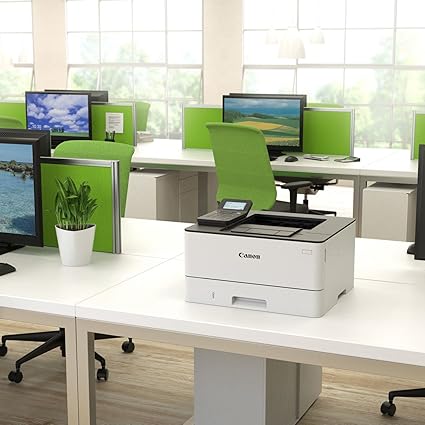
The printer’s compact size makes it easy to fit into smaller office spaces while still providing robust performance, without taking up much room.
Security Features:
Enhanced security features like Secure Print ensure that sensitive documents are protected and only printed by authorized users, which is important in professional or sensitive environments.
How to Install and Set Up Canon imageCLASS LBP226dw:
Unbox the Printer:
Remove the printer from the box and carefully remove all protective materials (plastic wraps, tapes, etc.).
Load Paper:
Open the paper tray and load it with appropriate paper (e.g., A4, letter size). Ensure the paper is aligned correctly to avoid paper jams.
Install the Toner Cartridge:
Open the front cover and install the toner cartridge according to the printer’s instructions. Ensure it clicks securely into place.
Connect the Printer to Power:
Plug the printer into a power outlet and turn it on using the power button.
Connect to a Network:
For wireless setup, press the Wi-Fi button on the printer, and follow the on-screen instructions to connect the printer to your network. You can also connect via Ethernet or directly using Wi-Fi Direct.
If using a wired connection, simply plug the printer into your router or computer using the Ethernet cable.
Install the Printer Driver:
On your computer, download and install the printer driver from Canon’s official website (or use the provided CD if applicable). Follow the on-screen instructions to complete the driver installation.
Test Print:
Once the printer is connected and the driver is installed, print a test page to ensure the printer is set up correctly and functioning properly.




 HP, Laserjet Printer, Printers


There are no reviews yet.