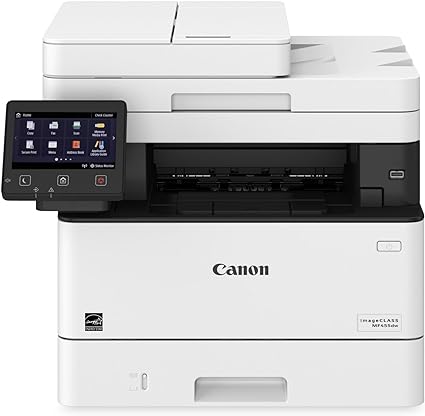
The Canon Laser MFP i-SENSYS MF455dw is a multifunction monochrome laser printer designed for small to medium-sized businesses that require reliable and high-speed printing, scanning, and copying. It is equipped with advanced features to help improve productivity and efficiency, all while offering a compact footprint suitable for various office environments.
Key Features of the Canon Laser MFP i-SENSYS MF455dw:
Multifunctional Performance:
The MF455dw offers four functions: printing, copying, scanning, and faxing. This makes it an ideal choice for businesses that need a single device to handle various document-related tasks.
Fast Printing Speed:
The printer delivers impressive print speeds of up to 40 pages per minute (ppm), ensuring quick document output for fast-paced office environments.
Automatic Duplex Printing:
The i-SENSYS MF455dw supports automatic duplex (two-sided) printing, helping reduce paper usage and costs while enhancing the presentation of printed documents.
High-Quality Print Output:
The printer features a print resolution of up to 1200 x 1200 dpi (with Automatic Image Refinement), ensuring sharp, high-quality text and graphics for professional documents.
Wireless and Mobile Connectivity:
With Wi-Fi, Ethernet, and Wi-Fi Direct support, this model provides flexibility for users to print wirelessly from smartphones, tablets, or laptops. It also supports mobile printing solutions such as Apple AirPrint, Google Cloud Print, and Canon PRINT Business.
Large Paper Capacity:
The MF455dw has a 250-sheet paper tray and a 100-sheet output tray, which reduces the need for frequent reloading of paper. Additionally, it includes a 35-sheet automatic document feeder (ADF) for scanning and copying multiple pages automatically.
High Paper Handling Versatility:
This printer supports various paper sizes, including A4, A5, B5, and Letter, and is compatible with different media types like plain paper, labels, envelopes, and more.
Intuitive Touchscreen Display:
It comes with a 5-line LCD display that provides an intuitive interface for easy navigation, making it simple to manage print jobs, access settings, and use different features.
Cost Efficiency:
The i-SENSYS MF455dw is designed with cost-effectiveness in mind, offering low-cost printing, energy-saving features, and a high-yield toner option for longer print runs with fewer replacements.
Energy-Efficient:
This model is ENERGY STAR certified, contributing to lower energy consumption and helping businesses save on operating costs.
Specifications:
Type: Multifunction monochrome laser printer
Functions: Print, Copy, Scan, Fax
Print Speed: Up to 40 pages per minute (ppm) (black)
Print Resolution: Up to 1200 x 1200 dpi (with Automatic Image Refinement)
Duplex Printing: Automatic (two-sided printing)
Display: 5-line LCD display
Connectivity:
Wi-Fi, Ethernet, USB 2.0
Wi-Fi Direct, Apple AirPrint, Google Cloud Print, Canon PRINT Business
Monthly Duty Cycle: Up to 30,000 pages
Paper Capacity:
250-sheet paper tray
100-sheet output tray
35-sheet Automatic Document Feeder (ADF)
Supported Paper Sizes: A4, A5, B5, Letter, Legal, Envelope
Energy Efficiency:ENERGY STAR certified
Weight: Approx. 13.4 kg (29.5 lbs)
Dimensions (W x D x H):398 x 379 x 289 mm
Benefits of Using the Canon Laser MFP i-SENSYS MF455dw:
High-Speed Printing:
With 40 ppm print speeds, the MF455dw can quickly produce large volumes of documents, which improves overall productivity and ensures efficient workflows in busy office environments.
Cost-Effective and Low Maintenance:
This printer is designed to be cost-efficient, offering high-yield toner options for reduced operating costs and longer periods between toner replacements. The automatic duplex printing further helps reduce paper costs.
Reliable Performance:
The i-SENSYS MF455dw is built to deliver consistent, high-quality monochrome prints for a variety of document types, making it suitable for daily office printing tasks.
User-Friendly Interface:
The 5-line LCD display is simple to use, allowing users to easily access and manage print, copy, and scan jobs without complicated menus or navigation.
Energy-Efficient Design:
With ENERGY STAR certification and Canon’s On-Demand Fixing technology, the printer reduces power consumption during operation, helping to lower electricity costs and contribute to a greener office environment.
Convenient Wireless and Mobile Printing:
Wi-Fi, Ethernet, and Wi-Fi Direct capabilities, along with compatibility with mobile printing services like Apple AirPrint and Google Cloud Print, allow users to print wirelessly from various devices, making it easy to print from laptops, smartphones, and tablets.
Versatile Paper Handling:
The 250-sheet input tray and 100-sheet output tray provide a good balance between capacity and size, while the 35-sheet ADF helps streamline scanning and copying tasks, especially when working with multi-page documents.
Secure Printing:
With options for secure printing, the printer ensures that confidential documents are printed only when the correct PIN or password is entered, adding an additional layer of security in busy office environments.
How to Install the Canon Laser MFP i-SENSYS MF455dw:
Unbox the Printer:
Unpack the MF455dw and remove all packing materials, including protective tapes and foam from the printer.
Install the Toner Cartridges:
Open the front cover and install the toner cartridges into the printer by following the instructions in the manual. Be sure to remove any protective covers from the toner cartridges before installing.
Load Paper:
Load the 250-sheet paper tray with the desired paper size (typically A4 or Letter). Adjust the paper guides to ensure the paper is properly aligned.
Connect the Printer:
Connect the printer to your Wi-Fi network, Ethernet, or directly via USB. Follow the instructions on the LCD display to configure the wireless or wired connection.
Power On the Printer:
Turn on the printer using the power button and wait for the printer to initialize.
Install Drivers and Software:
Download the necessary drivers and software from the Canon website or use the included CD for installation. Follow the on-screen instructions to complete the installation process.
Test Print:
After the installation is complete, print a test page to ensure the printer is functioning properly.
Once installed, the Canon Laser MFP i-SENSYS MF455dw will be ready to handle your printing, copying, scanning, and faxing needs with speed and efficiency, helping to boost productivity in your office.


 HP, Laserjet Printer, Printers
There are no reviews yet.