

Canon PIXMA Ink Tank 451 M | RELIABLE | EFFICIENT | HIGH QUALITY
$10.18 $20.00
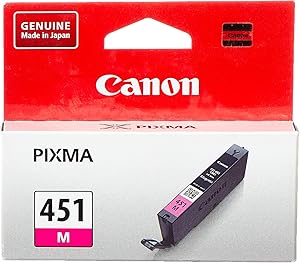
Canon PIXMA Ink Tank 451 M
The Canon PIXMA Ink Tank 451 M is a magenta ink cartridge designed for use in Canon PIXMA series printers. This cartridge is part of the Canon PGI-450/CLI-451 ink series, which is designed to deliver vibrant, high-quality color prints, particularly for photo printing. The CLI-451 M cartridge is specifically for magenta, one of the key colors used to create a full color spectrum in your prints.
Key Features:
- Vibrant Magenta Ink:
- The CLI-451 M is a magenta ink cartridge that plays a crucial role in reproducing accurate and vibrant color prints. This ink is perfect for printing photos and color documents where vivid magenta tones are needed.
- It enhances the overall color reproduction, producing bright, lifelike images with true-to-life color accuracy.
- Dye-Based Ink:
- The CLI-451 M uses dye-based ink, which is ideal for photo printing. Dye-based inks offer excellent color saturation and are well-suited for glossy and photo paper types, providing sharp details and rich colors.
- Photo Quality Printing:
- This ink cartridge is optimized for photo printing, ensuring smooth gradations and rich color depth in prints. It is particularly suitable for printing professional-quality photos, brochures, and other full-color documents.
- Easy to Replace:
- The CLI-451 M cartridge is easy to install and replace, providing a seamless printing experience. Canon’s PIXMA series printers are designed to be user-friendly, allowing quick and efficient cartridge changes with minimal hassle.
- Compatibility:
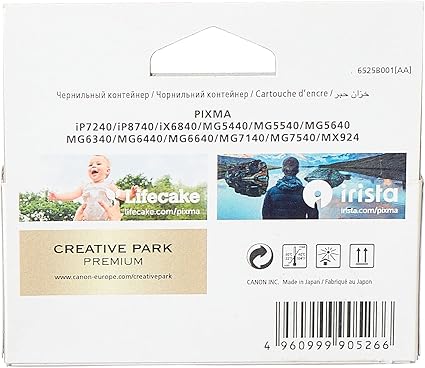
- The Canon PIXMA Ink Tank 451 M is compatible with various Canon PIXMA printers, including models like:
- PIXMA MG5550, MG6350, MG7150
- PIXMA iP7250, iP8750
- PIXMA MX725, MX925
- The Canon PIXMA Ink Tank 451 M is compatible with various Canon PIXMA printers, including models like:
Specifications:
- Product Name: Canon PIXMA Ink Tank 451 M (Magenta)
- Ink Type: Dye-based magenta ink
- Cartridge Color: Magenta
- Capacity: Typically around 9 ml (varies depending on region and printer model)
- Page Yield: Approx. 300 pages at 5% page coverage (varies depending on print settings and document type)
- Compatibility:
- Canon PIXMA MG5550, MG6350, MG7150
- Canon PIXMA iP7250, iP8750
- Canon PIXMA MX725, MX925
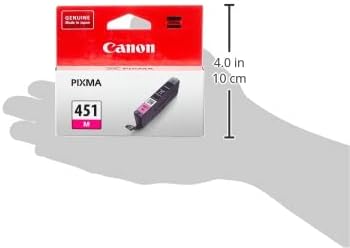
- Dimensions: Compact design for easy installation in compatible Canon printers
- Weight: Approximately 35-40 grams
Benefits:
- High-Quality Color Prints:
- The magenta ink delivers vivid color output, making it perfect for printing photos, artwork, or color documents. It works in conjunction with the other CLI-451 ink cartridges (cyan, yellow, and black) to produce a wide color gamut for high-quality prints.
- Ideal for Photo Printing:
- The dye-based formulation ensures bright, rich colors with smooth transitions, making it ideal for photographic prints, posters, and colorful presentations.
- High Yield:
- The CLI-451 M ink tank offers a decent page yield, meaning you can print many pages before needing a replacement. This helps reduce the frequency of cartridge replacements, lowering printing costs for regular users.
- Easy Installation and Replacement:
- The ink cartridge is designed for easy installation and replacement, ensuring that users can quickly swap out empty cartridges without much effort. Simply remove the old cartridge and insert the new one for seamless printing.
- Cost-Effective for Home and Office Use:
- This ink tank is a cost-effective solution for home users and small businesses that need to produce high-quality color prints regularly. By replacing only the individual color cartridges, users can reduce waste and keep costs down.
Installation/Usage Tips:
- Installing the PIXMA Ink Tank 451 M:
- Open the ink compartment of your compatible Canon printer.
- Remove the old or empty magenta ink tank (if applicable).
- Take the new CLI-451 M ink tank out of its packaging, remove any protective tape or plastic, and insert it into the correct slot (magenta).
- Press the cartridge down until it clicks into place. Close the ink compartment.
- Checking Ink Levels:
- Many Canon PIXMA printers allow you to monitor ink levels via the printer’s display or the printer software on your computer. Regularly check to avoid running out of ink mid-print.
- Maintaining Print Quality:
- To keep print quality at its best, perform regular printhead cleaning or alignment procedures through the printer’s maintenance settings if you notice any streaking, misalignment, or fading in prints.
- Storage:
- When not in use, store ink cartridges in a cool, dry place to prevent the ink from drying out or leaking. Avoid storing them in direct sunlight or humid environments.
Conclusion:
The Canon PIXMA Ink Tank 451 M (Magenta) is an excellent choice for users who need to produce high-quality, color-rich prints. With its dye-based ink, it ensures vibrant and professional-quality photo prints and color documents. The easy installation, cost-effectiveness, and reliable yield make it a great option for home users, photographers, and small businesses that require high-quality color printing on a regular basis.
| Weight | 0.04 kg |
|---|



There are no reviews yet.