

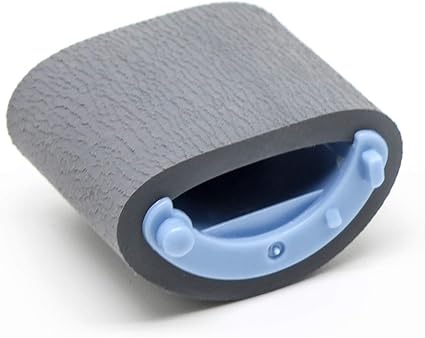
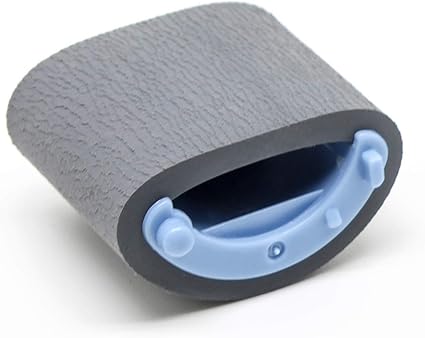
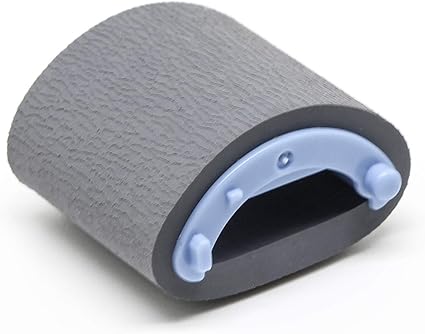
Canon Paper Pickup Roller | COST EFFECTIVE | RELIABLE | HIGH PRINT QUALITY
$4.95 $10.00
Canon Paper Pickup Roller Overview
The Canon Paper Pickup Roller is an essential component in Canon printers and multifunction devices. It plays a crucial role in the paper handling system by ensuring the smooth and reliable feeding of paper from the input tray to the printing mechanism. The paper pickup roller engages with the paper stack in the tray, lifting and feeding it into the printer for the printing process.
Key Features
- Paper Feeding Function:
The primary role of the paper pickup roller is to feed the paper from the input tray into the printer’s internal mechanism. It works by making contact with the paper stack, gripping the top sheet, and feeding it toward the printer’s paper path. - Prevents Paper Jams:
A functioning paper pickup roller helps prevent paper jams caused by improper feeding or misalignment. By feeding paper smoothly, it ensures a continuous and uninterrupted print job. - Durability:
Made from high-quality rubber or similar materials, the pickup roller is designed to withstand constant friction and pressure from the paper stack. It provides long-lasting performance even in high-volume printing environments. - Easy Maintenance:
The paper pickup roller is typically easy to access and replace when needed, making it a relatively low-maintenance component. Regular cleaning and maintenance of the roller help maintain consistent paper feeding and print quality.
Specifications
- Compatibility:
The paper pickup roller is designed for specific Canon printer models. Always ensure that the part is compatible with your printer before purchasing or replacing it. - Material:
The roller is usually made of high-quality rubber or silicone to provide a reliable grip and smooth feeding of paper. - Size:
The size of the pickup roller is calibrated to fit the paper feed system of Canon printers, with its diameter and length matching the printer’s paper handling assembly. - Weight:
The weight of the paper pickup roller typically ranges from 0.1 kg to 0.2 kg (100 grams to 200 grams), depending on the specific printer model and packaging. - Lifespan:
Depending on usage, the pickup roller can typically last for about 50,000 to 100,000 pages. It may need replacement sooner if you experience issues like paper jams, misfeeds, or uneven paper feeding.
Benefits
- Reliable Paper Feeding:
The paper pickup roller ensures reliable and consistent paper feeding, minimizing the chances of paper jams and misfeeds during printing. - Improved Print Quality:
Proper paper handling leads to smoother, uninterrupted printing, helping ensure that each page is fed accurately and that there is no loss of print quality due to paper misalignment. - Cost-Effective Maintenance:
Regularly replacing or maintaining the paper pickup roller can save money by preventing more costly repairs or issues caused by poor paper handling. - Extended Printer Lifespan:
Keeping the paper pickup roller clean and functional helps reduce wear on other components of the printer, potentially extending its overall lifespan and reducing the need for more frequent repairs.
How to Replace the Canon Paper Pickup Roller
- Turn Off the Printer:
Power off the printer and unplug it from the power source before beginning any maintenance work to avoid electrical hazards. - Open the Printer Access Panel:
Depending on the printer model, open the printer’s front or rear access panel to gain access to the paper pickup mechanism. - Locate the Paper Pickup Roller:
The pickup roller is typically located near the paper tray or the paper feed mechanism. It may be positioned alongside other rollers, such as the separation roller, in the paper path. - Remove the Old Paper Pickup Roller:
The pickup roller is often held in place by clips or pins. Carefully release these clips and remove the old roller from its assembly. Make a note of how the roller is positioned for proper installation of the new one. - Install the New Paper Pickup Roller:
Install the new paper pickup roller by aligning it with the roller housing and securing it with the clips or fasteners. Make sure it is seated properly. - Reassemble the Printer:
Once the new roller is installed, reassemble the printer by closing the access panels or tray that you opened earlier. - Test the Printer:
After reassembling the printer, load paper into the tray and run a test print to ensure that the paper is feeding correctly and that there are no issues with paper jams or misfeeds.
Conclusion
The Canon Paper Pickup Roller is a vital part of the paper handling system in Canon printers and multifunction devices. It ensures smooth paper feeding, prevents jams, and plays a key role in maintaining print quality. Regular maintenance, including cleaning and timely replacement of the paper pickup roller, can help ensure that your printer operates efficiently and reliably, providing high-quality prints with minimal downtime. If you notice issues like paper misfeeds or jams, replacing the paper pickup roller is often a straightforward solution to restore proper paper handling.
| Weight | 0.2 kg |
|---|
Based on 0 reviews
Be the first to review “Canon Paper Pickup Roller | COST EFFECTIVE | RELIABLE | HIGH PRINT QUALITY”
Related products
-
-
canon, Canon Printers, Officejet Printers, Printers
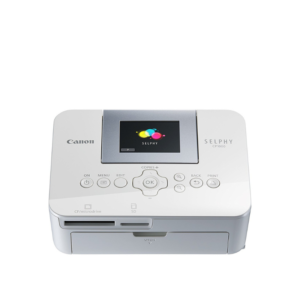
Canon Selphy CP1000 Photo Printer (0011C010) – White
-33% canon, Canon Printers, Officejet Printers, Printers
Canon Selphy CP1000 Photo Printer (0011C010) – White
Brand CANON Functions Photo Printing Sub-brand Canon SELPHY Printing Technology Dye sublimation Duplex Print Nil Print speed (Mono) Up to 0.8 min/page – 3.95 in x 5.83 in Print Resolution 300 x 300 dpi Wireless No SKU: 0011C010



There are no reviews yet.