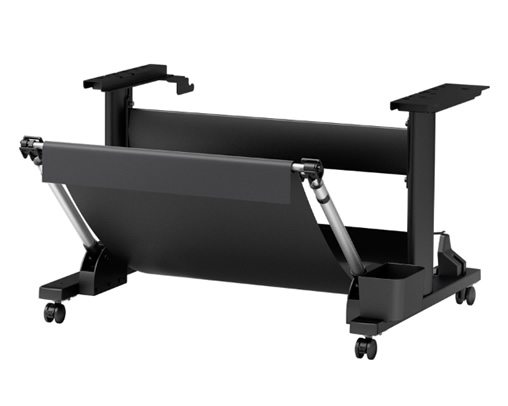
The Canon SD-21 Printer Stand is an accessory specifically designed for use with Canon’s large-format printers, including models like the Canon imagePROGRAF PRO-2000 and Canon imagePROGRAF TX-2000. It provides a sturdy and ergonomic platform for your printer, enhancing functionality and workspace efficiency.
Key Features: Canon SD-21 Printer Stand
Sturdy Construction:
Made with high-quality materials to support the weight of large-format printers securely.
Ergonomic Design:
Optimizes printer height for user comfort during loading and operation.
Mobility:
Equipped with lockable caster wheels for easy movement and secure positioning.
Media Storage:
Provides built-in storage options for rolls of paper or other media, keeping your workspace organized.
Compatibility:
Designed for Canon’s large-format printers like the PRO-2000 and TX-2000.
Space-Saving Design:
Compact design helps maximize your workspace while maintaining accessibility.
Benefits
Increased Efficiency:
Keeps the printer at an ideal height for loading paper and changing ink cartridges, reducing strain.
Workspace Organization:
Integrated storage helps manage media rolls and accessories.
Mobility:
Easily move the printer around your workspace as needed.
Stability:
Ensures that the printer remains stable during operation, even with high-volume printing tasks.
Professional Aesthetic:
Complements the sleek design of Canon printers, maintaining a professional look in your studio or office.
How to Assemble and Use
Unboxing:
Carefully unbox all components and verify against the assembly instructions provided.
Assembly:
Follow the step-by-step guide to assemble the stand, using the tools included in the package.
Securely attach the caster wheels to the base.
Mount the Printer:
Place your Canon printer onto the stand, ensuring it aligns with the designated support areas.
Organize Media:
Utilize the storage compartments for rolls or sheets of media.
Position and Secure:
Move the stand to the desired location using the caster wheels.




There are no reviews yet.