

-1%
canon, Canon Accessories, Canon Ink & Toner
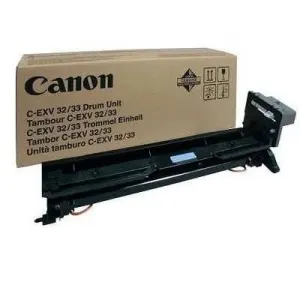
Canon Drum Unit for C-EXV 32/33 | Reliable and High-Yield Printing
USD
$267.75 $270.00
Canon Drum Unit for C-EXV 32/33
The Canon Drum Unit for C-EXV 32/33 is an essential component for achieving high-quality print results with Canon laser printers and multifunction devices. This drum unit is designed to work with Canon’s imageRUNNER series to produce sharp, crisp prints with consistent color quality.
Key Features:
- High-Quality Output:
- Ensures sharp, clear text and high-quality color prints.
- Long-Lasting Performance:
- Designed to handle a high volume of printing while maintaining consistent output quality.
- Precision Imaging:
- Delivers accurate color reproduction and crisp details for professional documents.
- Optimized for Canon Printers:
- Specifically designed to work with Canon imageRUNNER models for maximum performance.
- Easy Installation:
- Simple, hassle-free installation process.
Specifications: Canon Drum Unit for C-EXV 32/33
- Model: Canon C-EXV 32/33 Drum Unit
- Color: Black (for C-EXV 32/33 Black Drum) and other colors for different units.
- Page Yield:
- C-EXV 32 (Black): Up to 50,000 pages
- C-EXV 33 (Color): Approximately 30,000 pages per drum (varies based on usage)
- Compatibility:
- Canon imageRUNNER 2206, 2306, 3306, 4006, and similar models.
- Technology: Laser printing technology for precise color and image reproduction.
- Weight: Approximately 1.2–1.5 kg (varies by color).
Benefits: Canon Drum Unit for C-EXV 32/33
- Enhanced Print Quality:
- Reliable drum technology produces consistent and high-quality prints, even during high-volume printing.
- Durable and Efficient:
- Can handle large print jobs without compromising on quality or performance.
- Consistent Color Output:
- Maintains true-to-life colors and sharp detail, ensuring professional-level results.
- Cost-Effective:
- With proper maintenance, these drum units can last for thousands of pages, reducing the need for frequent replacements.
- Simple Maintenance:
- Easy to install and replace, making it straightforward to maintain the printer’s performance.
How to Install Canon Drum Unit for C-EXV 32/33
- Power Off the Printer:
- Turn off the printer and ensure it is cooled down before replacing the drum unit.
- Open the Printer’s Drum Access Panel:
- Open the cover to access the drum and toner compartments.
- Remove the Old Drum Unit:
- Carefully remove the old drum unit from the printer, disposing of it according to your printer’s instructions or recycling program.
- Prepare the New Drum:
- Remove the new drum unit from the packaging, being cautious not to touch the surface of the drum.
- Install the New Drum Unit:
- Insert the new drum unit into the printer, ensuring it clicks into place securely.
- Close the Access Panel:
- Close the drum access panel and power the printer back on.
- Run a Test Print:
- Print a test page to ensure that the drum unit is installed correctly and printing is clear.
| Weight | 1.5 kg |
|---|


There are no reviews yet.