

-3%


canon, Canon Printers, Laserjet Printer, Printers
CANON MFP 3010 WITHOUT EXTRA TONER
USD
$204.00 $210.00
CANON MFP 3010 WITHOUT EXTRA TONER
The CANON MFP 3010 WITHOUT EXTRA TONER is a robust multifunction printer designed to handle your printing, scanning, and copying needs with ease. This versatile device comes with additional toner to ensure you get more value and uninterrupted performance for your home or office.
Without extra toner, it generally refers to purchasing the printer without any additional toner cartridges, as the printer usually comes with a starter toner cartridge.

Key Features:
- Multifunction Capabilities: CANON MFP 3010 WITHOUT EXTRA TONER Print, scan, and copy with a single device, enhancing productivity and efficiency.
- High-Quality Print Output: Enjoy sharp and clear prints with a resolution of up to 1200 x 1200 dpi.
- Extra Toner Included: Comes with an additional toner cartridge, providing extended printing capabilities and better value.
- User-Friendly Interface: Easy-to-use controls and a straightforward setup process for a hassle-free experience.
- Compact Design: Space-saving design fits comfortably in any office or home environment.
Specifications
- Brand: Canon
- Model: MFP 3010
- Print Technology: Laser
- Functionality: Print, Scan, Copy
- Print Resolution: Up to 1200 x 1200 dpi
- Print Speed: Up to 30 pages per minute
- Connectivity: USB 2.0
- Paper Handling: 250-sheet input tray, 100-sheet output tray
- Dimensions: 408 mm x 364 mm x 309 mm
- Weight: 8.8 kg
- Toner Included: Yes, standard toner cartridge plus extra toner
Benefits:
- Cost-Effective Printing: The additional toner cartridge provides greater value and reduces the frequency of toner replacements.
- Versatile Functionality: Handles multiple tasks including printing, scanning, and copying, making it an all-in-one solution.
- High-Quality Output: Delivers professional-quality prints with high resolution and clarity.
- Efficient Performance: Fast print speeds and reliable operation ensure smooth and effective printing.
- Compact and Practical: Space-saving design and user-friendly features make it ideal for various environments.
How to Set Up
- Unbox and Place: Remove the printer from its packaging and position it on a flat surface.
- Install Toner Cartridges: Open the toner compartment and insert the standard and extra toner cartridges as per the instructions.
- Connect to Power: Plug in the power cord and switch on the printer.
- Install Software: Download and install the Canon printer software from the official website or use the installation CD.
- Connect to Computer: Connect the printer to your computer via USB and follow the setup wizard.
- Load Paper: Insert paper into the input tray and adjust the paper guides as necessary.
| Weight | 8.8 kg |
|---|
Based on 0 reviews
Be the first to review “CANON MFP 3010 WITHOUT EXTRA TONER”
Related products
-
HP, Laserjet Printer, Printers
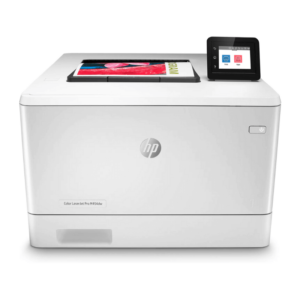
HP LaserJet Pro M454dw Colour Wireless Printer (W1Y45A)
HP LaserJet Pro M454dw Colour Wireless Printer (W1Y45A)
Brand HP Functions Print Sub-brand Laserjet Printing Technology Laser Print colors Yes Processor speed 1200 MHz Connectivity Hi-Speed USB 2.0 Memory 512 MB SKU: W1Y45A -
HP, Laserjet Printer, Printers, Workstation Deal
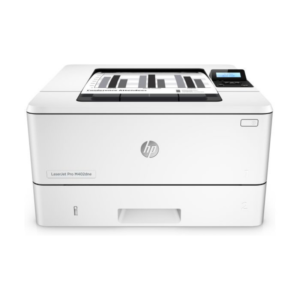
HP LASERJET PRO M404DW PRINTER (W1A56A)
HP LASERJET PRO M404DW PRINTER

Printer Output Type Monochrome Color Black, White Printing Technology Laser Brand HP Printing Media Type Envelopes, Paper (plain), Transparencies, Card stock, Labels, Glossy photo paper, High-resolution paper SKU: W1A56A -
-
canon, Canon LFP, Canon Printers, Inkjet, Printers
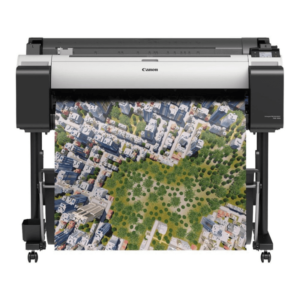
Canon imagePROGRAF TM-300 36-inch Large-Format 5-Color Inkjet Printer Plotter
-16% canon, Canon LFP, Canon Printers, Inkjet, Printers
Canon imagePROGRAF TM-300 36-inch Large-Format 5-Color Inkjet Printer Plotter
Brand CANON Functions Print Sub-brand Designjet Printing Technology Inkjet Print colors Yes Print Resolution 2400 x 1200 dpi Connectivity Hi-Speed USB 2.0, RJ45, Wi-Fi 802.11a/b/g/n Storage 500 GB SKU: C-TM-300

There are no reviews yet.