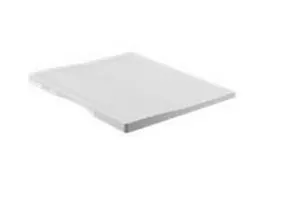
The Canon Platen Cover Type P is an essential accessory designed for Canon multifunctional printers and copiers. It provides a protective covering for the flatbed scanning surface, ensuring optimal scanning and copying performance while safeguarding the device from dust, debris, and light interference.
Key Features
Perfect Fit:
Designed to securely cover the flatbed glass surface of compatible Canon devices.
Lightweight and Durable:
Made with high-quality materials to ensure longevity and ease of use.
Enhanced Scanning Quality:
Reduces external light interference, ensuring clear and accurate scan results.
User-Friendly Design:
Easy to install and remove, providing convenience during scanning and copying operations.
Device Protection:
Prevents dust and debris from accumulating on the scanning surface, reducing maintenance needs.
Specifications: Canon Platen Cover Type P
Model: Canon Type P
Material: Durable and lightweight plastic or composite material
Compatibility:
Compatible with specific Canon imageRUNNER or multifunction printer models. Refer to your device’s user manual for exact compatibility.
Color: Typically available in neutral shades (e.g., white or gray).
Benefits: Canon Platen Cover Type P
Improved Image Quality:
Ensures consistent and distortion-free scanning by minimizing light exposure and reducing glare.
Extended Device Longevity:
Protects the flatbed glass from scratches, smudges, and dust accumulation, maintaining device performance.
Ease of Use:
Simple to attach and remove without requiring special tools or expertise.
Cost-Effective Maintenance:
Reduces the need for frequent cleaning or replacement of the scanning glass.
Installation and Usage: Canon Platen Cover Type P
Attach the Cover:
Align the platen cover with the flatbed scanning surface and secure it in place.
Most Canon devices include attachment points or hinges for easy installation.
Adjust as Needed:
For thicker documents or books, adjust the cover position to accommodate the material.
Close During Scanning:
Always close the platen cover fully to prevent light leakage and ensure optimal scanning quality.
Clean Periodically:
Wipe the underside of the platen cover with a soft, lint-free cloth to remove any dust or residue.






There are no reviews yet.