

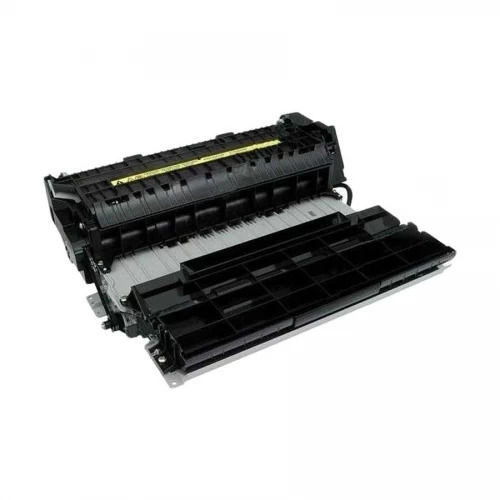
Canon Duplex Unit-C1 | HIGH SPEED PRINTING | EFFICIENT | RELIABLE
$273.00 $280.00
Canon Duplex Unit-C1
The Canon Duplex Unit-C1 is an accessory designed for use with certain Canon imageRUNNER and imageRUNNER ADVANCE multifunction printers. It provides automatic duplex printing, allowing users to print on both sides of a sheet of paper without manually flipping it. This feature helps save paper, reduce costs, and improve workflow efficiency in high-volume printing environments.
Key Features
- Automatic Duplex Printing: The Duplex Unit-C1 enables automatic double-sided printing, which eliminates the need for manual intervention and reduces paper usage.
- Cost-Efficient: By enabling duplex printing, it helps reduce paper consumption, leading to savings in operational costs, particularly for businesses with high-volume print requirements.
- Compatible with Canon Printers: Specifically designed to work seamlessly with various Canon imageRUNNER and imageRUNNER ADVANCE series printers, ensuring reliable performance and quality.
- High-Speed Printing: The unit works efficiently with Canon’s high-speed printers, allowing for quick, high-volume duplex printing tasks.
- Easy Installation: The Duplex Unit-C1 can be easily installed onto the printer without needing specialized tools or expertise.
Specifications: Canon Duplex Unit-C1
- Model: Canon Duplex Unit-C1
- Compatibility: Works with various Canon imageRUNNER and imageRUNNER ADVANCE series models. Specific models may vary, so checking compatibility with your printer is important.
- Duplex Printing: Enables automatic printing on both sides of the page, supporting various paper sizes like A4, Letter, Legal, etc.
- Paper Size: Supports A4, Letter, Legal, and other common paper sizes.
- Weight: Approximately 3.5 kg (varies by model).
- Dimensions: Varies slightly depending on the printer model and installation configuration, but typically compact to fit with Canon’s multifunction printers.
Benefits: Canon Duplex Unit-C1
- Environmental Impact: Duplex printing reduces paper waste, contributing to eco-friendly practices in the workplace.
- Improved Efficiency: Automatically printing on both sides of a page reduces the time spent manually flipping paper, enhancing office productivity and workflow.
- Cost Savings: The reduction in paper usage can lead to significant savings in operational costs, especially for businesses that print large volumes.
- Seamless Integration: The Duplex Unit-C1 is designed to integrate seamlessly with compatible Canon printers, ensuring smooth operation and minimal setup time.
- Convenient and User-Friendly: The unit allows for convenient double-sided printing with minimal setup or training needed, making it accessible even to less experienced users.
How to Install and Use the Canon Duplex Unit-C1
- Prepare the Printer:
- Power off your Canon printer and unplug it to ensure safety during installation.
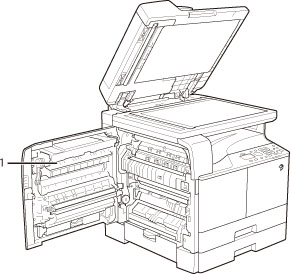
- Open the front or rear cover of the printer (depending on your model) to access the areas where the Duplex Unit-C1 will be installed.
- Remove the Existing Components (if applicable):
- If your printer has any existing paper trays or units that need to be removed for installation, take them out as per the instructions in your printer manual.
- Install the Duplex Unit-C1:
- Align the Duplex Unit-C1 with the designated slot on the printer.
- Insert the unit into the printer, making sure it is securely connected. The unit should click into place.
- Reconnect the Printer:
- Once the Duplex Unit-C1 is installed, close any covers or trays and reconnect the printer to the power source.
- Configure Printer Settings:
- Power on the printer and navigate to the printer’s menu on the control panel.
- Select the duplex printing option in the print settings. This may involve enabling automatic double-sided printing or selecting duplex options from a software application on your computer.
- Test Duplex Printing:
- Load a stack of paper into the printer’s paper tray.
- Run a test print job to ensure the duplex unit is working correctly, with printing occurring on both sides of the paper.
Conclusion
The Canon Duplex Unit-C1 is a valuable accessory for users of compatible Canon imageRUNNER and imageRUNNER ADVANCE printers. It enables efficient, cost-saving, and eco-friendly automatic duplex printing, making it a great addition to any high-volume printing environment. By following simple installation steps and configuring the printer settings, users can quickly benefit from the enhanced printing capabilities of the Duplex Unit-C1.
| Weight | 5 kg |
|---|


There are no reviews yet.