

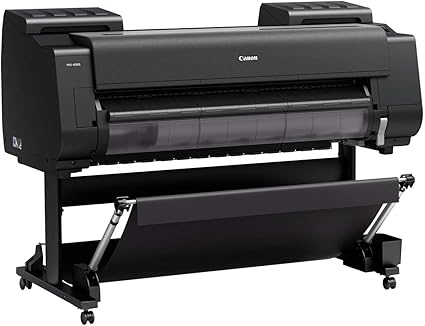
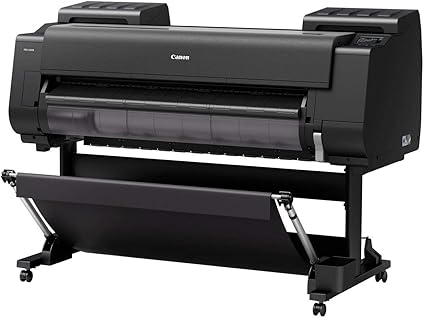

Canon imagePROGRAF PRO-4100S | Exceptional Print Quality | RELIABLE
$3,780.00 $3,880.00
Canon imagePROGRAF PRO-4100S
The Canon imagePROGRAF PRO-4100S is a high-performance large-format printer designed for commercial and professional printing applications, including photography, fine art prints, signage, and posters. It is part of Canon’s imagePROGRAF PRO series, which is known for producing exceptional quality prints with advanced technology and precision. The PRO-4100S is specifically designed for businesses that require high-speed printing while maintaining outstanding print quality.
Key Features of Canon imagePROGRAF PRO-4100S:
- Exceptional Print Quality:
- The printer is equipped with Canon’s LUCIA PRO ink system, which includes 12 colors, including Chroma Optimizer, for precise color reproduction and fine details. This system ensures the highest quality prints with smooth gradients, accurate colors, and sharp text.
- High Resolution:
- The imagePROGRAF PRO-4100S supports high-resolution printing up to 2400 x 1200 dpi, making it suitable for detailed photography, fine art reproductions, and high-quality graphics.
- Fast Print Speeds:
- The printer is designed to handle large-format print jobs with efficiency. It is capable of producing an A1-sized print in approximately 2 minutes depending on the media and settings used, making it ideal for businesses that need quick turnaround times.
- Wide Media Support:
- The PRO-4100S can handle a wide range of media, from coated papers to fine art papers, canvas, photographic papers, and specialty media. It supports roll media up to 44 inches (1118 mm) in width and can handle cut-sheet paper as well.
- Advanced Color Management:
- The Color Calibration System built into the printer ensures consistent color output across different print runs, which is important for professional print environments where color accuracy is critical.
- Enhanced Productivity:
- The printer comes with large-capacity ink tanks (700 ml), reducing the frequency of ink replacements and ensuring continuous operation, particularly for high-volume printing jobs.
- Air Feeding System:
- The PRO-4100S incorporates an air-feeding system, which helps prevent media wrinkles and ensures smooth, consistent media feeding for high-quality results.
- Connectivity and Software:
- The printer supports Ethernet, Wi-Fi, and USB 2.0 connections, making it easy to integrate into different office or production environments. It also supports cloud printing through apps like Apple AirPrint, Google Cloud Print, and Canon’s Print App.
- User-Friendly Operation:
- Equipped with a large, intuitive 3.5-inch touchscreen, the PRO-4100S allows users to easily manage and operate print jobs. It also comes with Canon’s Printer Driver and imagePROGRAF Print Utility for advanced print settings.
- Reliability and Durability:
- Built for high-volume, long-term use, the imagePROGRAF PRO-4100S ensures durable prints with long-lasting results, even for outdoor signage or prints exposed to light.
Specifications: Canon imagePROGRAF PRO-4100S
- Model: Canon imagePROGRAF PRO-4100S
- Print Technology: Inkjet (Pigment-based LUCIA PRO ink system)
- Print Resolution: Up to 2400 x 1200 dpi
- Print Speed:
- A1-sized print in approximately 2 minutes (based on media and settings)
- Media Sizes:
- Roll media up to 44 inches (1118 mm) wide
- Cut-sheet paper up to 24 x 36 inches (610 x 914 mm)
- Media Types:
- Coated, fine art, photo paper, canvas, vinyl, and other specialty media
- Ink System: 12-color LUCIA PRO pigment-based ink system (including Chroma Optimizer)
- Ink Tanks:
- 700 ml large-capacity ink tanks for increased productivity
- Connectivity:
- Ethernet (10/100/1000Base-T)
- Wi-Fi (802.11a/b/g/n)
- USB 2.0
- Cloud printing via AirPrint, Google Cloud Print, Canon Print App
- Control Panel: 3.5-inch color touchscreen
- Operating System Support:
- Windows (7/8/10)
- macOS (10.12 or later)
- Mobile printing via iOS and Android
- Dimensions:
- Width: 1,707 mm (67.2 inches)
- Depth: 1,116 mm (44 inches)
- Height: 1,190 mm (46.8 inches)
- Weight: Approx. 95 kg (209.4 lbs)
Benefits: Canon imagePROGRAF PRO-4100S
- High-Quality Prints:
- The LUCIA PRO ink system ensures vibrant and accurate color reproduction, ideal for professional photographers, fine art prints, and commercial signage applications.
- Faster Turnaround Times:
- With the ability to produce A1-sized prints in about 2 minutes, businesses can efficiently handle high-volume printing while maintaining print quality.
- Wide Media Compatibility:
- The printer supports a variety of media types, allowing users to expand their services and offer more versatile printing options to customers.
- Reduced Operational Costs:
- The use of large-capacity ink tanks (700 ml) reduces the need for frequent ink replacements, which can save businesses time and money on consumables.
- High Productivity:
- The PRO-4100S offers high-speed printing and a large media capacity, making it an ideal choice for businesses that require continuous, high-quality printing output.
- Reliable and Durable:
- The Canon imagePROGRAF PRO-4100S is built for high-volume, long-term use, ensuring reliable operation even in demanding professional environments.
- Advanced Color Management:
- With Canon’s Color Calibration System, users can be confident that their prints will be consistent in color quality, which is crucial for applications where color fidelity is a priority.
How to Install the Canon imagePROGRAF PRO-4100S:
- Unbox the Printer:
- Carefully unbox the printer, removing any protective packaging, and place it on a stable, flat surface with enough space for media rolls and maintenance access.
- Connect the Printer:
- Connect the power cable, then connect the printer to your network via Ethernet or Wi-Fi, depending on your preference.
- Install the Ink Tanks:
- Install the LUCIA PRO ink tanks (700 ml) into the designated slots. Ensure each tank is correctly inserted and securely in place.
- Load Media:
- Load the roll media into the printer’s roll holder, ensuring proper alignment, or load cut-sheet paper into the paper tray.
- Install the Printer Drivers:
- Install the printer drivers and software from the Canon website or provided installation CD, and follow the on-screen instructions for installation.
- Perform a Test Print:
- After installation, perform a test print to ensure proper setup and verify that the printer is working as expected. The test print can be a sample document or image.
- Calibrate and Align:
- Follow the on-screen prompts to calibrate and align the print head for optimal color and print quality.
| Weight | 95 kg |
|---|
Based on 0 reviews
Be the first to review “Canon imagePROGRAF PRO-4100S | Exceptional Print Quality | RELIABLE”
Related products
-
HP, Laserjet Printer, Printers
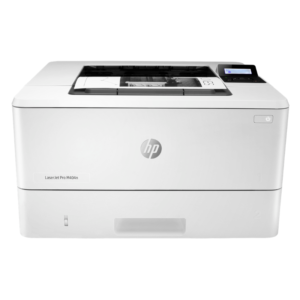
HP LaserJet Pro M404n Printer – Reliable Monochrome Laser with Ethernet and Security Features
-21% HP, Laserjet Printer, Printers
HP LaserJet Pro M404n Printer – Reliable Monochrome Laser with Ethernet and Security Features
HP LaserJet Pro M404n Printer W1A52A
Brand HP Functions Print Sub-brand Laserjet Printing Technology Laser Print colors No Processor speed 1200 MHz Connectivity 1 Hi-Speed USB 2.0; 1 host USB at rear side; Gigabit Ethernet 10/100/1000BASE-T network; 802.3az(EEE) Memory 256 MB SKU: W1A52A -
HP, Laserjet Printer, Printers
HP LaserJet MFP M442dn (8AF71A) – Efficient Monochrome Multifunction Printer for Businesses
-22%HP, Laserjet Printer, PrintersHP LaserJet MFP M442dn (8AF71A) – Efficient Monochrome Multifunction Printer for Businesses
HP LaserJet MFP M442dn 8AF71A

-
Connectivity, standard:Hi-Speed USB 2.0 Device, Ethernet 10/100 Base TX
-
Duty cycle (monthly, A4):Up to 50,000 pages per month
-
Paper handling input, standard:Tray 1: 100 sheet; Tray 2: 250 sheet
-
Print technology:Laser
SKU: n/a -
-
HP, hp printers, Laserjet Printer, Printers, Techtober, Workstation Deal
HP Color LaserJet Pro MFP M479dw (W1A77A)
-8%HP, hp printers, Laserjet Printer, Printers, Techtober, Workstation DealHP Color LaserJet Pro MFP M479dw (W1A77A)
Brand HP Functions Print, copy, scan Sub-brand LaserJet Printing Technology Laser Print colors Yes Processor speed 1200 MHz Connectivity Wireless, Apple AirPrint™; Google Cloud Print™; HP ePrint; HP Smart App; Mobile Apps; Mopria™ Certified. Paper Size A4, A5, A6 SKU: W1A77A


There are no reviews yet.