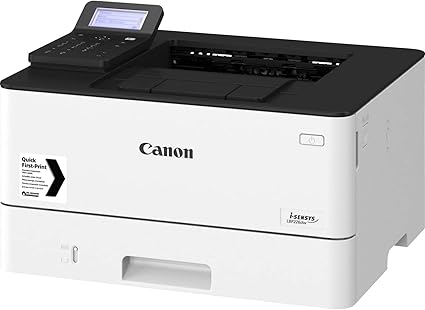
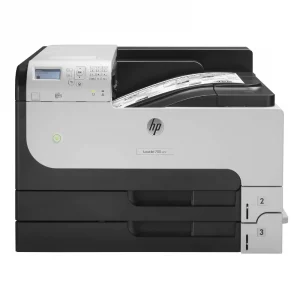
The Canon LBP223dw Printer is a monochrome laser printer designed for small to medium-sized businesses and offices that need high-performance, efficient, and fast printing. It is part of Canon’s imageCLASS series and is known for its compact design, advanced features, and cost-effective operation.
Key Features: Canon LBP223dw Printer
Monochrome Printing:
The Canon LBP223dw is a monochrome laser printer, meaning it prints in black and white only. It is ideal for printing text-heavy documents such as reports, invoices, contracts, and other office paperwork.
High-Speed Printing:
It offersfast printing speeds of up to 40 pages per minute (ppm), making it well-suited for environments that require high-volume printing.
Wireless and Mobile Printing:
The LBP223dw supports Wi-Fi and Wi-Fi Direct connectivity, allowing users to print wirelessly from smartphones, tablets, and computers.
Mobile printing options include support for Apple AirPrint, Google Cloud Print, and Canon PRINT Business, enabling easy printing from mobile devices.
Automatic Duplex Printing:
The printer supports automatic duplex (two-sided) printing, helping save paper and reduce printing costs, which is especially useful for businesses with high-volume printing needs.
Paper Handling:
It comes with a 250-sheet paper tray and a 1-sheet manual feed slot for handling a variety of paper types and sizes.
The 250-sheet paper capacity reduces the need for frequent paper refills.
Energy Efficiency:
The printer is designed to be energy-efficient with Energy Star® certification, meaning it meets strict environmental guidelines for low energy consumption during operation.
Compact Design:
The Canon LBP223dw features a compact design that can easily fit into small office spaces without taking up too much room. Its smaller footprint makes it ideal for tight spaces or shared work areas.
High Print Resolution:
The printer delivers high-quality black-and-white prints with a maximum print resolution of up to 600 x 600 dpi (enhanced to 1200 x 1200 dpi), ensuring crisp and clear text.
User-Friendly Interface:
The printer is equipped with a 5-line LCD display for easy navigation and printer settings management, making it simple for users to operate and maintain the device.
Specifications: Canon LBP223dw Printer
Printer Type: Monochrome Laser Printer
Functionality: Single function (print only)
Print Speed: Up to 40 pages per minute (ppm)
Print Resolution: 600 x 600 dpi, enhanced to 1200 x 1200 dpi
Paper Handling:
250-sheet paper tray
1-sheet manual feed slot
Automatic Duplex Printing (two-sided printing)
Connectivity:
Wi-Fi (802.11 b/g/n)
Wi-Fi Direct
Ethernet (wired)
Mobile Printing: Apple AirPrint, Google Cloud Print, Canon PRINT Business
Dimensions: 14.8 x 15.4 x 10.5 inches (376 x 391 x 266 mm)
Weight: 14.3 lbs (6.5 kg)
Power Consumption: Energy Star® certified
Benefits: Canon LBP223dw Printer
Fast and Efficient:
With a 40 ppm print speed, the Canon LBP223dw is a highly efficient printer that can keep up with the demands of fast-paced offices.
Eco-Friendly:
Automatic duplex printing helps save paper, while Energy Star® certification ensures that the printer consumes minimal energy during operation, reducing its carbon footprint.
Compact and Space-Saving:
The compact design of the printer allows it to fit into smaller office spaces, making it a great option for offices with limited space.
Wireless and Mobile Printing:
With Wi-Fi and Wi-Fi Direct, users can print wirelessly from any compatible device. The mobile printing support via Apple AirPrint and Google Cloud Print adds flexibility for on-the-go printing.
High-Quality Prints:
The 600 x 600 dpi print resolution (enhanced to 1200 x 1200 dpi) ensures clear, sharp text and graphics, making it ideal for professional documents and communications.
Easy to Use:
The 5-line LCD display provides an intuitive interface for managing print jobs, checking printer status, and changing settings.
How to Install and Set Up Canon LBP223dw Printer:
Unbox the Printer:
Remove the printer from the packaging and remove all protective materials, including any tapes or plastic covers.
Load Paper:
Open the front paper tray and load it with appropriate paper, such as A4 or Letter-size paper. Adjust the paper guides to fit the size of the paper.
Install the Toner Cartridge:
Open the front cover of the printer and install the Canon toner cartridge into its designated slot. Be sure to remove any protective seals or packaging before inserting the toner cartridge.
Connect the Printer:
Plug the printer into a power outlet and turn it on.
Connect the printer to your Wi-Fi network or use the Ethernet port for a wired connection. If connecting wirelessly, follow the on-screen instructions to set up the connection via the Wi-Fi Setup option on the printer’s control panel.
Install the Printer Driver:
On your computer, download and install the printer driver from the Canon website (or use the installation CD if provided).
Follow the on-screen instructions to install the driver and set up the printer.
Test Print:
After completing the installation, print a test page to verify that the printer is functioning correctly.



 HP, Laserjet Printer, Printers



There are no reviews yet.