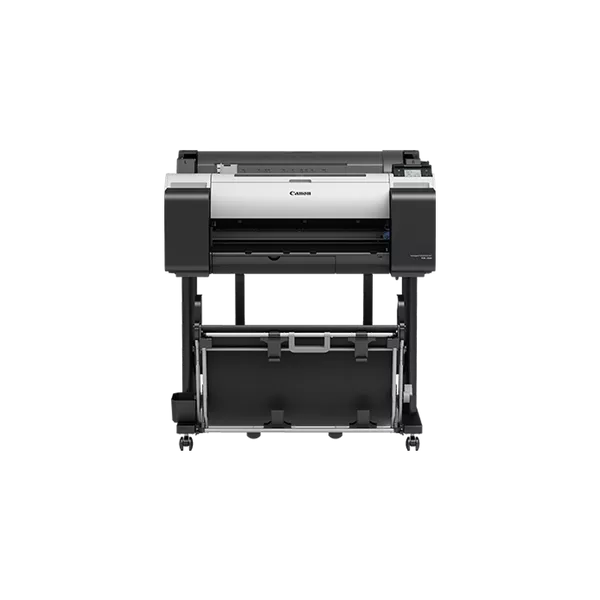
The Canon LFP TM-200 is a large-format printer (LFP) designed for professional and high-quality print production. It is part of Canon’s imagePROGRAF TM series, engineered for printing detailed, high-quality color images, CAD drawings, and large-format graphics. It is commonly used by design professionals, architects, and engineers for creating posters, blueprints, presentations, and various graphic applications.
Key Features:
Compact Design: The Canon TM-200 is designed to fit in smaller workspaces while still being capable of printing up to 24 inches wide.
Quiet Operation: Equipped with a newly developed print head and advanced ink technology, it produces prints with minimal noise, making it suitable for office environments.
Sub-Ink Tank System: The printer uses a sub-ink tank system, which helps in reducing ink wastage and supports continuous printing.
High-Quality Print Output: It delivers high-resolution prints with fine details and accurate colors. It uses a 5-color LUCIA TD ink set, which ensures vibrant color reproduction and long-lasting prints.
Fast Print Speed: With speeds of up to 180 square feet per hour (on plain paper), it provides efficient output for large-format printing needs.
Wireless and Network Connectivity: The TM-200 supports Wi-Fi, Ethernet, and USB connections, providing flexibility in how it is connected and accessed by users.
Advanced Media Handling: Supports a wide variety of media types and sizes, including roll paper and cut sheets.
Smartphone Printing: Supports mobile printing via the Canon PRINT app, enabling users to send print jobs directly from their smartphones or tablets.
Specifications: Canon LFP TM-200
Print Technology: Inkjet
Print Width: Up to 24 inches (610 mm)
Ink System: 5-color LUCIA TD Ink System (Cyan, Magenta, Yellow, Black, and Matte Black)
Ink Types: Pigment-based ink
Print Resolution: Up to 2400 x 1200 dpi
Print Speed:
A1 (24” wide) in approximately 35 seconds
ISO Print Speed (A1): 60 seconds
Plain paper: Up to 180 square feet per hour
Media Handling: Roll paper, cut sheets, and other media types
Media Sizes: Supports sizes from A4 to A1, as well as custom sizes
Connectivity: Wi-Fi, Ethernet, USB 2.0
Display: 3-inch color touchscreen
Weight: Approximately 45.5 kg (100.3 lbs)
Dimensions (W x D x H): 1,066 mm x 657 mm x 1,139 mm (42 x 25.9 x 44.8 inches)
Benefits: Canon LFP TM-200
Compact and Space-Saving: Despite its high-performance capabilities, the Canon LFP TM-200 has a relatively small footprint, making it ideal for environments with limited space.
Cost-Effective Operation: The sub-ink tank system helps reduce the need for frequent ink replacements, making it more efficient and cost-effective over time.
Quiet and Efficient: The low noise level ensures that it won’t disrupt office environments, and its high-speed printing capabilities increase productivity.
High-Quality Results: The advanced print head and LUCIA TD ink set provide exceptional color accuracy, which is important for professional presentations and graphic design.
User-Friendly Interface: The 3-inch color touchscreen display makes it easy to operate and manage print jobs.
Wireless and Mobile Printing: The ability to print wirelessly or from mobile devices adds convenience for users in modern, flexible work environments.
Versatility: Ideal for various applications like architectural prints, engineering drawings, posters, and photo prints, the TM-200 can handle a wide range of media types and sizes.
How to Install the Canon LFP TM-200:
Unbox the Printer:
Carefully remove the printer from its packaging and place it in a well-ventilated area with enough space to operate.
Set Up the Printer:
Place the printer on a stable surface, ensuring the printer is level and all necessary accessories (such as paper roll and ink cartridges) are available.
Load the Ink Cartridges:
Open the front panel of the printer.
Insert the ink cartridges into their respective slots (Cyan, Magenta, Yellow, Black, Matte Black).
Close the panel securely.
Load Paper:
If you’re using roll paper, install the roll on the printer’s roll paper holder.
If using cut sheets, load them into the cut-sheet tray.
Connect the Printer:
Connect the printer to your computer or network via Ethernet, USB, or Wi-Fi.
For Wi-Fi setup, follow the printer’s setup wizard to connect to your wireless network.
Install Drivers and Software:
Download and install the printer drivers and software from Canon’s official website (or use the installation CD, if available).
Follow the on-screen instructions to complete the installation process.
Test Print:
After installation, perform a test print to ensure that the printer is working correctly and that the print quality is as expected.
Calibration (if necessary):
If required, calibrate the printer for color accuracy and alignment, as per the user manual.



 HP, Laserjet Printer, Printers


There are no reviews yet.