

Canon Pad Separation FL3-5538 | RELIABLE | EFFECTIVE | COMPACT
$8.53 $15.00
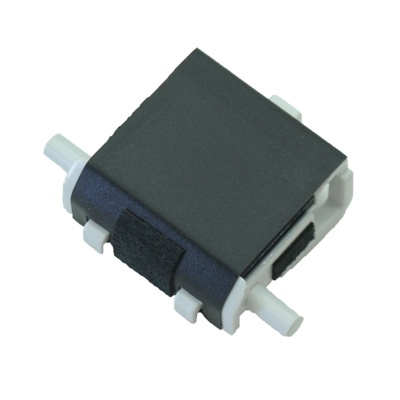
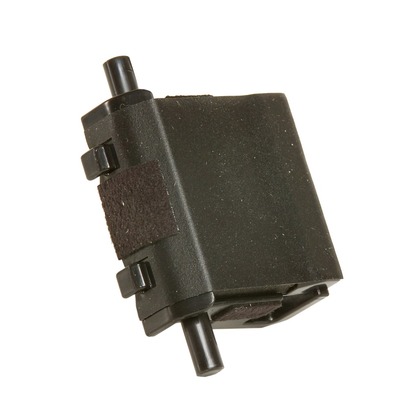
Canon Pad Separation FL3-5538
The Canon Pad Separation FL3-5538 is an essential component in Canon laser printers and multifunction devices. This part is responsible for helping separate sheets of paper in the paper feed mechanism to ensure that only one sheet is picked up and fed into the printer at a time. It is typically used in conjunction with the paper pickup roller to ensure smooth, reliable paper feeding without multiple sheets being fed at once, which can lead to paper jams.
Key Features
- Paper Separation:
The separation pad plays a critical role in the paper feeding process by preventing multiple sheets from being picked up at once. It provides the necessary friction to separate the top sheet of paper from the rest of the stack, ensuring that only one sheet is fed into the printer at a time. - Prevent Paper Jams:
A well-functioning separation pad helps to reduce the likelihood of paper jams caused by improper paper feeding. By separating the paper sheets correctly, the pad ensures smooth operation and helps the printer feed the paper without issues. - Durable Design:
The separation pad (FL3-5538) is made from durable materials such as rubber or similar compounds, designed to withstand the friction and wear of the paper feeding process. It is engineered to last for many print cycles, ensuring reliable performance over time. - Maintenance and Replacement:
The separation pad is easy to maintain and replace if it becomes worn out. Regular cleaning and replacement of the separation pad can ensure optimal performance and prevent issues such as misfeeds or paper jams.
Specifications: Canon Pad Separation FL3-5538
- Compatibility:
The Canon separation pad FL3-5538 is designed for use in certain Canon laser printers and multifunction devices. Always verify compatibility with your specific printer model before purchasing. - Material:
Typically made of rubber or a similar high-quality material that provides friction to separate sheets of paper. - Size:
The separation pad is sized to fit the paper feed mechanism of the printer. Its dimensions are designed to interact effectively with the paper stack and the paper pickup roller. - Weight:
The FL3-5538 separation pad weighs approximately 0.1 kg to 0.15 kg (100 grams to 150 grams), depending on packaging and model variations. - Lifespan:
The separation pad is typically designed to last for 50,000 to 100,000 pages, depending on the printer’s usage. It may need to be replaced sooner if you experience frequent paper jams, multiple sheets feeding at once, or other feeding issues.
Benefits: Canon Pad Separation FL3-5538
- Improved Paper Feeding:
The separation pad ensures that only one sheet of paper is fed at a time, reducing the risk of paper jams and ensuring smooth and reliable paper feeding. - Cost-Effective Maintenance:
Replacing or maintaining the separation pad regularly helps avoid more costly repairs and print defects caused by feeding issues. It ensures that your printer continues to function optimally. - Long-Term Reliability:
By maintaining a functional separation pad, you can extend the lifespan of your printer’s paper handling system and avoid disruptions in print jobs caused by paper feeding issues. - Reduced Print Defects:
Proper paper separation helps to ensure that prints are accurate, with no misalignment or paper feeding errors. This results in better print quality and fewer misprints.
How to Replace the Canon Separation Pad FL3-5538
- Turn Off the Printer:
Always power off the printer and unplug it from the electrical socket to avoid electrical hazards. - Open the Printer Access Panel:
Depending on the printer model, open the front, rear, or side access panel to reach the paper feed system. Locate the paper pickup and separation assembly where the separation pad is housed. - Locate the Separation Pad:
The Canon Pad Separation FL3-5538 is typically located near the paper pickup roller in the paper feed assembly. You may need to remove or lift other components to access it. - Remove the Old Separation Pad:
Gently remove the worn-out separation pad from its position. It may be secured in place with clips or fasteners. Take note of how the old pad is positioned so you can install the new one correctly. - Install the New Separation Pad:
Align the new Canon Pad Separation FL3-5538 with the correct orientation and place it into the paper feed system. Ensure it is seated securely and properly aligned with the rest of the paper feed components. - Reassemble the Printer:
After installing the new separation pad, reassemble the printer by reattaching any removed parts and closing the access panels. - Test the Printer:
Once the printer is reassembled, load paper into the tray and run a test print. Verify that the paper is feeding properly and that no paper jams or misfeeds occur.
Conclusion
The Canon Separation Pad FL3-5538 is a vital component in ensuring smooth and efficient paper feeding in Canon printers and multifunction devices. By properly separating sheets of paper, it helps prevent paper jams, misfeeds, and print defects, ensuring high-quality, uninterrupted printing. Regular maintenance and timely replacement of the separation pad can improve your printer’s reliability, extend its lifespan, and reduce the likelihood of paper-related issues. If you experience frequent paper jams or multi-sheet feeding problems, replacing the separation pad may resolve these issues and restore proper paper handling.
| Weight | 0.15 kg |
|---|
Based on 0 reviews
Be the first to review “Canon Pad Separation FL3-5538 | RELIABLE | EFFECTIVE | COMPACT”
Related products
-
canon, Canon Cameras
Canon PowerShot V10 Vlog Camera (Black)
Key Features- For Vlogging and Live Streaming
- 20.9MP 1″ CMOS Sensor
- UHD 4K up to 29.97 fps
- Full HD up to 59.94 fps
- 19mm Equivalent Wide-Angle Lens
- Web Camera Compatible with UVC Support
- 460,000-Dot 2″ Touchscreen LCD
- Wi-Fi & Bluetooth Connectivity
- Vertical Capture Capable
- Built-In 30° Stand
SKU: n/a -
canon, Canon Printers, Inkjet, Inkjet Printer, Printers
Canon PIXMA G3430 All-in-One Multi-function Printer
-22% canon, Canon Printers, Inkjet, Inkjet Printer, Printers
Canon PIXMA G3430 All-in-One Multi-function Printer
- High quality printing
- Print, scan and copy with a single device
- Large-capacity rear tray for volume printing
- Connect wirelessly to your computer or smart device
- Mac, Windows and Chrome
SKU: n/a



There are no reviews yet.