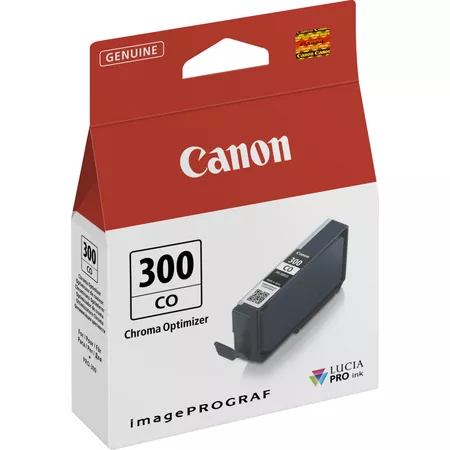
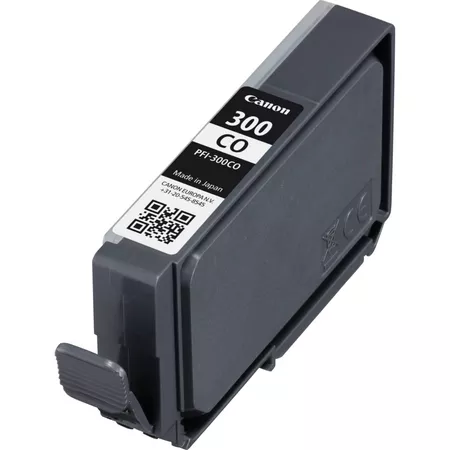
The Canon PFI-300 CO Ink Cartridge is a Chromatic Orange ink cartridge designed for use with Canon’s imagePROGRAF PRO series large-format printers, such as the imagePROGRAF PRO-1000, PRO-2000, and PRO-4000. This ink is part of Canon’s LUCIA PRO pigment-based ink set, which is specifically engineered to produce high-quality, durable, and vibrant prints with an expanded color gamut. The PFI-300 CO cartridge is particularly beneficial for enhancing the accuracy of orange hues, especially in professional photography, fine art, and graphic design applications.
Key Features of Canon PFI-300 CO Ink Cartridge:
Chromatic Orange Ink:
The PFI-300 CO is a Chromatic Orange ink cartridge. This unique ink is designed to reproduce more vibrant and accurate orange tones, improving color accuracy, especially in prints with rich reds, yellows, and orange hues. The chromatic orange ink also enhances the overall color gamut for better color transitions.
LUCIA PRO Ink Technology:
Canon’s LUCIA PRO pigment-based ink system ensures professional-grade color reproduction. This technology produces prints with vivid colors and high resistance to fading. Pigment inks are more durable than dye-based inks and are ideal for creating long-lasting prints that remain vibrant for years.
Wide Color Gamut:
The Chromatic Orange ink helps expand the printer’s overall color gamut, ensuring more accurate and vibrant reproduction of red, orange, and yellow tones. This is crucial for professional applications that require high color precision, such as fine art prints, commercial photography, and graphic design.
Durability:
The PFI-300 CO uses pigment-based inks, which are highly resistant to fading and environmental damage. This makes it ideal for archival-quality prints that require longevity, such as gallery and exhibition displays.
Ideal for Professional Print Quality:
This ink cartridge is ideal for creating high-quality prints with precise color accuracy, making it an essential component for professional photographers, fine artists, and designers who need to reproduce rich colors and intricate details.
Specifications of Canon PFI-300 CO Ink Cartridge:
Ink Type: Pigment-based
Color: Chromatic Orange (CO)
Model Number: Canon PFI-300 CO
Capacity: 80 ml (Standard capacity)
Compatibility:
Canon imagePROGRAF PRO-1000
Canon imagePROGRAF PRO-2000
Canon imagePROGRAF PRO-4000
Other printers in the imagePROGRAF PRO series
Print Quality: High-quality chromatic orange ink for vivid and accurate color reproduction, ideal for professional fine art, photography, and graphic design prints.
Printer Types: Large-format inkjet printers
Weight: Approximately 0.3 kg (300 grams)
Benefits of Canon PFI-300 CO:
Accurate Color Reproduction:
The Chromatic Orange ink ensures that prints with rich reds, oranges, and yellows are highly accurate and vibrant. This is essential for professionals who require precise color accuracy for their prints.
Wider Color Gamut:
The PFI-300 CO ink helps to expand the color gamut, improving the range of colors that can be reproduced by the printer. This results in more vivid and accurate color transitions, particularly in red and orange areas.
Long-Lasting Prints:
The pigment-based formulation of the PFI-300 CO ensures that prints are resistant to fading and environmental damage. This is crucial for creating high-quality prints that maintain their vibrancy for many years.
Ideal for Fine Art and Professional Photography:
The PFI-300 CO is perfect for creating fine art prints, commercial photography, and graphic design work where vibrant and accurate color reproduction is crucial.
How to Replace the Canon PFI-300 CO Ink Cartridge:
Turn on the Printer:
Ensure the printer is powered on and the ink compartment is accessible.
Open the Ink Cartridge Compartment:
Open the printer’s ink compartment to reveal the ink cartridges.
Remove the Old Ink Cartridge:
Gently remove the old PFI-300 CO Chromatic Orange ink cartridge from its designated slot.
Insert the New Ink Cartridge:
Unbox the new PFI-300 CO Chromatic Orange ink cartridge, remove any protective seals or packaging, and insert the cartridge into the correct slot. Press it gently until it clicks into place.
Close the Ink Compartment:
Once the new cartridge is installed, close the ink compartment securely.
Check Ink Status:
The printer will automatically detect the new cartridge. It’s a good idea to print a test page to verify that the cartridge is functioning correctly.




There are no reviews yet.