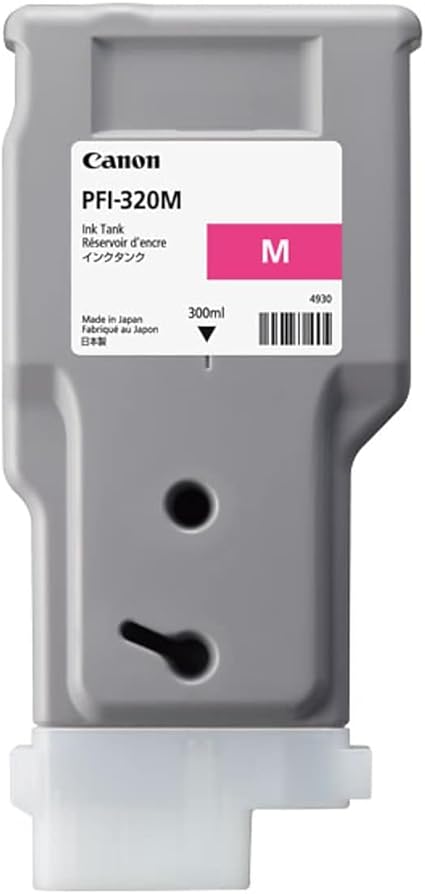
Canon PFI-320 M
The Canon PFI-320 M is a premium magenta ink cartridge tailored for Canon’s imagePROGRAF large-format printers. It is part of Canon’s PFI-320 series, providing vibrant and precise magenta tones that are vital for accurate color printing. The cartridge is well-suited for applications in photography, graphic design, and other professional printing tasks.
Key Features
- Vivid Magenta Tones: Delivers bright, accurate, and consistent magenta shades, essential for true-to-life color prints.
- High Capacity: Holds 330ml of pigment-based ink, ideal for high-volume printing and reducing frequent cartridge replacements.
- Durable Pigment Ink: Offers excellent water, smudge, and fade resistance for long-lasting results.
- Seamless Compatibility: Designed to work perfectly with Canon imagePROGRAF large-format printers.
- Eco-Friendly Recycling: Fully recyclable through Canon’s environmentally sustainable programs.
Specifications: Canon PFI-320 M
- Model: Canon PFI-320 M
- Ink Color: Magenta
- Ink Type: Pigment-based ink
- Capacity: 330ml
- Weight: Approximately 0.6 kg (1.3 lbs) when full
- Compatibility: Works with Canon imagePROGRAF models such as:
- PRO-2000
- PRO-4000
- PRO-6000
- Shelf Life: Up to 24 months when stored in a proper environment.
Benefits Canon PFI-320 M
- Outstanding Print Quality: Ensures vibrant magenta hues for highly detailed and professional-grade prints.
- Cost-Effective: The large capacity minimizes costs per print and reduces cartridge changes.
- Enhanced Print Durability: Pigment ink resists fading, making prints suitable for archival purposes or outdoor display.
- Optimal Printer Performance: Designed to prevent clogging and maintain smooth, reliable printer operation.
- Eco-Conscious: Supports Canon’s recycling initiative for environmentally responsible printing.
How to Install the Canon PFI-320 M Cartridge
- Turn On the Printer:
- Power on your printer and open the cartridge access door.
- Remove the Empty Cartridge:
- Locate the magenta slot.
- Press the release tab to eject the used cartridge and pull it out gently.
- Prepare the New Cartridge:
- Unbox the PFI-320 M cartridge and remove all protective seals and packaging.
- Shake the cartridge gently to ensure even ink distribution.
- Insert the New Cartridge:
- Align the cartridge with the magenta slot in the printer.
- Push it in firmly until it clicks into place.
- Close the Printer Access Panel:
- Secure the ink bay cover and wait for the printer to initialize the new cartridge.
- Run a Test Print:
- Perform a nozzle check or print alignment to ensure proper ink flow and color balance.
Pro Tips
- Storage: Store the cartridge in a cool, dry place away from direct sunlight to maintain ink quality.
- Genuine Cartridges: Always use authentic Canon cartridges to avoid damage to your printer and ensure optimal results.
- Regular Maintenance: Clean the printer heads periodically to prevent clogs and maintain consistent print quality.


There are no reviews yet.