

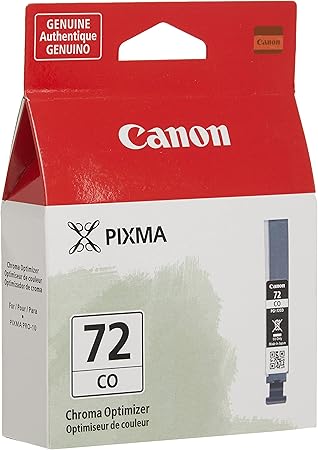
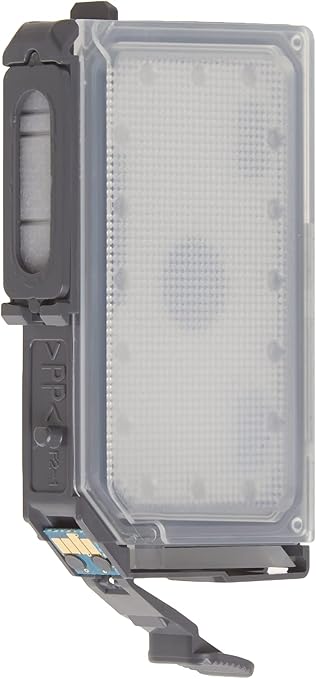

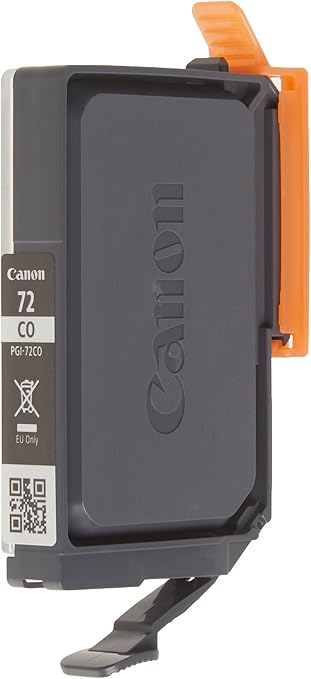
Canon PGI-72 CO Chroma Optimiser Ink Tank | EFFICIENT | RELIABLE | HIGH QUALITY
$13.75 $20.00
Canon PGI-72 CO Chroma Optimiser Ink Tank
The Canon PGI-72 CO Chroma Optimiser Ink Tank is a specialized ink cartridge designed to be used with certain Canon PIXMA PRO and Canon imagePROGRAF series printers. The Chroma Optimiser is a unique ink designed to enhance print quality by optimizing the surface of glossy photo paper, ensuring that prints have a rich, vibrant finish without unwanted gloss differential. This ink tank is specifically designed to complement other inks, such as the PGI-72 color inks (cyan, magenta, yellow, black, etc.), allowing for better control over the color and surface finish of the printed images.
Key Features:
- Chroma Optimiser Ink:
- The Chroma Optimiser is a clear ink used to improve the glossiness and smoothness of prints when used on glossy photo papers.
- It enhances color depth and produces prints with consistent gloss levels, preventing gloss differential (where areas of the print have uneven glossiness) on glossy or semi-glossy photo paper.
- Professional-Grade Printing:
- Designed for high-end photo printing, it ensures that prints have a professional, museum-quality finish. The result is sharper, more detailed, and more vibrant photos.
- The Chroma Optimiser provides additional depth and clarity to prints, particularly in dark areas or areas with fine details.
- Ink Compatibility:
- This ink tank is specifically compatible with Canon PIXMA PRO-100, PIXMA PRO-10, PIXMA PRO-1, and Canon imagePROGRAF series printers.
- It works in conjunction with other Canon inks, such as PGI-72 color cartridges (cyan, magenta, yellow, etc.), to achieve excellent photo print quality.
- Printing on Glossy and Semi-Glossy Papers:
- The Chroma Optimiser ink is especially effective for prints made on glossy and semi-glossy photo papers. When used with these types of media, it helps avoid the problem of uneven gloss, which can occur when the inks are not properly optimized for the paper surface.
- This makes it ideal for photo albums, fine art prints, and gallery-quality prints.
Specifications: Canon PGI-72 CO Chroma Optimiser Ink Tank
- Product Name: Canon PGI-72 CO Chroma Optimiser Ink Tank
- Ink Type: Chroma Optimiser (Clear ink for enhancing gloss)
- Capacity: Typically, the PGI-72 ink tanks (including the Chroma Optimiser) have a capacity of around 14 ml per cartridge, but this can vary.
- Compatibility:
- Canon PIXMA PRO-1
- Canon PIXMA PRO-10
- Canon PIXMA PRO-100
- Canon imagePROGRAF series
- Function: Designed to improve glossiness, clarity, and color depth on glossy or semi-glossy photo paper.
- Color: Clear (no pigment or dye, it is a transparent ink).
- Printing Media: Primarily used with glossy and semi-glossy photo papers.
Benefits: Canon PGI-72 CO Chroma Optimiser Ink Tank
- Enhanced Gloss and Finish:
- The Chroma Optimiser provides a smooth and even glossy finish to prints, making it perfect for professional photographers and artists who require consistent, high-quality prints.
- Prevents Gloss Differential:
- Gloss differential occurs when certain areas of a print appear shinier or more matte than others. The Chroma Optimiser ink helps to prevent this by evenly coating the paper’s surface, ensuring a uniform gloss.
- Professional Print Quality:
- By using the Chroma Optimiser, prints exhibit a professional-quality finish with enhanced colors, improved contrast, and richer details, especially in areas with fine highlights or dark shadows.
- Increased Durability of Prints:
- The Chroma Optimiser can also help protect the print surface, providing added durability against fingerprints, smudges, and other potential damage.
- Cost-Effective for High-Volume Printing:
- This ink tank can help reduce the cost of printing for photographers and businesses that produce a high volume of photo prints, especially glossy or semi-glossy prints, without compromising on quality.
How to Install Canon PGI-72 CO Chroma Optimiser Ink Tank
- Turn On the Printer:
- Power on your Canon PIXMA PRO series printer or imagePROGRAF printer.
- Open the Ink Cartridge Compartment:
- Open the ink compartment or ink tank holder to access the area where the cartridges are installed.
- Remove the Old Cartridge (if applicable):
- If you are replacing an empty PGI-72 CO Chroma Optimiser Ink Tank, carefully remove the old cartridge by pressing on it lightly until it clicks out of its holder.
- Install the New Chroma Optimiser Ink Tank:
- Take the new PGI-72 CO Chroma Optimiser Ink Tank out of its packaging and remove any protective plastic or seals.
- Insert the new ink tank into the designated slot in the printer. Make sure it clicks into place securely.
- Close the Ink Compartment:
- After the cartridge is properly seated, close the ink compartment or holder.
- Perform a Test Print:
- After installation, you may want to perform a test print to ensure that the Chroma Optimiser ink is functioning correctly and that the printer recognizes the new cartridge.
Conclusion:
The Canon PGI-72 CO Chroma Optimiser Ink Tank is an essential component for anyone using Canon professional-grade photo printers who wants to achieve high-quality glossy prints with even and consistent gloss. Its ability to enhance the finish, depth, and color accuracy of prints makes it an ideal choice for photographers, artists, and print shops looking for professional results with glossy and semi-glossy photo papers. When used alongside the other Canon PGI-72 ink tanks, it ensures that your prints will have a stunning and durable finish that stands out in any setting.
| Weight | 0.02 kg |
|---|
Based on 0 reviews
Be the first to review “Canon PGI-72 CO Chroma Optimiser Ink Tank | EFFICIENT | RELIABLE | HIGH QUALITY”
Related products
-
canon, Canon Printers, Inkjet, Inkjet Printer, Printers
Canon PIXMA G3430 All-in-One Multi-function Printer
-22% canon, Canon Printers, Inkjet, Inkjet Printer, Printers
Canon PIXMA G3430 All-in-One Multi-function Printer
- High quality printing
- Print, scan and copy with a single device
- Large-capacity rear tray for volume printing
- Connect wirelessly to your computer or smart device
- Mac, Windows and Chrome
SKU: n/a


There are no reviews yet.