

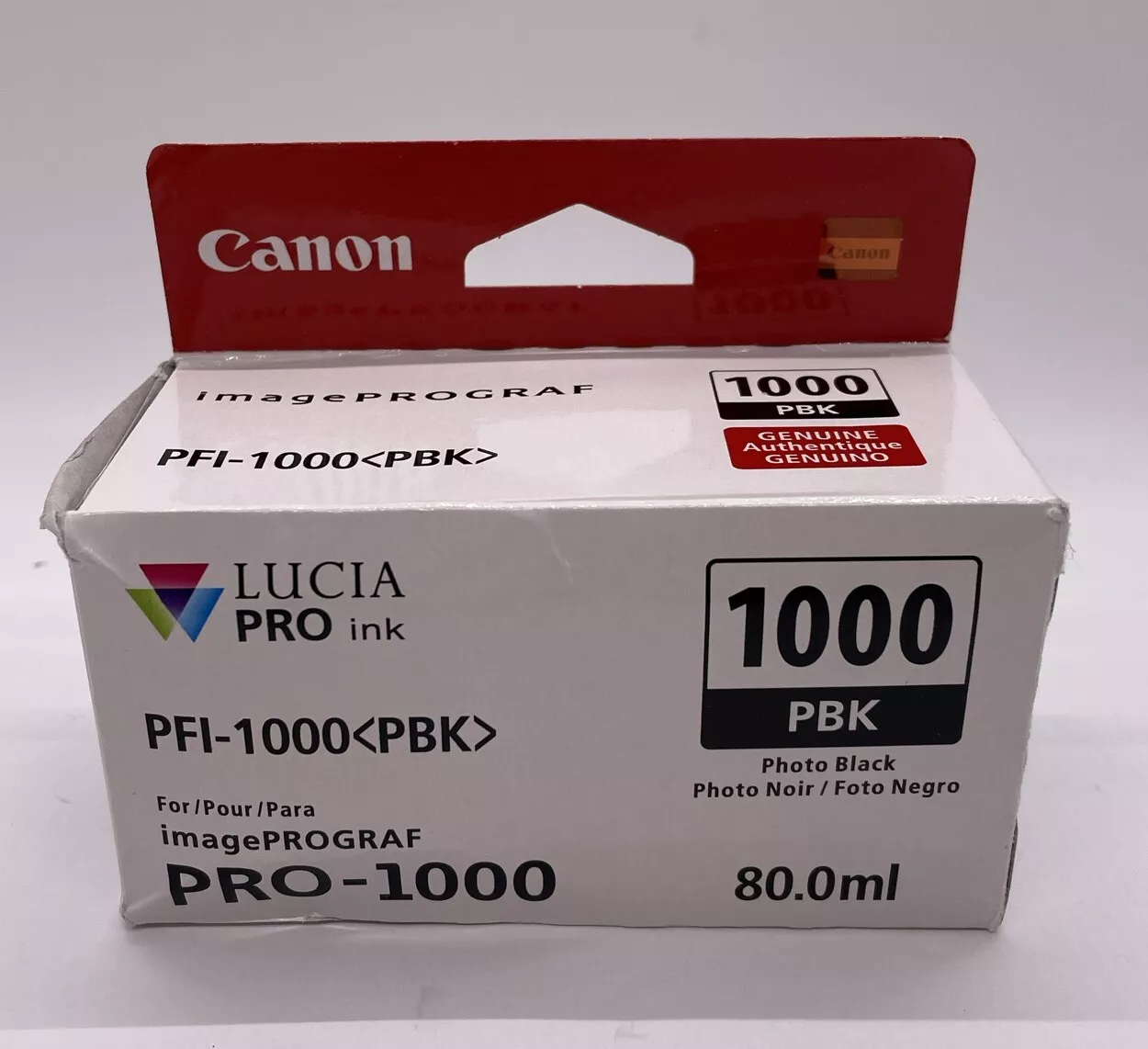
CANON PFI-1000 PBK INK CARTRIDGE | RELIABLE and EFFICIENT
$48.40 $50.00
CANON PFI-1000 PBK INK CARTRIDGE
The Canon PFI-1000 PBK INK Cartridge is a photo black ink cartridge designed for Canon’s professional imagePROGRAF series of large-format printers, such as the Canon imagePROGRAF PRO-1000. The “PBK” stands for “Photo Black,” which is used for printing high-quality photo prints with deep blacks and smooth tonal gradations.
This ink is ideal for high-resolution photo printing on various media types.
Features:
1. High-Quality Photo Black Ink: The PFI-1000 PBK uses dye-based ink, specially formulated for deep, rich black tones.
2. Large Ink Capacity (80ml): The cartridge comes with an 80ml ink capacity, allowing for longer print runs and fewer replacements.
3. Wide Color Gamut: When used in conjunction with the other Canon PFI-1000 ink cartridges (cyan, magenta, yellow, etc.), the PBK ink helps produce a wide color gamut with accurate and vibrant colors for photo printing.
4. Enhanced Durability and Stability: The ink is designed to provide long-lasting prints with resistance to fading over time, helping preserve photo prints for extended periods without color degradation.
5. Precise Ink Delivery: The PFI-1000 series cartridges are engineered for precise ink delivery to the print head, ensuring consistent print quality with minimal ink waste.
6. Seamless Integration with Canon Printers: Designed for use with the Canon imagePROGRAF PRO-1000 and similar Canon printers, ensuring seamless integration and optimal print results.
7. Easy Installation: The cartridge is designed for easy installation and replacement in the printer, reducing downtime for professionals.
8. Eco-Friendly: Made with environmentally friendly materials and processes.
Specifications of Canon PFI-1000 PBK INK Cartridge
- Product Type: Dye-based ink cartridge (Photo Black)
- Cartridge Model: PFI-1000 PBK
- Ink Color: Photo Black (PBK)
- Ink Type: Dye-based ink
- Capacity: 80 mL
- Weight: 150g
Benefits: of Canon PFI-1000 PBK INK Cartridge
-
1. Superior Photo Quality
- The dye-based ink provides deep, rich blacks and ensures smooth transitions in dark areas, making it ideal for printing high-quality black-and-white photographs and monochrome images.
2. Professional-Grade Prints
- The ink cartridge is part of the Canon LUCIA PRO ink system, designed for fine art and professional photo printing, ensuring that prints are sharp, detailed, and color-accurate.
3. Wide Color Gamut
- The PFI-1000 PBK, when used with other compatible ink cartridges, contributes to a wide color gamut, making it suitable for printing on various media types (e.g., glossy, semi-gloss, matte papers).
- This wide range helps achieve accurate color reproduction, ensuring that the final print closely matches what is seen on-screen.
4. Longevity of Prints
- The high-quality dye-based ink helps produce prints with excellent durability that resist fading over time. This makes it suitable for archival-quality prints that last for years.
5. High Ink Yield
- The 80mL capacity of the PFI-1000 PBK cartridge provides longer print runs, reducing the need for frequent cartridge replacements and improving printing efficiency.
6. Optimized for Canon ImagePROGRAF PRO-1000
- The cartridge is specifically designed to work with the Canon imagePROGRAF PRO-1000 printer, ensuring seamless integration for optimal performance and print quality.
7. Easy to Install and Replace
- The PFI-1000 PBK cartridge is designed for easy installation and quick replacement, allowing users to spend more time printing and less time managing their printer.
8. Environmentally Friendly
- Canon has made efforts to reduce the environmental impact of their ink cartridges. The PFI-1000 series is designed to be recyclable, helping users reduce waste.
9. Consistent Print Quality
- The PFI-1000 PBK ensures consistent, high-quality output for all types of prints, whether you’re working on photo prints, fine art reproductions, or high-resolution graphics.
10. Cost Efficiency for Professionals
- For professional photographers, print shops, and artists who require frequent high-quality prints, the PFI-1000 PBK offers excellent value with its large capacity and reliable performance.
How to Install
- Prepare the Printer
- Ensure the printer is powered on and ready.
- Open the ink compartment panel.
- Remove the Empty Cartridge
- If you’re replacing an old cartridge, remove the old ink cartridge before installing the new one.
- Gently pull the old cartridge out of its slot by pressing the small tab or lever that secures it.
- Unpack the New Cartridge
- Remove the Canon PFI-1000 PBK cartridge from its box and protective packaging.
- Install the New Cartridge
- Insert the cartridge into the PBK slot, ensuring it clicks into place securely.
- Close the Ink Compartment
- Close the panel and wait for the printer to recognize the new cartridge.
- Perform a Test Print
- Print a test page to ensure the new ink is functioning correctly.
Based on 0 reviews
Be the first to review “CANON PFI-1000 PBK INK CARTRIDGE | RELIABLE and EFFICIENT”
Related products
-
canon, Canon Printers, Inkjet, Inkjet Printer, Printers
Canon PIXMA G3430 All-in-One Multi-function Printer
-22% canon, Canon Printers, Inkjet, Inkjet Printer, Printers
Canon PIXMA G3430 All-in-One Multi-function Printer
- High quality printing
- Print, scan and copy with a single device
- Large-capacity rear tray for volume printing
- Connect wirelessly to your computer or smart device
- Mac, Windows and Chrome
SKU: n/a



There are no reviews yet.