

-1%
canon, Canon Accessories, Canon Catridge, Canon Ink & Toner, consumable
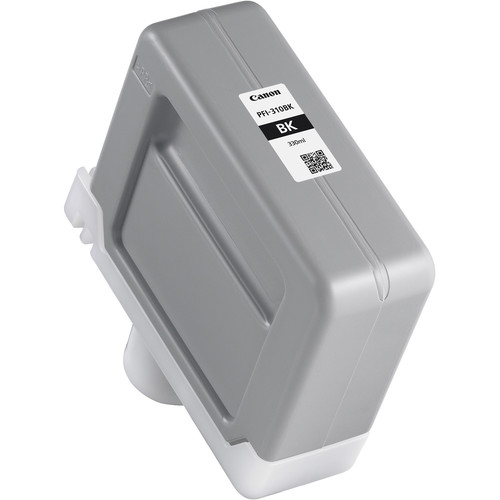
Canon PFI-310 Black Pigment Ink Tank | RELIABLE and EFFICIENT
USD
$138.60 $140.00
Canon PFI-310 Black Pigment Ink Tank
The Canon PFI-310 Black Pigment Ink Tank is designed for precise, high-quality prints in professional large-format applications. This ink tank uses Canon’s advanced pigment technology to produce sharp, detailed black tones that are durable and fade-resistant, ensuring reliability for projects like CAD drawings, fine art, photography, and signage.
Key Features:
- Sharp and Detailed Prints:
- Provides crisp black output for text and graphics.
- Durable Pigment Ink:
- Water-resistant and fade-resistant for long-lasting results.
- Large Capacity:
- Designed for high-volume printing with minimal interruptions.
- Printer Compatibility:
- Optimized for Canon imagePROGRAF printers.
- Environmentally Friendly:
- Produced using recyclable components to reduce environmental impact.
Specifications: Canon PFI-310 Black Pigment Ink Tank
- Color: Black (BK)
- Ink Type: Pigment-based
- Capacity: 330 ml
- Weight: Approximately 0.8–1.0 kg (including packaging).
- Compatible Printers:
- Canon imagePROGRAF PRO-2100
- Canon imagePROGRAF PRO-4100
- Canon imagePROGRAF PRO-6100
- Other Canon imagePROGRAF models (refer to the printer’s specifications).
- Technology: Advanced pigment ink for consistent, professional-grade output.
Benefits: Canon PFI-310 Black Pigment Ink Tank
- Professional Print Quality:
- Delivers high-resolution, detailed black tones ideal for technical and artistic projects.
- Enhanced Productivity:
- Large-capacity design minimizes the need for frequent replacements.
- Durable Output:
- Ink is resistant to smudging, water damage, and fading.
- Eco-Conscious Design:
- Recyclable components reduce environmental impact.
- Seamless Integration:
- Works effortlessly with Canon printers for optimal performance.
How to Install Canon PFI-310 Black Pigment Ink Tank
- Prepare the Printer:
- Power on the printer and ensure it is in ready mode.
- Access the Ink Tank Slot:
- Open the ink compartment panel according to the user manual.
- Remove the Used Ink Tank:
- Carefully release and remove the empty or low PFI-310 Black ink tank.
- Unpack the New Ink Tank:
- Take the PFI-310 Black from its packaging, avoiding contact with the ink port.
- Insert the New Ink Tank:
- Align and slide the tank into the designated slot until it clicks securely.
- Close the Compartment:
- Ensure the panel is closed to prevent any operational issues.
- Verify Installation:
- Perform a test print or nozzle check to ensure proper installation.
| Weight | 1 kg |
|---|
Based on 0 reviews
Be the first to review “Canon PFI-310 Black Pigment Ink Tank | RELIABLE and EFFICIENT”
Related products
-
canon, Canon Cameras
Canon PowerShot V10 Vlog Camera (Black)
Key Features- For Vlogging and Live Streaming
- 20.9MP 1″ CMOS Sensor
- UHD 4K up to 29.97 fps
- Full HD up to 59.94 fps
- 19mm Equivalent Wide-Angle Lens
- Web Camera Compatible with UVC Support
- 460,000-Dot 2″ Touchscreen LCD
- Wi-Fi & Bluetooth Connectivity
- Vertical Capture Capable
- Built-In 30° Stand
SKU: n/a




There are no reviews yet.