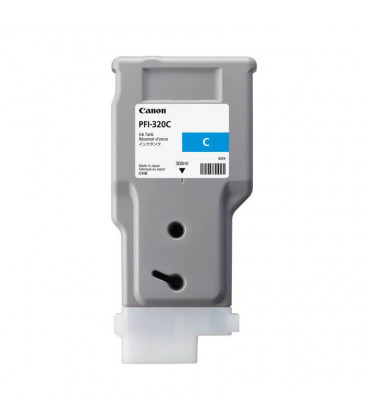
The Canon PFI-320 Cyan is a premium ink cartridge designed to deliver outstanding performance for Canon’s imagePROGRAF large-format printers. The “C” indicates that this cartridge contains cyan ink, which is essential for creating vibrant, high-quality color prints. It is particularly suited for professionals in graphic design, photography, and technical printing applications.
Key Features
Vivid Color Reproduction: Ensures sharp and accurate cyan tones, critical for producing balanced and vibrant color outputs.
Large Ink Capacity: Holds 330ml of ink, making it ideal for high-volume printing with fewer interruptions.
High Compatibility: Works seamlessly with Canon imagePROGRAF series printers.
Pigment-Based Ink: Offers water-resistant and fade-resistant properties for long-lasting prints.
Environmentally Conscious: Fully recyclable through Canon’s eco-friendly cartridge programs.
Specifications: Canon PFI-320 Cyan
Model Name: Canon PFI-320 C
Ink Color: Cyan
Ink Type: Pigment-based ink
Capacity: 330ml
Weight: Approximately 0.6 kg (1.3 lbs) when full
Compatibility: Compatible with Canon imagePROGRAF models such as PRO-2000, PRO-4000, and PRO-6000.
Shelf Life: Up to 24 months when stored properly.
Benefits: Canon PFI-320 Cyan
Consistent Quality: Produces vivid cyan shades with exceptional precision.
High Yield: Reduces downtime with its high ink capacity, maximizing productivity.
Durable Prints: Pigment-based formula ensures prints are resistant to water, smudging, and fading.
Professional Results: Perfect for industries requiring accurate color reproduction, such as architecture, photography, and marketing.
Eco-Friendly Disposal: Canon’s recycling initiatives support sustainable printing.
How to Install the Canon PFI-320 C Cartridge
Prepare the Printer:
Turn on the printer and open the cartridge access panel.
Wait until the printer is idle before proceeding.
Remove the Empty Cartridge (if applicable):
Locate the cyan cartridge slot.
Press the release lever and carefully pull out the old cartridge.
Prepare the New Cartridge:
Unbox the PFI-320 C and remove protective seals and plastic covers.
Gently shake the cartridge to distribute the ink evenly.
Insert the New Cartridge:
Align the cartridge with the designated cyan slot.
Push it in until it clicks securely into place.
Close the Printer Cover:
Secure the cartridge panel and allow the printer to initialize the new cartridge.
Run a Test Print:
Perform a nozzle check or print alignment to ensure proper installation and color consistency.





There are no reviews yet.