

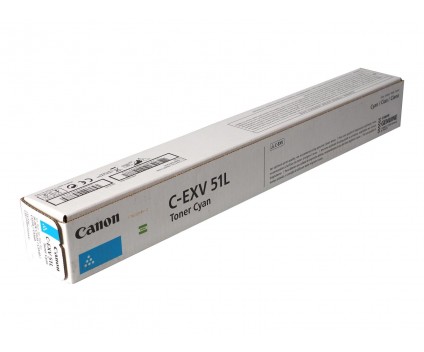

CANON C-EXV 51L CYAN TONER | Reliable and High-Yield Printing
$179.03 $180.00
CANON C-EXV 51L CYAN TONER
The Canon C-EXV 51L Cyan Toner Cartridge is a low-yield toner cartridge designed for specific Canon imageRUNNER ADVANCE multifunction devices. It offers professional-quality cyan printing for moderate-volume printing needs, making it ideal for smaller offices or workflows requiring vivid color prints.
Key Features:
- Moderate Page Yield: Prints up to 33,000 pages, perfect for moderate workloads.
- Vibrant Color Output: Produces high-quality, sharp cyan tones for professional documents and images.
- Seamless Compatibility: Engineered for Canon imageRUNNER ADVANCE DX series printers, ensuring optimal performance.
- Eco-Conscious: Recyclable through Canon’s toner recycling program, contributing to environmental sustainability.
- Durable and Reliable: Designed for consistent output and reduced printer downtime.
- Easy Installation: Simple to install and replace, making it user-friendly.
Specifications of Canon C-EXV 51L Cyan Toner Cartridge
- Color: Cyan
- Type: Low-yield toner cartridge
- Page Yield: Approximately 33,000 pages (at 5% coverage on A4 paper)
- Compatibility: PIXMA MX494, PIXMA MG2440, PIXMA MG2545S, PIXMA iP2840, PIXMA MG2940
- Dimensions: Standard cartridge size
- Weight: 2kg
Benefits
1. High-Quality Prints: Produces vibrant and consistent cyan tones, ideal for professional documents and high-resolution images.
2. Low-Yield for Cost Efficiency: Perfect for moderate-volume printing needs, reducing upfront costs compared to higher-yield cartridges.
3. Compatibility and Performance: Seamlessly integrates with compatible Canon imageRUNNER ADVANCE DX devices, ensuring reliable and smooth operation.
4. Eco-Friendly: Fully recyclable through Canon’s toner recycling program, supporting environmental sustainability initiatives.
5. Easy to Handle: Designed for quick and straightforward installation, saving time during cartridge replacement.
How to Install
- Access the Printer: Ensure the printer is powered on and not printing.
- Remove the Old Cartridge (If Applicable): Carefully remove the old ink cartridges from their slots.
- Remove Protective Materials: Unpack the 490 Colours Ink Printing Cartridge, removing any protective covers or tapes.
-
Insert the Cartridge: Align the cartridge with the slot marked for Cyan in the toner compartment.
- Close Printer: Close the printer the printer.
- Run Test Print: Perform a test print to check the installation and print quality.
| Weight | 2 kg |
|---|


There are no reviews yet.