

-0%
canon, Canon Accessories, Canon Catridge, Canon Ink & Toner
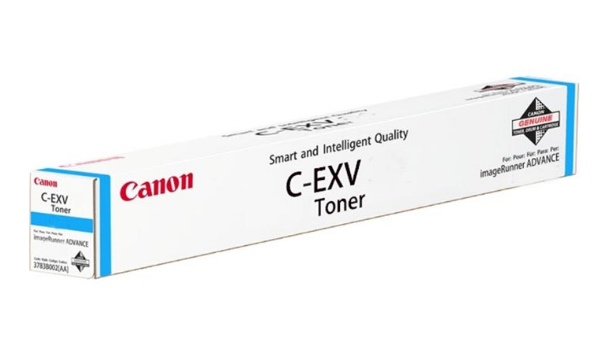
CANON C-EXV 51 CYAN TONER CARTRIDGE 60K Toner | High-Yield Printing
USD
$368.55 $370.00
CANON C-EXV 51 Cyan TONER CARTRIDGE 60K Toner
The Canon C-EXV 51 Cyan Toner Cartridge is a high-capacity toner cartridge designed for specific Canon imageRUNNER ADVANCE multifunction devices. It is optimized for professional-quality color printing, delivering consistent, vibrant cyan tones suitable for high-volume environments such as offices and print shops.
Features:
- Vibrant Color Quality: Canon C-EXV 51 Cyan Toner Cartridge Provides sharp, consistent, and vibrant cyan tones, ideal for color-critical documents.
- Reliable Performance: Ensures consistent and high-quality printing with minimal maintenance.
- Wide Compatibility: Compatible with various printer models, making it a versatile choice.
- High Page Yield: Produces up to 60,000 pages, reducing the frequency of replacements and ensuring efficiency for high-volume printing.
- Eco-Friendly: Made with environmentally friendly materials and processes.
Specifications of Canon C-EXV 51 Cyan Toner Cartridge
- Color: Cyan
- Type: High-yield toner cartridge
- Page Yield: Approximately 60,000 pages (at 5% coverage on A4 paper)
- Cartridge Type: Canon C-EXV 51 Cyan Toner Cartridge
- Compatibility: Canon imageRUNNER ADVANCE DX C3720i, Canon imageRUNNER ADVANCE DX C3725i, Canon imageRUNNER ADVANCE DX C3730i, Canon imageRUNNER ADVANCE DX C3822i, Canon imageRUNNER ADVANCE DX C3830i
- Dimensions: Standard cartridge size
- Weight: 2kg
Benefits: of Canon C-EXV 51 Cyan Toner Cartridge
- Cost-Effective: High page yield reduces the cost per page, making it economical.
- Easy to Install: Quick and hassle-free installation process.
- Consistent Print Quality: Provides high-quality, professional-looking prints every time.
- Environmentally Friendly: Produced with eco-friendly practices, helping to reduce your carbon footprint.
How to Install
- Access the Printer/Toner Area:
- Open the toner compartment or front cover on the compatible Canon device.
- Remove the Old Cartridge:
- Gently pull out the existing cartridge, if applicable.
- Prepare the New Cartridge:
- Unpack the new C-EXV 51 Cyan cartridge and shake it gently to distribute the toner evenly.
- Remove Protective Materials:
- Take off any protective seals or caps from the cartridge.
- Install the New Cartridge:
- Align the cartridge with the designated slot and slide it in until it locks in place.
- Close the Cover:
- Securely close the toner compartment and allow the device to initialize.
| Weight | 2 kg |
|---|


There are no reviews yet.