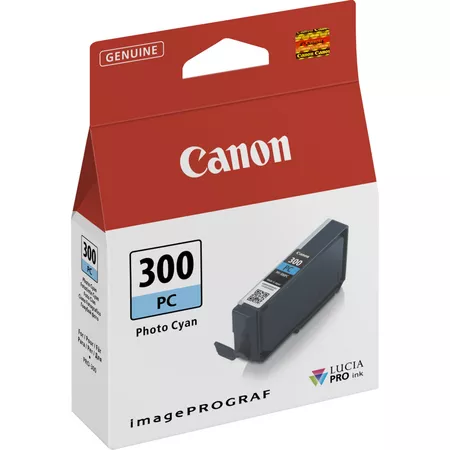
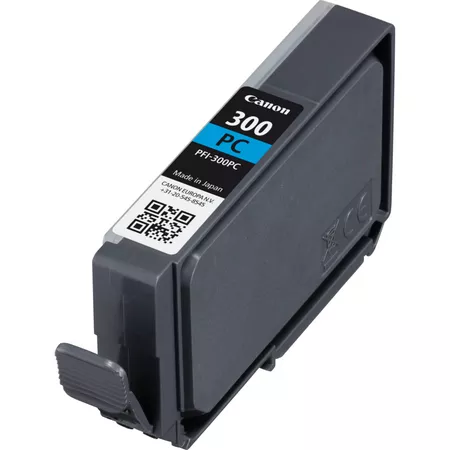
The Canon PFI-300 PC Ink Cartridge is a Photo Cyan ink cartridge designed for use with Canon’s imagePROGRAF PRO series of large-format printers, including the imagePROGRAF PRO-1000, PRO-2000, and PRO-4000. This ink cartridge is part of Canon’s LUCIA PRO ink set, engineered for professional applications, providing high-quality, vibrant prints with a wide color gamut. The photo cyan ink is particularly important for enhancing color accuracy and smooth tonal transitions, especially in the reproduction of images with delicate cyan and blue tones.
The PFI-300 PC is a photo cyan ink cartridge, designed specifically for producing subtle shades of cyan in professional photo and fine art printing. The photo cyan helps create smooth gradations and adds depth to prints with light blue, cyan, and other similar tones.
LUCIA PRO Ink Technology:
The LUCIA PRO ink set uses pigment-based inks, providing enhanced durability, superior color accuracy, and rich, vibrant color output. This pigment technology ensures that prints last longer and resist fading over time, which is essential for high-quality professional print applications.
Wide Color Gamut:
The photo cyan ink enables a wider color gamut, which is crucial for capturing delicate tones and color transitions. This results in highly accurate reproductions of photographs and artwork, particularly for images with sky tones, water, and other soft gradients.
Professional-Grade Printing:
Designed for Canon’s imagePROGRAF PRO series printers, this ink cartridge is ideal for professional photographers, fine artists, and graphic designers who demand the highest print quality and color precision.
Durability:
Being a pigment-based ink, the PFI-300 PC ensures that prints are resistant to fading, moisture, and environmental damage. This makes it perfect for creating archival-quality prints for galleries, exhibitions, and professional portfolios.
Specifications of Canon PFI-300 PC Ink Cartridge:
Ink Type: Pigment-based
Color: Photo Cyan (PC)
Model Number: Canon PFI-300 PC
Capacity: 80 ml (Standard)
Compatibility:
Canon imagePROGRAF PRO-1000
Canon imagePROGRAF PRO-2000
Canon imagePROGRAF PRO-4000
Other printers in the imagePROGRAF PRO series
Print Quality: High-quality photo cyan ink for smooth color gradations and accurate reproduction, ideal for professional photo and fine art printing.
Printer Types: Large-format inkjet printers
Weight: Approximately 0.3 kg (300 grams)
Benefits of Canon PFI-300 PC:
Accurate and Vibrant Color:
The photo cyan ink produces highly accurate, vibrant color, particularly for delicate cyan and blue tones. This helps ensure true-to-life color reproduction in high-quality prints.
Wide Color Gamut:
The PFI-300 PC contributes to a broader color gamut, allowing for more accurate and vibrant color reproduction, especially in images with subtle color transitions or gradients.
Durable and Long-Lasting:
With its pigment-based ink, the prints made with the PFI-300 PC are highly resistant to fading and damage, making it ideal for prints that need to last for a long time, such as archival prints or gallery pieces.
Ideal for High-Quality Photography and Fine Art:
This ink is perfect for professional photographers, graphic designers, and artists who need to reproduce precise color details and smooth gradients, making it an essential tool for fine art, photography, and commercial applications.
How to Replace the Canon PFI-300 PC Ink Cartridge:
Turn on the Printer:
Power on the printer and ensure that the ink compartment is accessible.
Open the Ink Cartridge Compartment:
Open the printer’s ink compartment to access the installed ink cartridges.
Remove the Old Ink Cartridge:
Gently remove the old PFI-300 PC photo cyan ink cartridge from its slot.
Insert the New Ink Cartridge:
Unbox the new PFI-300 PC photo cyan ink cartridge, remove any protective seals or packaging, and insert the cartridge into the correct slot. Push it firmly until it clicks into place.
Close the Ink Compartment:
Close the ink compartment after the new cartridge is securely installed.
Check Ink Status:
The printer should automatically detect the new cartridge. You can print a test page to verify that the ink is functioning properly and that the cartridge has been correctly installed.





There are no reviews yet.