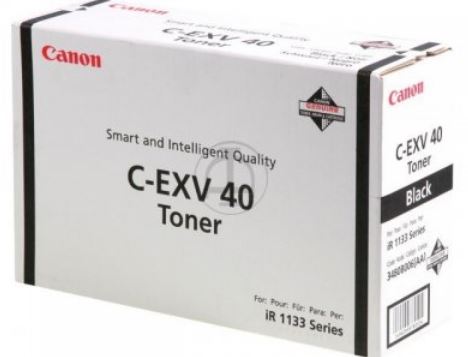
The Canon C-EXV 40 Toner is an original toner cartridge designed for use in Canon color laser printers and multifunction devices. It is a part of Canon’sEXV (Extended Imaging and Xerox) series and is known for its high-quality printing performance, reliability, and excellent color reproduction.
Key Features:
Compatibility:
The Canon C-EXV 40 toner is primarily compatible with specific Canon color laser printers and multifunction printers (MFPs) in the imageRUNNER and imagePRESS series.
Some of the models that use this toner include:
Canon imageRUNNER C2020
Canon imageRUNNER C2030
Canon imageRUNNER ADVANCE C3320i
Canon imagePRESS C6000
And other compatible devices in the imageRUNNER and imagePRESS ranges.
Superior Print Quality:
The C-EXV 40 toner provides high-quality color prints with vibrant, accurate colors and sharp text. It is designed to work seamlessly with Canon’s color laser printers to produce professional-grade color documents, graphics, and marketing materials.
Yield:
The approximate page yield of the Canon C-EXV 40 toner cartridge is around 30,000 pages at 5% coverage on A4 paper for each color (cyan, magenta, yellow, and black). The yield may vary depending on usage and the type of printing jobs.
Eco-Friendly Design:
Canon’s toner cartridges, including the C-EXV 40, are designed with the environment in mind. The cartridges are recyclable, and Canon has an extensive recycling program for used toner cartridges to minimize environmental impact.
Reliability and Consistency:
As an original Canon product, the C-EXV 40 toner cartridge provides consistent, reliable performance. It minimizes the likelihood of issues like print smudging, uneven color, or print streaking, ensuring high-quality prints with every job.
Specifications: Canon C-EXV 40 Toner
Model: Canon C-EXV 40
Type: Toner Cartridge (Available in four colors: Cyan, Magenta, Yellow, and Black)
Compatibility: Canon color laser printers and multifunction printers, primarily in the imageRUNNER and imagePRESS series
Page Yield: Approx. 30,000 pages at 5% coverage per color (cyan, magenta, yellow, black)
Toner Type: Color laser toner for professional-quality color printing
Cartridge Color: Available in Cyan, Magenta, Yellow, and Black
Environmental Impact: Recyclable and environmentally conscious design
Benefits: Canon C-EXV 40 Toner
High-Quality Prints:
The C-EXV 40 toner is specifically designed to provide consistent, vibrant, and precise colors. Whether you’re printing documents, presentations, or marketing materials, the toner ensures professional results.
Longer Cartridge Life:
With a yield of 30,000 pages, the C-EXV 40 toner offers a long-lasting solution for high-volume printing environments, such as offices or print shops, reducing the frequency of cartridge replacements.
Cost-Effective:
Despite being an original toner, the C-EXV 40 is cost-effective in terms of cost-per-page due to its high page yield. This helps reduce printing costs in high-volume environments.
Eco-Friendly:
Canon’s toner cartridges, including the C-EXV 40, are designed for sustainability. They can be recycled through Canon’s Cartridge Recycling Program, helping reduce waste and promote environmental responsibility.
Reduced Downtime:
The long-lasting nature of the C-EXV 40 means fewer interruptions to your printing operations, providing more consistent workflow and reducing downtime in office or commercial printing settings.
How to Replace the Canon C-EXV 40 Toner Cartridge:
Turn Off the Printer:
Ensure that the printer is turned off and unplugged to avoid any electrical hazards while replacing the toner cartridge.
Open the Printer’s Front Panel:
Open the front cover or access panel of the printer or multifunction device to reach the toner compartment.
Remove the Old Toner Cartridge:
Carefully remove the used Canon C-EXV 40 toner cartridge from the printer. Hold it by its sides to avoid touching the imaging drum (if applicable) to prevent toner stains or damage.
Prepare the New Toner Cartridge:
Unbox the new Canon C-EXV 40 toner cartridge, and gently shake it from side to side to evenly distribute the toner inside. This ensures optimal performance and quality printing.
Install the New Toner Cartridge:
Insert the new toner cartridge into the correct slot (color-specific) in the printer. Ensure that it is properly aligned and securely installed.
Close the Printer’s Front Panel:
Once the cartridge is in place, close the front cover or access panel of the printer.
Turn the Printer Back On:
Power the printer back on and run a test print to verify that the new cartridge is functioning properly and that the printer is printing quality documents.






There are no reviews yet.