


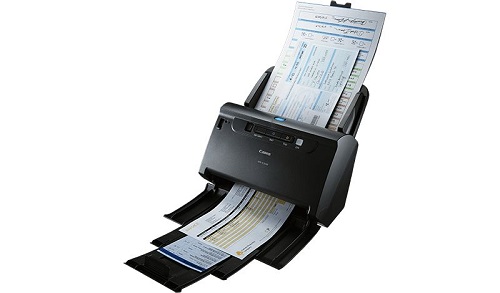

Canon imageFORMULA DR-C230 Document Scanner
The Canon imageFORMULA DR-C230 is a compact, reliable, and efficient document scanner designed for businesses and professionals. It offers high-speed scanning and advanced image processing features, making it ideal for digitizing documents, photos, and business cards with exceptional quality.
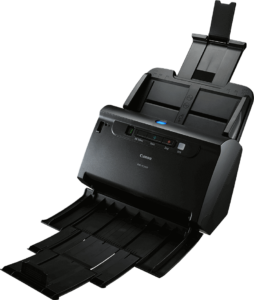
Key Features:
- High-Speed Scanning:
- Scans up to 30 pages per minute (ppm) or 60 images per minute (ipm) in duplex mode.
- Automatic Document Feeder (ADF):
- Equipped with a 60-sheet ADF for batch scanning.
- Versatile Media Support:
- Handles a wide range of media, from thin receipts to thick cards (27–209 g/m²).
- Advanced Image Processing:
- Includes features like auto color detection, text enhancement, deskew, and more for clean and accurate scans.
- Compact Design:
- Space-saving size for use in small offices or on desktops.
- Reliable Performance:
- Daily duty cycle of up to 3,500 scans, ensuring durability for heavy workloads.
- Easy Integration:
- USB 2.0 connectivity and compatibility with Windows and macOS.
- Energy Efficient:
- Low power consumption with an Energy Star certification.
Specifications: Canon imageFORMULA DR-C230
- Scan Type: Automatic duplex scanner
- Scan Speed:
- Simplex: 30 ppm
- Duplex: 60 ipm
- Resolution:
- Optical: Up to 600 dpi
- ADF Capacity: 60 sheets
- Media Types:
- Plain paper, business cards, plastic ID cards, and more
- Paper Size:
- Minimum: 50.8 x 70 mm
- Maximum: 216 x 356 mm
- Daily Duty Cycle: Up to 3,500 scans/day
- Interface: USB 2.0
- Weight: Approximately 2.8 kg
- Dimensions: 291 x 253 x 231 mm (with trays extended)
- Software Included: Canon CaptureOnTouch, CapturePerfect, and compatibility with Kofax VRS and other industry-standard solutions.
Benefits: Canon imageFORMULA DR-C230
- Efficiency and Productivity:
- Fast and reliable scanning enhances workflow efficiency.
- High-Quality Outputs:
- Advanced image processing ensures sharp and accurate scans.
- Versatile Applications:
- Perfect for digitizing invoices, contracts, business cards, and more.
- User-Friendly Design:
- Intuitive controls and software make operation simple.
- Compact and Portable:
- Ideal for small office spaces or on-the-go professionals.
How to Set Up: Canon imageFORMULA DR-C230
- Unbox the Scanner:
- Remove the scanner and accessories (USB cable, power adapter, etc.) from the packaging.
- Connect the Power:
- Plug in the power adapter and connect the scanner to a power source.
- Install Drivers and Software:
- Download and install the drivers and software from Canon’s official website or use the included installation CD.
- Connect to Computer:
- Use the USB cable to connect the scanner to your PC or Mac.
- Power On:
- Turn on the scanner and follow the on-screen setup instructions.
- Test the Scanner:
- Use Canon CaptureOnTouch software to scan a test document and ensure the scanner is functioning correctly.
| Weight | 2.8 kg |
|---|



There are no reviews yet.