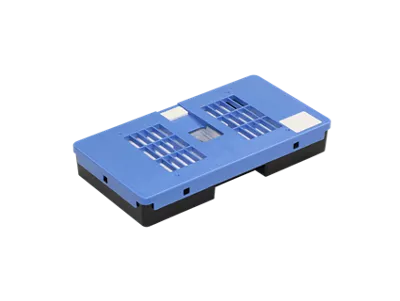
The Canon Maintenance Cartridge MC-31 is a critical component for Canon’s large-format printers. It is responsible for collecting and safely storing excess ink generated during printing and maintenance processes such as printhead cleaning. This ensures smooth operation, protects internal printer components, and enhances the longevity of the printer.
Key Features: Canon Maintenance Cartridge MC-31
Efficient Ink Collection:
Captures waste ink during printhead cleaning and other maintenance tasks, preventing overflow.
Printer Compatibility:
Designed for Canon imagePROGRAF PRO series and other compatible printers, including:
PRO-2100
PRO-4100
PRO-6100
High Capacity:
Handles large volumes of waste ink, making it ideal for professional and high-output environments.
Weight:
Empty Weight: Approximately 0.39 kg (390 grams).
Durable Design:
Constructed for reliable performance, even in demanding printing scenarios.
User-Friendly Replacement:
Easy to remove and install, ensuring minimal downtime.
Printer Alerts:
The printer provides notifications when the cartridge is nearly full or needs replacement.
Benefits: Canon Maintenance Cartridge MC-31
Prevents Ink Overflow:
Keeps the printer clean and operational by efficiently managing waste ink.
Prolongs Printer Life:
Protects internal components from damage caused by ink leaks or spills.
Easy Maintenance:
Quick and straightforward cartridge replacement minimizes interruptions.
Ideal for High-Volume Printing:
Suitable for businesses and professionals requiring consistent, high-quality output.
How to Install and Replace Canon Maintenance Cartridge MC-31
Monitor Cartridge Status:
Watch for printer alerts indicating that the maintenance cartridge is full or nearing capacity.
Access the Maintenance Compartment:
Open the printer’s maintenance door to locate the MC-31 cartridge.
Remove the Used Cartridge:
Carefully pull out the full cartridge, avoiding ink spillage. Seal it for proper disposal.
Insert the New Cartridge:
Align and slide the new MC-31 cartridge into the slot until it clicks into place.
Verify Installation:
Close the compartment and confirm the printer recognizes the new cartridge.
Dispose of the Old Cartridge:
Follow local guidelines for disposing of electronic waste and residual ink.





There are no reviews yet.