

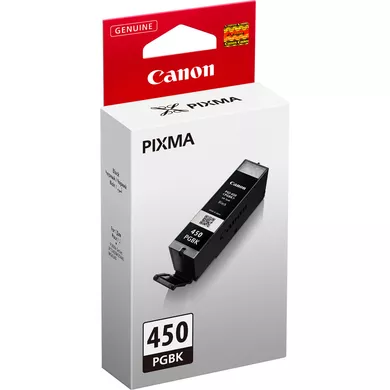
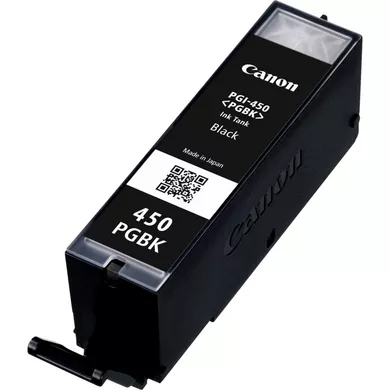
Canon PGI-450PGBK Pigment Black Ink Tank | HIGH QUALITY | RELIABLE
$12.10 $15.00
Canon PGI-450PGBK Pigment Black Ink Tank
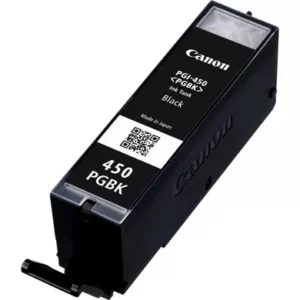
The Canon PGI-450PGBK Pigment Black Ink Tank is an ink cartridge specifically designed for Canon PIXMA series printers. The PGI-450PGBK is the pigment black version of the ink tank, optimized for printing sharp, black text and high-quality documents. This cartridge is ideal for users looking to print professional-quality text documents, reports, and other black-and-white materials.
Key Features:
- Pigment-Based Ink:
- The PGI-450PGBK features pigment-based ink designed to produce sharp, crisp black text. Unlike dye-based inks, pigment inks are more resistant to fading and are often preferred for printing documents that need to be preserved over time.
- Sharp, High-Quality Prints:
- The PGI-450PGBK is engineered to provide clear, precise text and excellent black-and-white prints. It is ideal for office environments, home offices, or users who print a lot of text-heavy documents.
- Easy Installation:
- The ink tank is easy to install in Canon PIXMA printers that are compatible with the PGI-450 ink series. The cartridge has a simple plug-and-play design that makes replacement fast and convenient.
- High Yield:
- This ink tank offers a high page yield for black-and-white documents, making it cost-effective for users who need to print high volumes of text-based content. It ensures that users can print more pages before needing a replacement.
- Compatibility:
- The PGI-450PGBK is compatible with various Canon PIXMA printers, including but not limited to:
- PIXMA MG5450, MG6350, MG7150
- PIXMA iP7250, iP8750
- PIXMA MX725, MX925
- The PGI-450PGBK is compatible with various Canon PIXMA printers, including but not limited to:
- Printer Compatibility:
- This ink tank is part of the Canon PGI-450 series, which includes different cartridges for colors like cyan, magenta, and yellow. The PGI-450PGBK is specifically the pigment black ink, used primarily for printing text and documents in black.
Specifications:
- Product Name: Canon PGI-450PGBK Pigment Black Ink Tank
- Ink Type: Pigment-based black ink
- Cartridge Color: Black
- Compatibility:
- Canon PIXMA MG5450, MG6350, MG7150
- Canon PIXMA iP7250, iP8750
- Canon PIXMA MX725, MX925
- Page Yield: Approx. 400 pages at 5% page coverage (can vary depending on print settings, document type, and other factors).
- Ink Capacity: Typically 13 ml (specific capacity may vary by region or model).
- Dimensions: Compact design for easy installation in compatible Canon printers.
- Weight: Approximately 50 grams (varies slightly by region).
Benefits:
- Sharp, Professional Print Quality:
- The PGI-450PGBK produces high-quality black-and-white prints with sharp text and clear details, ideal for official documents, reports, and contracts.
- Long-Lasting Prints:
- The pigment ink provides better resistance to fading compared to dye-based inks, making it perfect for archival-quality prints, documents that need to last over time, or those that are handled frequently.
- High Yield:
- The PGI-450PGBK cartridge is designed to last longer and print more pages compared to standard ink cartridges, allowing for cost-effective printing, especially for text-heavy documents.
- Cost-Effective:
- This cartridge is affordable, and because it lasts longer than other black ink cartridges, it helps users save money on regular printing jobs.
- Easy Installation and Replacement:
- The PGI-450PGBK ink tank is simple to install and replace, ensuring minimal downtime. It is designed to work seamlessly with compatible Canon printers, so users can get back to printing quickly.
Installation/Usage Tips:
- Installing the PGI-450PGBK Ink Tank:
- Open the printer’s ink cartridge compartment.
- Remove the empty PGI-450PGBK ink tank (if replacing a used one).
- Insert the new ink tank into the appropriate slot, ensuring it clicks securely into place.
- Close the printer compartment.
- Checking Ink Levels:
- Most Canon printers can display ink levels on the printer screen or via the printer driver on your computer. Regularly check the ink levels to ensure you don’t run out during a printing job.
- Print Quality Maintenance:
- If you notice any print quality issues (such as faint text or missing parts), try running the printer’s cleaning cycle to maintain the printhead and ink flow.
- Storing Ink Tanks:
- Keep unused ink cartridges in a cool, dry place to prevent ink from drying out or leaking. Always store ink cartridges upright to avoid spills.
Conclusion:
The Canon PGI-450PGBK is an excellent choice for users who require high-quality, black-and-white document printing. Its pigment-based ink ensures sharp, crisp text and long-lasting prints that are resistant to fading. With a high yield and easy installation process, it is ideal for use in home offices, small businesses, and other environments that require cost-effective, reliable printing. This ink tank is compatible with a range of Canon PIXMA printers, making it a versatile and essential component of the Canon PGI-450 ink series.
| Weight | 0.5 kg |
|---|
Based on 0 reviews
Be the first to review “Canon PGI-450PGBK Pigment Black Ink Tank | HIGH QUALITY | RELIABLE”
Related products
-
canon, Canon Printers, Inkjet, Inkjet Printer, Printers
Canon PIXMA G3430 All-in-One Multi-function Printer
-22% canon, Canon Printers, Inkjet, Inkjet Printer, Printers
Canon PIXMA G3430 All-in-One Multi-function Printer
- High quality printing
- Print, scan and copy with a single device
- Large-capacity rear tray for volume printing
- Connect wirelessly to your computer or smart device
- Mac, Windows and Chrome
SKU: n/a




There are no reviews yet.