

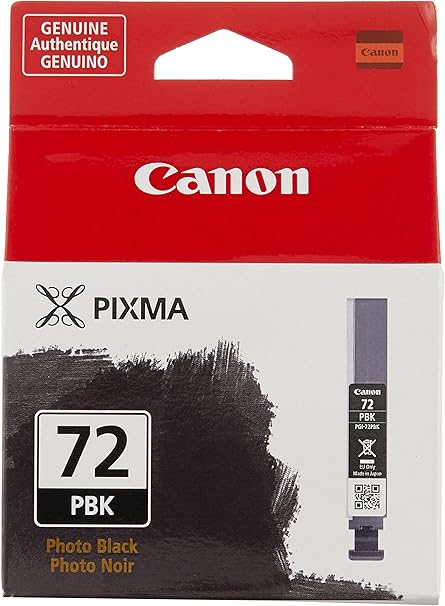


Canon PGI-72 PBK Photo Black Ink Tank | HIGH QUALITY | COMPACT | EFFICIENT
$13.75 $20.00
Canon PGI-72 PBK Photo Black Ink Tank
The Canon PGI-72 PBK Photo Black Ink Tank is a high-quality photo ink cartridge designed for use with select Canon PIXMA PRO series printers, particularly ideal for professional photographers and creatives who demand exceptional print quality, especially for photo printing. The Photo Black (PBK) ink in this cartridge is specifically formulated to produce vibrant, detailed, and rich black tones for glossy or lustrous photo paper, enhancing the depth and contrast of your prints.

Key Features of Canon PGI-72 PBK Photo Black Ink Tank:
- Vivid and Rich Photo Prints:
- The PGI-72 PBK Photo Black Ink delivers deep blacks and rich details in photo prints, especially when printing on glossy or luster photo paper. It is optimized for printing high-quality photographs with enhanced contrast.
- Designed for Professional Use:
- The Photo Black ink is designed specifically for high-end photo printing applications, offering excellent color reproduction and smooth gradations in shadows and dark areas of photos.
- Part of Canon’s LUCIA Ink System:
- The Canon PGI-72 PBK ink is part of Canon’s LUCIA pigment-based ink system, which is designed to provide professional-grade prints that offer longevity and fade resistance.
- Smooth Gradation and Detail:
- The PBK ink is designed to produce smooth gradations in both the dark and mid-tone ranges, resulting in excellent detail and sharpness in photo prints, especially on glossy paper.
- Durable and Fade-Resistant Prints:
- The ink uses pigment-based technology, which provides durable, long-lasting prints that resist fading over time, ideal for archival-quality photo prints and professional portfolios.
Specifications of Canon PGI-72 PBK Photo Black Ink Tank:
- Cartridge Type: Ink tank
- Color: Photo Black (PBK)
- Ink Type: Pigment-based ink
- Compatibility:
- Canon PIXMA PRO series printers, including:
- PIXMA PRO-10 and PIXMA PRO-100 printers.
- The PGI-72 PBK is part of the LUCIA ink system, which works in combination with other Canon PGI-72 ink cartridges for high-quality photo printing.
- Canon PIXMA PRO series printers, including:
- Ink Capacity: Approximately 14 ml of ink.
- Page Yield:
- The yield can vary depending on the type of print, but typically, the PGI-72 PBK ink tank yields around 350-500 prints, based on 5% coverage per page. This yield can fluctuate based on the usage and type of photo paper used.
- Dimensions:
- Width: Approx. 1.8 inches (45.7 mm)
- Depth: Approx. 3.5 inches (88.9 mm)
- Height: Approx. 1.2 inches (30.5 mm)
- Weight: Approx. 0.03 kg (0.07 lbs)
Benefits of Canon PGI-72 PBK Photo Black Ink Tank:
- Exceptional Photo Quality:
- The Photo Black ink is specially formulated to produce rich blacks and enhanced tonal depth for high-quality photographs, providing crisp details and smooth gradations, particularly on glossy or lustrous paper.
- Long-lasting and Fade-resistant Prints:
- The pigment-based ink technology offers superior durability, ensuring your prints last longer without fading, even under exposure to light and air. This makes it ideal for professional portfolios and photo archiving.
- Ideal for Glossy and Luster Paper:
- Canon PGI-72 PBK ink is optimized for printing on glossy and lustrous photo papers, providing the best results in terms of deep blacks and vibrant contrast on these types of media.
- Precise and Accurate Color:
- The ink is engineered for consistent, accurate color reproduction, making it suitable for high-end photo printing where detail and color fidelity are essential.
- Easy Installation:
- The PGI-72 PBK ink tank is designed for quick and easy installation in compatible Canon PIXMA PRO printers, reducing downtime and allowing users to continue printing without hassle.
How to Install Canon PGI-72 PBK Photo Black Ink Tank:
- Power Off the Printer:
- Turn off the printer before replacing the ink tank.
- Open the Printer’s Ink Cartridge Compartment:
- Open the printer’s front cover or ink compartment to access the ink tanks.
- Remove the Old Ink Tank (if applicable):
- Gently release and remove the old PGI-72 PBK ink tank by unlocking it and pulling it out.
- Unbox the New Ink Tank:
- Remove the new Canon PGI-72 PBK Photo Black Ink Tank from its packaging. Be cautious not to touch the ink nozzles or the electrical contacts.
- Install the New Ink Tank:
- Insert the PGI-72 PBK ink tank into the correct slot in the printer. Ensure it is properly aligned and securely inserted into place.
- Close the Printer:
- Close the printer’s ink compartment and turn the printer back on. The printer will automatically recognize the new ink tank.
- Print a Test Page:
- Once installed, print a test page to confirm that the Photo Black ink is working properly and that the print quality meets your expectations.
Conclusion:
The Canon PGI-72 PBK Photo Black Ink Tank is designed for professional photographers and creatives who demand superior black-and-white prints on glossy and lustrous photo papers. The pigment-based ink ensures long-lasting, fade-resistant prints, with rich blacks, smooth gradations, and enhanced contrast. Ideal for use with Canon PIXMA PRO series printers, this ink tank produces vibrant, detailed, and accurate photo prints suitable for portfolios, exhibitions, and personal photo collections. Its easy installation process ensures minimal downtime, making it an essential component for anyone looking to produce professional-quality photo prints.
| Weight | 0.03 kg |
|---|
Based on 0 reviews
Be the first to review “Canon PGI-72 PBK Photo Black Ink Tank | HIGH QUALITY | COMPACT | EFFICIENT”
Related products
-
canon, Canon Cameras
Canon PowerShot V10 Vlog Camera (Black)
Key Features- For Vlogging and Live Streaming
- 20.9MP 1″ CMOS Sensor
- UHD 4K up to 29.97 fps
- Full HD up to 59.94 fps
- 19mm Equivalent Wide-Angle Lens
- Web Camera Compatible with UVC Support
- 460,000-Dot 2″ Touchscreen LCD
- Wi-Fi & Bluetooth Connectivity
- Vertical Capture Capable
- Built-In 30° Stand
SKU: n/a




There are no reviews yet.