

-9%
canon, Canon Accessories, Canon Catridge, Canon Ink & Toner
Canon PIXMA CL-521C | RELIABLE and CONSISTENT Prints
USD
$11.83 $13.00
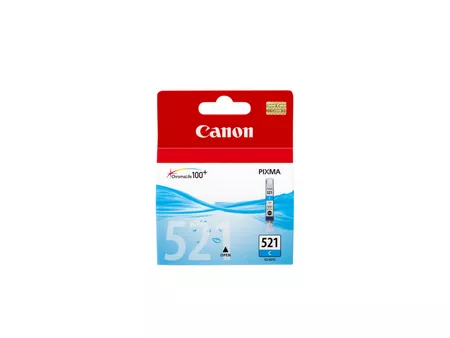
Canon PIXMA CL-521C
The Canon PIXMA CL-521C is a cyan ink cartridge designed for Canon PIXMA printers. This cartridge is part of Canon’s 521 series, offering reliable, high-quality ink for vibrant and accurate color prints. It is ideal for home or office printing, providing consistent results for photos, documents, and graphics.
Key Features
- Vibrant Cyan Tones: Produces sharp, vivid cyan shades that enhance color accuracy in prints.
- ChromaLife100+ Technology: Works with Canon paper and printers to deliver prints that resist fading for up to 100 years under optimal conditions.
- Individual Cartridge System: Allows replacement of only the depleted color, reducing waste and costs.
- Seamless Compatibility: Engineered specifically for Canon PIXMA printers, ensuring smooth integration and high performance.
- Compact Design: Small and lightweight for easy installation and storage.
Specifications: Canon PIXMA CL-521C
- Model: Canon PIXMA CL-521C
- Ink Color: Cyan
- Ink Type: Dye-based ink
- Capacity: Standard yield (Approx. 500 pages at 5% coverage)
- Weight: Approximately 50g (1.76 oz)
- Compatibility: Compatible with Canon PIXMA printers, including:
- iP3600
- iP4600
- MP540
- MP620
- MP630
- MX860
- Shelf Life: Up to 24 months when stored properly.
Benefits: Canon PIXMA CL-521C
- High-Quality Output: Delivers clear and vibrant cyan tones for professional-looking prints.
- Cost-Effective: Individual ink tanks allow you to replace only the color you need.
- Fade-Resistant Prints: ChromaLife100+ technology ensures prints retain their quality over time.
- Eco-Friendly Design: Compatible with Canon’s recycling program for sustainable disposal.
- Reliable Performance: Genuine Canon ink reduces risks of smudging, leaks, and printer malfunctions.
How to Install the Canon PIXMA CL-521C Cartridge
- Turn On the Printer:
- Ensure the printer is powered on and ready.
- Access the Ink Compartment:
- Open the printer’s front panel to access the cartridge bay.
- Remove the Empty Cartridge:
- Locate the cyan cartridge slot.
- Press the release tab and pull the old cartridge out gently.
- Prepare the New Cartridge:
- Unbox the CL-521C and remove the protective tape and orange cap.
- Avoid touching the electrical contacts or ink outlet.
- Insert the New Cartridge:
- Align the cartridge with the cyan slot and press it in until it clicks into place.
- Close the Printer Panel:
- Shut the compartment door and wait for the printer to recognize the new cartridge.
- Run a Test Print:
- Print a test page to verify the installation and ensure the color output is correct.
Based on 0 reviews
Be the first to review “Canon PIXMA CL-521C | RELIABLE and CONSISTENT Prints”
Related products
-
canon, Canon Cameras
Canon PowerShot V10 Vlog Camera (Black)
Key Features- For Vlogging and Live Streaming
- 20.9MP 1″ CMOS Sensor
- UHD 4K up to 29.97 fps
- Full HD up to 59.94 fps
- 19mm Equivalent Wide-Angle Lens
- Web Camera Compatible with UVC Support
- 460,000-Dot 2″ Touchscreen LCD
- Wi-Fi & Bluetooth Connectivity
- Vertical Capture Capable
- Built-In 30° Stand
SKU: n/a



There are no reviews yet.