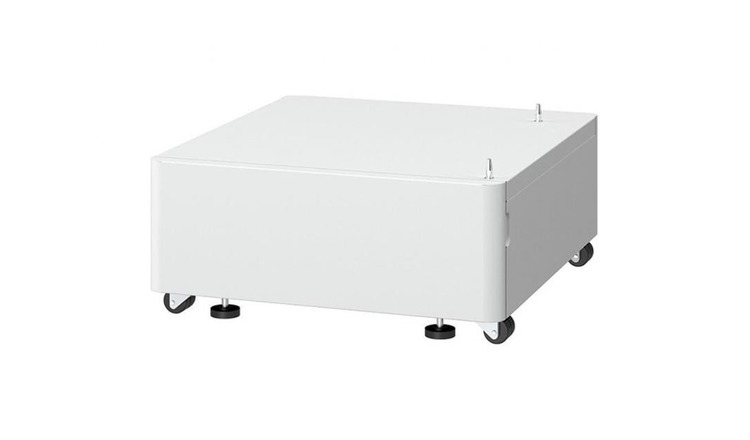
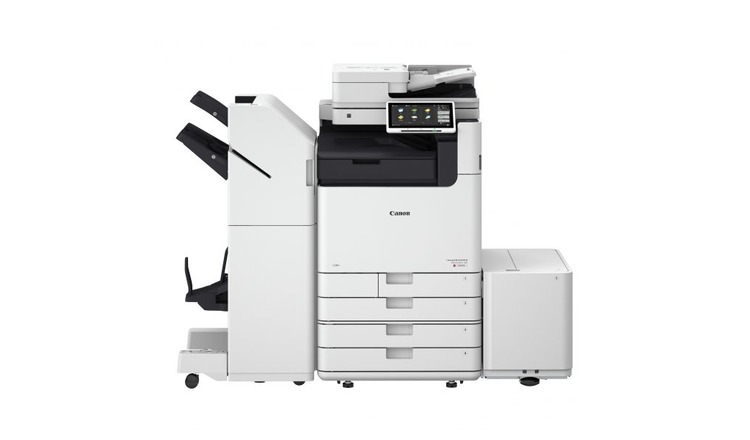
The Canon Plain Pedestal Type Q3 is an accessory pedestal designed to be used with certain Canon imageRUNNER ADVANCE series multifunction printers (MFPs). Pedestals like the Type-Q3 are intended to provide a stable base for large or heavy devices and enhance the overall usability and ergonomics of the device by raising the printer to a more convenient working height. This helps users easily access and operate the device, especially in busy office environments.
Key Features of Canon Plain Pedestal Type Q3:
Ergonomic Design:
The Type-Q3 pedestal helps to position the printer or MFP at an optimal height, which reduces the need for bending or crouching during operation. This improves user comfort, especially during long print runs.
Sturdy and Durable:
Designed for heavy-duty use, the pedestal ensures the stability of your printer, providing a solid foundation for large Canon MFPs. It can hold the weight of multifunction devices without wobbling or tipping.
Compatibility:
The Canon Plain Pedestal Type Q3 is specifically compatible with certain Canon imageRUNNER ADVANCE series MFPs. This makes it an ideal solution for businesses and office environments using compatible Canon printers.
Space Efficiency:
The pedestal design incorporates additional storage space beneath the printer. This allows you to store paper trays, toner cartridges, or other printing accessories in an organized manner, saving valuable office space.
Professional Appearance:
The sleek and professional design of the Type-Q3 pedestal complements the imageRUNNER ADVANCE MFPs, maintaining a cohesive look in your office or print environment.
Enhanced Accessibility:
By raising the printer off the floor, the Type-Q3 pedestal improves the accessibility of the paper trays, toner compartments, and operation panels, making it more convenient for operators.
Specifications:
Model: Canon Plain Pedestal Type-Q3
Function: Provides a stable base for compatible Canon imageRUNNER ADVANCE printers and MFPs.
Material: High-quality, durable materials designed for office environments.
Storage Capacity: Includes space for additional accessories or paper trays.
Compatibility: Compatible with select Canon imageRUNNER ADVANCE series models (check specific model compatibility).
Dimensions: Dimensions may vary depending on the printer model it is designed to support, but generally designed to fit underneath compatible devices.
Weight: Typically, pedestals like the Type-Q3 weigh around 10-15 kg (22-33 lbs), but this can vary based on the exact configuration and materials used.
Benefits:
Improved Ergonomics:
The pedestal helps reduce strain on users by bringing the printer to a more accessible height for loading paper and replacing toner cartridges.
Space Management:
With additional storage space under the printer, it helps organize the office by keeping supplies or accessories within reach, improving the overall workflow.
Enhanced Stability:
The pedestal ensures the printer is stable, preventing shaking or movement, which is especially important when printing large jobs.
Aesthetically Pleasing:
The Canon Plain Pedestal Type-Q3 complements the sleek and modern design of Canon printers, enhancing the aesthetic appeal of your office or workspace.
How to Install the Canon Plain Pedestal Type Q3:
Unbox the Pedestal:
Remove the pedestal from its packaging. Be sure to check that all parts are included, such as the pedestal frame and any screws or assembly tools.
Place the Pedestal:
Position the pedestal on a stable, flat surface where you intend to place your Canon imageRUNNER ADVANCE printer or MFP.
Assemble the Pedestal (if required):
Some pedestals may require simple assembly, such as attaching legs or securing parts with screws. Follow the instructions provided in the user manual for assembly.
Mount the Printer:
Once the pedestal is assembled, carefully place your Canon printer or MFP on top. Ensure it sits securely and evenly on the pedestal.
Check Stability:
Make sure the printer is stable and not prone to tipping. Ensure that the pedestal is positioned on a flat, level surface.
Storage:
Use the additional storage space beneath the pedestal for organizing accessories or paper trays, keeping your workspace tidy.




There are no reviews yet.