The Canon ST-27 Printer Stand is a specialized accessory designed to support and organize Canon printers and related office supplies. It provides a stable, durable platform with features like mobility, storage, and space efficiency, enhancing productivity in both home and office environments.
Key Features: Canon ST-27 Printer Stand
Sturdy and Durable Build:
Constructed from high-quality materials to securely support the weight of compatible Canon printers.
Compact and Space-Saving Design:
Fits seamlessly into small office or home setups without taking up excessive space.
Mobility:
Equipped with caster wheels for easy movement across rooms or between workstations.
Integrated Storage:
Includes shelves or compartments to store paper, cartridges, and other printer accessories.
Compatibility:
Specifically designed for certain Canon printer models to ensure a perfect fit.
Specifications: Canon ST-27 Printer Stand
Material: Sturdy metal or reinforced plastic.
Weight Capacity: Designed to support medium-to-large Canon printers (check model-specific limits).
Dimensions: Compact, exact measurements may vary.
Color: Neutral tones such as black, white, or gray.
Mobility: Smooth-rolling wheels with locking mechanisms.
Assembly: Requires basic assembly with provided instructions and tools.
Benefits: Canon ST-27 Printer Stand
Enhanced Organization:
Keeps printing supplies and equipment in one accessible location.
Space Efficiency:
Maximizes workspace by offering a compact yet functional design.
Increased Productivity:
With mobility and easy access to supplies, workflows are streamlined.
Stability and Safety:
Securely holds heavy printers and prevents accidental tipping or movement.
Multi-Purpose Use:
Can be repurposed for other office needs when not used for a printer.
How to Install Canon ST-27 Printer Stand
Unpack Components:
Unbox all parts, ensuring no pieces are missing.
Assemble the Frame:
Follow the included instructions to build the frame using screws or bolts provided.
Attach Wheels (If Applicable):
Secure the caster wheels to the base for mobility.
Install Storage Shelves (Optional):
Slide or attach any additional shelving components into place.
Place the Printer:
Position the Canon printer securely on the stand’s top surface, ensuring alignment with any anti-slip features.
Test Stability and Mobility:
Lock the wheels and test the structure for stability.


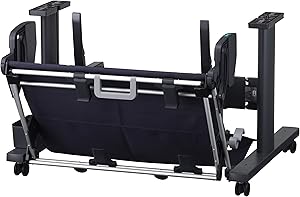
 canon, Canon Printers, Inkjet, Inkjet Printer, Printers


There are no reviews yet.