

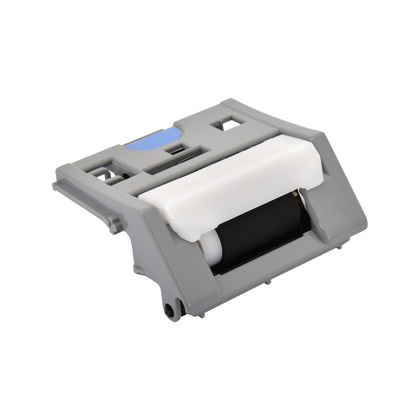
Canon Separation Roller Assembly | RELIABLE | EFFICIENT | COMPACT
$33.55 $50.00
Canon Separation Roller Assembly
The Canon Separation Roller Assembly is a vital component in Canon multifunction printers and copiers with an Automatic Document Feeder (ADF). Its main role is to ensure that only one sheet of paper is picked up and fed into the printer or scanner at a time. It works by separating individual sheets of paper as they move through the ADF, preventing misfeeds, paper jams, and other feeding issues. The Separation Roller Assembly is integral to the smooth functioning of the ADF and is commonly found in models used for high-volume scanning or copying.
Key Features
- Paper Separation:
The separation roller is responsible for ensuring that only one sheet of paper is picked up at a time from the paper tray, preventing multiple sheets from being fed together. This process is crucial for accurate document processing. - Reliable Paper Feeding:
It ensures smooth and reliable paper feeding into the printer or scanner. A properly functioning separation roller prevents misfeeds, which could result in documents being jammed or skipped. - Improved Document Handling:
The separation roller helps improve the overall document handling capabilities of the Automatic Document Feeder (ADF), making it possible to scan or copy multi-page documents without the need for manual intervention. - Durable and Long-lasting:
Made from high-quality, durable materials, the separation roller is designed to withstand continuous usage in high-volume environments, ensuring long-lasting performance without frequent replacements. - Prevents Jams:
The separation roller assembly, in conjunction with the pick-up rollers, ensures smooth paper handling by reducing the risk of paper jams. By preventing multiple sheets from feeding together, it helps maintain the printer’s operational efficiency. - Compatibility:
The Canon Separation Roller Assembly is compatible with various Canon printer models equipped with an ADF. It is important to verify compatibility with your specific printer model to ensure proper installation and performance.
Specifications
- Material:
The separation roller is typically made from durable rubber or a similar friction-enhancing material designed to grip and move paper efficiently. - Components:
- Separation Roller: The main component that interacts with the paper to separate individual sheets.
- Separation Pad: Works in conjunction with the roller to ensure that only one sheet is fed at a time.
- Drive Mechanism: The mechanism that powers the rollers and pads, facilitating the movement of paper through the ADF.
- Weight:
The weight of the Canon Separation Roller Assembly is generally in the range of 0.3 kg to 1 kg, depending on the specific model and packaging. - Lifespan:
The Separation Roller Assembly is designed to last for a substantial number of pages, typically between 50,000 and 100,000 pages, depending on the printer’s usage. When paper feeding issues or jams become frequent, it may be time to replace the separation roller.
Benefits
- Improved Print and Scan Efficiency:
By ensuring that paper feeds through the printer or scanner correctly, the Separation Roller Assembly improves the overall efficiency of your printer, reducing the need for manual intervention during document handling. - Enhanced Paper Handling:
The roller ensures that only one sheet of paper is picked up at a time, significantly reducing the risk of misfeeds, paper jams, and other issues associated with improper paper handling. - Smooth Multi-Page Document Processing:
The assembly is designed for use in high-volume document handling, allowing users to scan or copy multiple pages without worrying about paper handling problems. - Cost-Effective Maintenance:
Timely replacement of the separation roller helps prevent damage to other parts of the ADF system, saving on expensive repairs. Regular maintenance can extend the lifespan of your printer and ensure optimal performance. - Reduced Downtime:
By ensuring the separation roller is functioning properly, the risk of paper jams and misfeeds is minimized, reducing printer downtime and improving overall workflow in busy environments.
How to Replace the Canon Separation Roller Assembly
- Turn Off and Unplug the Printer:
For safety, always power off and unplug the printer before performing any maintenance. - Open the ADF Cover:
Depending on your Canon printer model, open the ADF cover or front access panel to expose the separation roller assembly. - Locate the Separation Roller:
Identify the separation roller and associated pads. These are typically located near the paper feed path of the ADF unit. - Remove the Old Separation Roller:
Gently remove the old separation roller assembly by disconnecting any fasteners, clips, or retaining screws that are holding it in place. - Install the New Separation Roller Assembly:
Place the new separation roller assembly into the correct position. Ensure that the separation roller and pads are seated properly and that the drive mechanism is aligned. - Reassemble the ADF Unit:
Once the new assembly is in place, close the ADF cover and ensure everything is securely fastened. - Test the Printer:
Plug the printer back in and run a test scan or copy to verify that the paper is feeding smoothly and that there are no misfeeds or jams.
Conclusion
The Canon Separation Roller Assembly plays a crucial role in the operation of Canon printers and multifunction devices with an Automatic Document Feeder (ADF). It helps ensure smooth and reliable paper feeding, prevents misfeeds, and improves the efficiency of document scanning or copying, especially when handling multi-page documents. Timely replacement and proper maintenance of the separation roller assembly are essential to keep your printer functioning optimally, ensuring high-quality results with minimal downtime.
| Weight | 1 kg |
|---|



There are no reviews yet.