The Canon C-EXV55 Yellow Drum Unit is a vital component for Canon imageRUNNER ADVANCE series copiers and printers. It’s responsible for transferring toner onto paper, producing high-quality yellow prints.
Key Features:
High Yield:Designed to deliver approximately 45,000 pages, ensuring long-lasting performance.
Consistent Quality: Produces sharp, vibrant yellow prints with consistent color accuracy.
Reliable Performance: Engineered to withstand heavy-duty usage and minimize downtime.
Easy Installation: Simple to install, requiring minimal effort and technical expertise.
Genuine Canon Product: Ensures optimal performance and compatibility with Canon devices.
Specifications: Canon C-EXV55 Yellow Drum Unit
Model: C-EXV55
Color: Yellow
Yield:Approximately 45,000 pages
Compatibility: Canon imageRUNNER ADVANCE series copiers and printers
Benefits: Canon C-EXV55 Yellow Drum Unit
Cost-Effective: High-yield capacity reduces the need for frequent replacements, saving you money.
Professional Output: Produces high-quality, professional-grade prints for various applications.
Reduced Downtime: Reliable performance minimizes interruptions and maximizes productivity.
Easy Maintenance: Simple installation and minimal maintenance requirements.
Environmental Friendliness: Canon’s commitment to sustainability ensures eco-friendly production processes.
How to Install:
Power Off: Turn off the copier or printer and unplug the power cord.
Open the Front Cover: Locate the front cover and open it according to the user manual.
Remove the Old Drum Unit: Carefully remove the old drum unit, paying attention to any locking mechanisms.
Install the New Drum Unit: Insert the new C-EXV55 Yellow Drum Unit into the designated slot, ensuring it’s securely in place.
Close the Front Cover: Close the front cover firmly.
Power On: Plug in the power cord and turn on the device.
Initialize: Follow the on-screen instructions to initialize the new drum unit.
Additional Tips: Canon C-EXV55 Yellow Drum Unit
Always handle the drum unit carefully to avoid damage.
Store the drum unit in a cool, dry place when not in use.
Regularly clean the drum unit to maintain optimal performance.
Consider using genuine Canon toner cartridges to ensure the best results.
By following these guidelines, you can ensure that your Canon C-EXV55 Yellow Drum Unit delivers exceptional performance and long-lasting reliability.


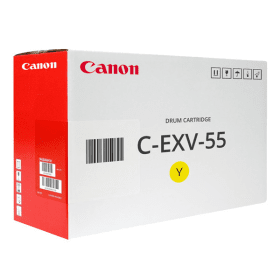
 canon, Canon Printers, Inkjet, Inkjet Printer, Printers


There are no reviews yet.