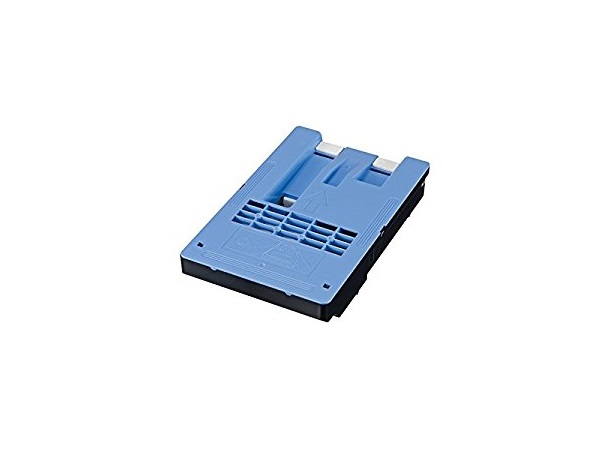
The Canon Maintenance Cartridge MC-10 is an essential printer component designed to collect excess ink during the printing and cleaning process. This helps maintain the printer’s efficiency, ensures high-quality prints, and prevents internal damage caused by ink overflow. It is typically used in Canon large-format printers.
Key Features:
Ink Waste Collection:
Efficiently collects excess ink to keep the printer clean and operational.
High Capacity:
Designed to support heavy-duty printing environments with a large waste ink storage capacity.
Printer Compatibility:
Specifically tailored for select Canon imagePROGRAF and other professional-grade printers.
Durable Construction:
Made from high-quality materials to withstand regular use and extended printing cycles.
Easy Replacement:
User-friendly design allows for quick and hassle-free installation.
Specifications: Canon Maintenance Cartridge MC-10
Component Type: Maintenance cartridge for collecting waste ink.
Weight: Approximately 800g–1kg (varies depending on ink content when full).
Compatible Models: Works with select Canon imagePROGRAF printers (e.g., PRO-1000, PRO-2000, PRO-4000, etc.).
Capacity: Designed to handle waste ink from thousands of prints, varying by model.
Material: Sturdy and leak-resistant materials to ensure safe handling and disposal.
Dimensions: Compact design suitable for integration into supported printers.
Benefits: Canon Maintenance Cartridge MC-10
Maintains Print Quality:
Prevents ink overflow that can affect the printer’s output quality.
Extends Printer Lifespan:
Protects internal components from ink buildup, reducing the risk of damage.
Reduces Downtime:
With its high capacity, the MC-10 minimizes the need for frequent replacements.
Cost-Effective Maintenance:
Prevents costly repairs by ensuring proper printer care.
Eco-Friendly Disposal:
Designed for easy recycling and disposal in accordance with environmental regulations.
How to Install Canon Maintenance Cartridge MC-10
Check the Maintenance Cartridge Status:
Monitor the printer’s display for a replacement notification or inspect the cartridge manually.
Turn Off the Printer:
Power off the printer and unplug it for safety.
Locate the Maintenance Cartridge Slot:
Open the printer’s maintenance panel, following the instructions in the user manual.
Remove the Old Cartridge:
Carefully pull out the used MC-10 cartridge and dispose of it according to local recycling guidelines.
Insert the New Cartridge:
Align the new maintenance cartridge and slide it into the designated slot until it clicks securely.
Close the Panel:
Ensure the maintenance panel is properly closed.
Restart the Printer:
Power the printer back on and confirm that the new cartridge is recognized.






There are no reviews yet.