-2%
, , ,

Canon PFI-320 Y | High Yield Printing | Efficient and Reliable

USD
  • NGN
  • USD
  • GBP

$133.35 $136.00

Buy via WhatsApp Now

Canon PFI-320 Y

The Canon PFI-320 Y is a professional-grade yellow ink cartridge designed for use with Canon’s imagePROGRAF series large-format printers. As part of the PFI-320 series, it is engineered to provide vibrant and precise yellow tones essential for high-quality color reproduction. Ideal for applications in photography, graphic design, and technical printing, this cartridge ensures consistent performance and long-lasting results.

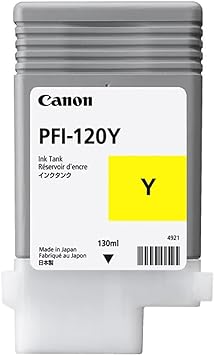
Canon PFI-120 Y

Key Features

  1. Bright and Accurate Yellow Tones: Produces vibrant, precise yellows for natural and balanced color output.
  2. Large Ink Capacity: Comes with 330ml of pigment-based ink, reducing the need for frequent cartridge changes.
  3. Pigment-Based Ink: Offers excellent water and UV resistance, ensuring durable prints that last.
  4. Printer Compatibility: Works seamlessly with Canon imagePROGRAF printers for optimized performance.
  5. Eco-Friendly Disposal: Fully recyclable under Canon’s sustainability programs.

Specifications: Canon PFI-320 Y

  • Model: Canon PFI-320 Y
  • Ink Color: Yellow
  • Ink Type: Pigment-based ink
  • Capacity: 330ml
  • Weight: Approximately 0.6 kg (1.3 lbs) when full
  • Compatibility: Supports Canon imagePROGRAF models, including:
    • PRO-2000
    • PRO-4000
    • PRO-6000
  • Shelf Life: Up to 24 months when stored properly.

Benefits Canon PFI-320 Y

  1. High-Quality Output: Ensures crisp and vibrant yellows for professional-grade color accuracy.
  2. Cost-Effective: The large-capacity design lowers costs per print by reducing the frequency of cartridge replacements.
  3. Durable Prints: Pigment ink provides resistance to water, fading, and UV exposure, making it suitable for archival and outdoor use.
  4. Printer Longevity: Genuine Canon ink cartridges reduce the risk of clogs and wear, maintaining printer reliability.
  5. Sustainable Printing: Contributes to environmentally responsible practices through Canon’s cartridge recycling initiative.

How to Install the Canon PFI-320 Y Cartridge

  1. Power On the Printer:
    • Turn on your printer and ensure it is in a ready state.
  2. Access the Ink Compartment:
    • Open the cartridge access door on the printer.
  3. Remove the Empty Cartridge:
    • Locate the yellow slot.
    • Press the release lever and gently pull out the old cartridge.
  4. Unpack the New Cartridge:
    • Remove the Canon PFI-320 Y from its packaging and peel off all protective seals and covers.
    • Gently shake the cartridge to evenly distribute the ink.
  5. Insert the New Cartridge:
    • Align the cartridge with the yellow slot and push it in until it clicks securely.
  6. Close the Ink Compartment:
    • Shut the printer’s ink compartment door and wait for the printer to recognize the new cartridge.
  7. Run a Test Print:
    • Perform a nozzle check or print alignment to ensure the cartridge is installed correctly and ink flow is consistent.

Based on 0 reviews

0.0 overall
0
0
0
0
0

Be the first to review “Canon PFI-320 Y | High Yield Printing | Efficient and Reliable”

There are no reviews yet.

Join our email list

Kindly provide us with your email to receive coupon code for your next order