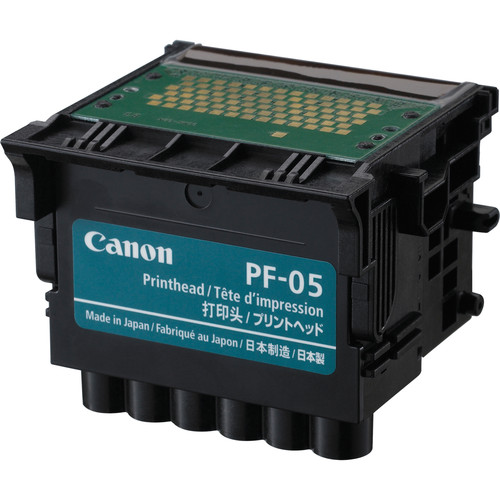
The Canon Print Head PF-05 is a high-quality print head designed for use in a range of Canon large format printers, particularly those in the imagePROGRAF series. The print head is a critical component in ensuring high-quality print output, as it is responsible for dispensing ink onto the media with precision. This specific print head is used in high-demand printing applications, such as photo prints, fine art prints, banners, posters, and other large-format media.
Key Features of Canon Print Head PF-05:
Precision Ink Droplet Control:
The PF-05 features highly advanced technology for controlling ink droplets with high precision, ensuring sharp text and smooth color gradients in prints.
High-Resolution Printing:
It is capable of producing high-resolution prints, supporting printing resolutions up to 2400 x 1200 dpi, which is ideal for fine art, photography, and high-end large-format graphics.
Durability and Long-Lasting Performance:
Designed for high-volume and continuous printing, the PF-05 ensures consistent performance with minimal maintenance. Its durability allows it to handle the demands of professional printing environments.
Efficient Ink Distribution:
The PF-05 print head is designed for efficient ink distribution, helping to prevent ink waste and optimize ink usage, which is crucial for reducing operational costs in large-format printing.
Compatibility:
The PF-05 print head is compatible with a range of Canon imagePROGRAF printers, such as the imagePROGRAF PRO-4000, PRO-6000, and other models that require this specific print head.
Easy Maintenance:
Canon’s design for the PF-05 includes easy maintenance features, such as simple installation and removal. It’s also designed to minimize issues related to clogged nozzles and ink residue buildup.
Print Head Nozzle Configuration:
The PF-05 includes a carefully engineered nozzle configuration that ensures the accurate and efficient spraying of ink onto the media, contributing to vivid colors, smooth gradations, and fine details in prints.
Specifications: Canon Print Head PF-05
Model: Canon PF-05
Type: Print Head
Resolution: Capable of 2400 x 1200 dpi resolution
Compatibility: Primarily for Canon imagePROGRAF series printers, including PRO-4000, PRO-6000, and similar models
Ink Type: Compatible with Canon LUCIA PRO inks (pigment-based)
Print Head Technology: Utilizes Micro Piezo inkjet technology for high-precision ink deposition.
Ink Channels: Supports multiple color channels for color printing (depending on the printer model).
Benefits: Canon Print Head PF-05
High-Quality Output:
The PF-05 is designed to deliver vivid, high-quality prints with excellent color reproduction, making it perfect for professional photography, fine art prints, and large-format signage.
Enhanced Productivity:
Canon’s print head technology ensures fast, high-quality printing, reducing downtime and increasing the efficiency of large-format print jobs, making it ideal for commercial print shops or businesses with high-volume needs.
Cost Efficiency:
The PF-05 print head helps reduce operational costs by improving ink efficiency, delivering sharp prints with minimal ink waste.
Reliable Performance:
Designed for long-lasting reliability, the PF-05 minimizes the risk of print head failure and clogging, providing consistent and high-quality results across many print runs.
Ease of Use:
The Canon PF-05 print head is easy to install and maintain, making it simple for users to replace or service when needed without complicated procedures.
How to Install the Canon Print Head PF-05:
Prepare the Printer:
Turn off the printer and disconnect it from the power source before beginning the print head replacement.
Ensure the printer is placed on a flat, stable surface, and remove any paper or media from the printer.
Open the Print Head Access Door:
Open the printer’s access door or panel where the print head is located. This is typically done by lifting a latch or pressing a button that releases the cover.
Remove the Old Print Head:
If replacing an old print head, carefully remove it by unlocking the print head holder and gently lifting it out of its position. Follow the printer’s instructions for handling and removing the print head properly to avoid damage.
Install the New PF-05 Print Head:
Take the new PF-05 print head from its packaging and remove any protective covers.
Carefully insert the new print head into the print head slot in the printer, ensuring it is aligned correctly.
Lock the print head holder to secure the print head in place.
Close the Access Panel:
Once the print head is properly installed, close the print head access door or panel.
Perform a Test Print:
Turn on the printer and perform a test print to ensure the print head is properly installed and functioning correctly. Check for any print quality issues, such as smudging or missing colors.
Align the Print Head:
Most printers will prompt you to align the print head after installation to ensure optimal print quality. Follow the printer’s on-screen instructions to complete the alignment process.





There are no reviews yet.