

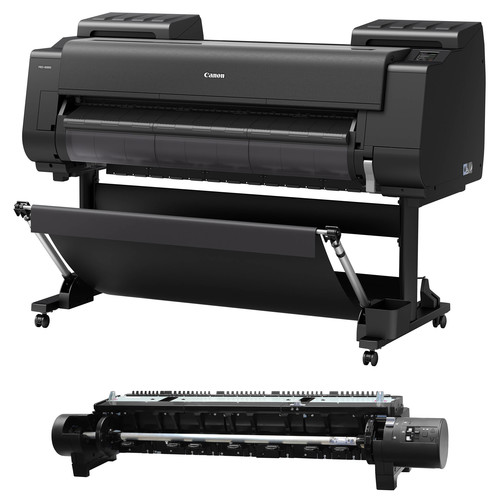
CANON PRO-4000S PLOTTER
The Canon PRO-4000S Plotter is an advanced wide-format printer equipped with an 8-color LUCIA PRO ink system, providing outstanding image quality, durability, and color accuracy. With a maximum print width of 44 inches, it supports various media types, including photo paper, fine art paper, and canvas, making it versatile for different printing needs.
Key Features: Canon PRO-4000S Plotter
- 8-Color LUCIA PRO Ink System:
- Delivers vibrant and precise colors with deep blacks and smooth gradations.
- Reduces ink usage while maintaining high-quality prints.
- Maximum Print Width:
- Supports media up to 44 inches wide, making it suitable for large-scale projects.
- High-Speed Printing:
- Optimized for rapid output without compromising quality, ideal for high-volume environments.
- Wi-Fi and Ethernet Connectivity:
- Easy integration into office or studio networks for seamless operation.
- User-Friendly Design:
- Features a touch-screen control panel for intuitive navigation.
- Easy media loading and maintenance.
- Advanced Software Support:
- Includes Canon’s Print Studio Pro and other software for precise color management and workflow optimization.
- Media Versatility:
- Compatible with various media types, including matte, glossy, satin, and fine art papers.
- Chroma Optimizer:
- Enhances gloss uniformity and improves color performance on glossy and semi-gloss papers.
- Built-in Hard Drive:
- Stores jobs directly on the printer for efficient handling of multiple print tasks.
Benefits: Canon PRO-4000S Plotter
- Professional-Grade Quality:
- Ensures stunning visuals with precise details, ideal for photographers and graphic designers.
- Cost-Efficiency:
- Reduces ink waste while delivering exceptional output, making it a cost-effective solution for professionals.
- Ease of Use:
- Simplified operation with features like automatic media handling and a user-friendly interface.
- Scalability:
- Suitable for small studios to large-scale production environments.
- Durability:
- Prints are long-lasting and resistant to fading, ensuring archival-quality results.
How to Set Up and Use Canon PRO-4000S Plotter
- Unboxing and Placement:
- Place the PRO-4000S on a stable, large surface to accommodate its size and weight.
- Connect it to a power source and ensure proper ventilation.
- Install Ink Cartridges:
- Insert the LUCIA PRO ink cartridges as instructed in the manual.
- Load Media:
- Select the appropriate media type and load it onto the roll holder or sheet feeder.
- Follow the printer’s prompts for alignment and configuration.
- Connect to a Network:
- Use Ethernet or Wi-Fi to connect the printer to your network.
- Install the required drivers and software on your computer.
- Test Print:
- Perform a test print to ensure proper installation and output quality.
- Start Printing:
- Use the Canon software or your preferred design application to send print jobs.
- Adjust settings such as media type, quality, and size for optimal results.


There are no reviews yet.