

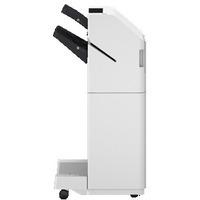
Canon Staple Finisher AB1
The Canon Staple Finisher AB1 is an accessory designed for use with select Canon imageRUNNER ADVANCE series multifunction printers (MFPs). It is primarily used for finishing printed documents, providing additional capabilities such as stapling and organizing output for a more professional finish, making it ideal for office environments that require high-volume document handling and finishing.
Key Features of Canon Staple Finisher AB1:
- Stapling Functionality:
- The Staple Finisher AB1 allows you to automatically staple documents after printing. This is especially useful for large print jobs or presentations where you need to keep documents together in a neat and organized manner.
- Output Capacity:
- It can handle an output capacity of up to 100 sheets per output bin, depending on the paper size and weight.
- Stapling Options:
- The finisher offers corner stapling and two-point stapling options, allowing you to select how documents are stapled (corner or two points depending on the document layout).
- Supports Various Media Types:
- It supports a variety of paper sizes and types, making it versatile for different types of print jobs, including reports, booklets, and presentations.
- Compact Design:
- The Canon Staple Finisher AB1 has a compact and space-efficient design, which makes it easy to integrate into an existing workflow without taking up excessive space.
- High Durability:
- It is designed to withstand high-volume printing environments and is built for durability and reliability.
- Easy Integration:
- The finisher seamlessly integrates with compatible Canon multifunction printers, automatically recognizing and adapting to the printer’s settings for efficient job handling.
- User-Friendly Interface:
- It can be easily operated via the multifunction printer’s touchscreen interface, where users can select stapling options and adjust settings as needed.
- Cost-Effective Finishing:
- The finisher eliminates the need for manual stapling, saving time and labor while maintaining a professional appearance for printed documents.
Specifications:
- Model: Canon Staple Finisher AB1
- Stapling Capacity:
- Up to 50 sheets for corner stapling
- Up to 30 sheets for two-point stapling
- Output Bin Capacity:
- 100 sheets (based on 20 lb paper, may vary depending on paper type and size)
- Staple Positions:
- Corner stapling and two-point stapling
- Supported Paper Sizes:
- Supports letter, legal, A4, A3, and other standard paper sizes.
- Compatible Printers:
- The Canon Staple Finisher AB1 is compatible with specific Canon imageRUNNER ADVANCE series MFPs (check the specific printer model compatibility).
- Dimensions (W x D x H):
- Approximately 550 x 460 x 255 mm (21.65 x 18.11 x 10.04 inches)
- Weight:
- Approximately 9.5 kg (20.94 lbs)
Benefits:
- Professional Document Finishing:
- The ability to staple documents automatically helps maintain a clean and professional appearance, especially for reports, presentations, and large print jobs.
- Increased Productivity:
- By automating the stapling process, the finisher saves time and reduces the need for manual intervention, allowing staff to focus on other tasks.
- Cost-Effective:
- The finisher minimizes the need for additional labor and supplies, reducing long-term costs for businesses that frequently handle large volumes of documents.
- Customizable Output:
- The flexible stapling options (corner or two-point) provide greater control over how documents are organized and presented.
- Space-Saving:
- The compact design ensures that the finisher does not take up significant space in the office, making it ideal for environments with limited room.
- Seamless Integration:
- The Canon Staple Finisher AB1 integrates seamlessly with Canon multifunction printers, improving efficiency and ensuring smooth operation.
How to Install the Canon Staple Finisher AB1:
- Unbox the Finisher:
- Carefully unpack the finisher from its box, and make sure all parts and accessories are included.
- Mount the Finisher:
- Place the finisher in the designated space where it will connect to the Canon printer. Align it correctly with the base of the printer and ensure it’s securely positioned.
- Connect the Finisher to the Printer:
- Connect the Canon Staple Finisher AB1 to the printer according to the user manual. This typically involves sliding it into place and connecting any cables or connectors as instructed.
- Load the Staples:
- Insert the staple cartridges into the finisher’s designated compartment. Make sure they are properly seated to ensure proper stapling function.
- Configure the Printer Settings:
- On the printer’s control panel, access the settings for stapling. Select your desired stapling method (corner or two-point stapling) and adjust other settings as needed.
- Test the Stapler:
- Run a test print job to ensure the stapler is functioning correctly. Ensure the staple is positioned correctly and that the output bin is receiving documents as expected.
Based on 0 reviews
Be the first to review “Canon Staple Finisher AB1| USER FRIENDLY | EFFICEINT | COMPACT”
Related products
-
canon, Canon Printers, Inkjet, Inkjet Printer, Printers
Canon PIXMA G3430 All-in-One Multi-function Printer
-22% canon, Canon Printers, Inkjet, Inkjet Printer, Printers
Canon PIXMA G3430 All-in-One Multi-function Printer
- High quality printing
- Print, scan and copy with a single device
- Large-capacity rear tray for volume printing
- Connect wirelessly to your computer or smart device
- Mac, Windows and Chrome
SKU: n/a


There are no reviews yet.