

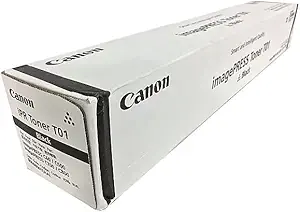
Canon Toner T01 Black (T01 BK) | HIGH YIELD PRINTS | RELIABLE | EFFICIENT
$189.00 $200.00
Canon Toner T01 Black (T01 BK)
The Canon Toner T01 Black (T01 BK) is a high-quality toner cartridge designed for use with certain Canon laser printers and multifunction devices. It is part of the Canon T01 series of toner cartridges, known for providing excellent print quality and efficiency in high-volume office environments. The T01 BK is the black toner variant of this series and is designed to deliver sharp text, fine lines, and high-quality graphics.
Key Features of Canon Toner T01 Black (T01 BK):
- High-Quality Print Output:
- The T01 BK Black Toner produces sharp, clear text and crisp black prints. It ensures that documents, reports, and professional materials look polished and crisp, making it ideal for business and office use.
- Consistent Performance:
- The T01 BK Toner is designed to deliver consistent print quality over the course of its lifecycle. Users can expect high-performance output throughout the toner’s lifespan, reducing the need for frequent replacements.
- Easy Installation:
- The Canon T01 Black Toner is designed for easy installation and quick setup. It can be seamlessly inserted into compatible printers or multifunction devices, allowing businesses to minimize downtime during cartridge changes.
- Long-Lasting Yield:
- With a high page yield, the T01 BK toner is ideal for offices or businesses that require large-volume printing. This helps to reduce the frequency of toner replacements, improving productivity.
- Environmentally Friendly:
- Canon strives to make its toner cartridges environmentally friendly, including features designed to minimize energy consumption and make the toner easy to recycle.
Specifications of Canon Toner T01 Black (T01 BK):
- Cartridge Type: Toner Cartridge
- Color: Black (BK)
- Compatibility:
- Compatible with specific Canon laser printers and multifunction devices (such as the Canon imageCLASS series or other compatible models).
- Page Yield:
- The Canon T01 BK Toner has an approximate yield of 2,300 pages at 5% page coverage. The actual yield may vary based on printing conditions, media used, and usage patterns.
- Dimensions:
- Width: Approx. 5.7 inches (145 mm)
- Depth: Approx. 14.2 inches (360 mm)
- Height: Approx. 6.1 inches (155 mm)
- Weight: Approx. 0.7 kg (1.5 lbs)
Benefits of Canon Toner T01 Black (T01 BK):
- Enhanced Print Quality:
- The Canon T01 BK Toner delivers high-resolution prints with sharp black text and clear lines, making it ideal for producing professional documents.
- High Yield and Cost Efficiency:
- With a yield of approximately 2,300 pages, the T01 BK Toner is an efficient and cost-effective solution for high-volume printing, reducing the need for frequent replacements and helping businesses save on printing costs.
- Reliable Performance:
- The T01 BK Toner provides reliable and consistent performance, ensuring that your printer operates smoothly and produces high-quality results every time.
- User-Friendly Installation:
- The toner is designed for easy installation and compatibility with supported Canon printers, ensuring a seamless user experience.
- Sustainability:
- Canon’s environmentally conscious design ensures that the T01 BK Toner can be easily recycled, and the printer uses energy-efficient technology to minimize environmental impact.
How to Install Canon Toner T01 Black (T01 BK):
- Turn Off the Printer:
- To ensure safety, power off your printer before replacing the toner.
- Open the Printer’s Front Panel:
- Open the printer’s front panel or the toner compartment to access the current toner cartridge.
- Remove the Old Toner Cartridge (If Replacing):
- Gently pull out the old toner cartridge from the printer. Dispose of or recycle it according to local recycling guidelines.
- Prepare the New Toner Cartridge:
- Unbox the Canon T01 BK Toner and remove any protective packaging or sealing tape. Be sure not to touch the toner surface to avoid damaging it or affecting print quality.
- Install the New Toner Cartridge:
- Insert the new toner cartridge into the designated slot inside the printer. Align it properly and gently push it until it clicks into place.
- Close the Printer’s Front Panel:
- Close the front panel of the printer securely once the toner is properly installed.
- Turn the Printer Back On:
- Power on your printer, and it will automatically detect the new toner cartridge.
- Print a Test Page:
- After installation, print a test page to ensure that the toner is installed correctly and that the print quality is satisfactory.
Conclusion:
The Canon Toner T01 Black (T01 BK) is an excellent choice for businesses and individuals who require high-quality, reliable prints with sharp black text and clean graphics. Offering a high page yield of around 2,300 pages, it ensures long-lasting performance and cost efficiency. The easy installation, consistent performance, and eco-friendly features make it a solid option for businesses with high-volume printing needs. Whether used for professional documents, reports, or other print materials, the Canon T01 BK Toner delivers the quality and reliability needed for demanding office environments.
| Weight | 0.7 kg |
|---|


There are no reviews yet.