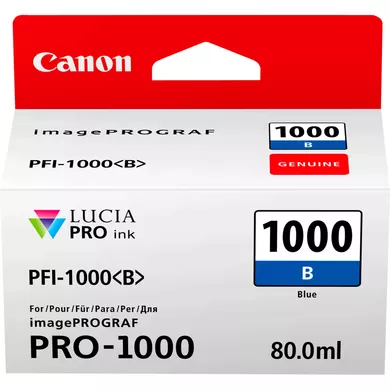
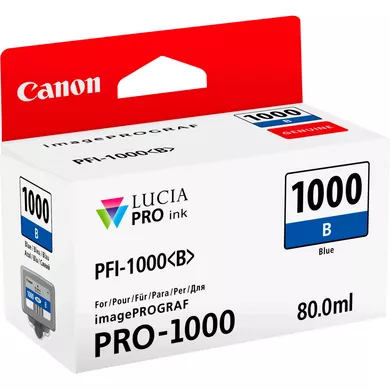
The INK CARTRIDGE CANON PFI-1000 B is an ink cartridge designed specifically for Canon’s imagePROGRAF PRO series large-format printers. The “B” in the model number indicates that this cartridge contains Blue ink.
It is part of the PFI-1000 series of ink cartridges, which are widely used in professional-grade printing environments, including photo printing, fine art prints, and other color-critical applications.
High-Quality Dye-Based Ink: The PFI-1000 B uses dye-based ink that offers rich, vibrant colors, ideal for producing glossy, photo-quality prints.
Wide Color Gamut: This ink cartridge is designed to reproduce a wide color range, ensuring precise color reproduction, especially in blue and cyan tones.
OEM Ink for Optimal Performance: As an Original Equipment Manufacturer (OEM) product, the PFI-1000 B is engineered for optimal compatibility and performance with Canon printers.
Reliable and Consistent: The cartridge is designed to work seamlessly with the Canon imagePROGRAF PRO-1000, PRO-2000, and PRO-4000 series printers to ensure consistent, high-quality results over time.
Durability: The dye-based ink in this cartridge ensures long-lasting prints with excellent resistance to fading, making it ideal for archival-quality photos and art prints.
Easy to Install: Like all Canon ink cartridges, the PFI-1000 B is easy to install and replace, requiring no special tools or complicated procedures.
Specifications of INK CARTRIDGE CANON PFI-1000 B
Model Number: Canon PFI-1000 B
Ink Type: Dye-based ink
Color: Blue
Cartridge Capacity: Available in 80ml, 130ml, and 300ml capacities, depending on the specific model.
Compatible Printers: Canon imagePROGRAF PRO-1000, PRO-2000, PRO-4000, PRO-4000S series
Print Yield: The yield varies depending on the specific printer model and print settings but is generally designed for high-volume printing.
Benefits
Vibrant and Accurate Colors: The dye-based ink ensures that prints have rich, vibrant blue and cyan tones, making it perfect for photo and fine art printing where color accuracy is critical.
High-Quality Prints: The PFI-1000 B cartridge helps produce high-quality prints that are highly detailed with excellent contrast and color saturation.
Long-Lasting Prints: The ink is designed to resist fading over time, ensuring that prints maintain their vibrancy for years.
Cost-Efficient for Professionals: With larger ink capacities (such as 130ml and 300ml options), the PFI-1000 B helps reduce the frequency of cartridge replacements, making it more cost-effective for professional and commercial use.
Reliable Performance: Canon’s PFI series cartridges are designed for maximum reliability, reducing the risk of issues such as clogging or poor color output.
Ease of Use: The PFI-1000 B is easy to install and replace, offering minimal downtime and hassle for users.
How to install INK CARTRIDGE CANON PFI-1000 B
Turn Off the Printer: Begin by turning off the printer to ensure safety during installation.
Open the Printer’s Ink Cartridge Compartment: Open the front cover or ink compartment door of your Canon imagePROGRAF printer to access the cartridge slots.
Remove the Old Cartridge (if necessary): If you are replacing an old cartridge, press the release mechanism and gently pull out the used cartridge.
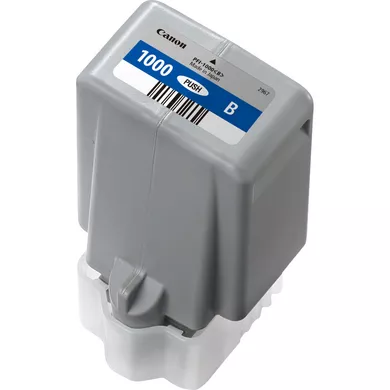
Prepare the New Cartridge: Take the new Canon PFI-1000 B ink cartridge out of its packaging. Avoid touching the ink spout to prevent contamination or damage.
Install the New Cartridge: Insert the new cartridge into the designated blue ink slot. Make sure the cartridge clicks into place securely.
Close the Ink Compartment: Once the cartridge is installed, close the ink compartment cover.
Power On the Printer: Turn the printer back on. The printer may go through an automatic process of ink initialization, where it will check the ink level and prepare the printer for use.
Run a Test Print: After installation, perform a test print to check that the ink is flowing correctly and that the color output is as expected.




There are no reviews yet.