

-2%
canon, Canon Accessories, Canon Catridge, Canon Ink & Toner
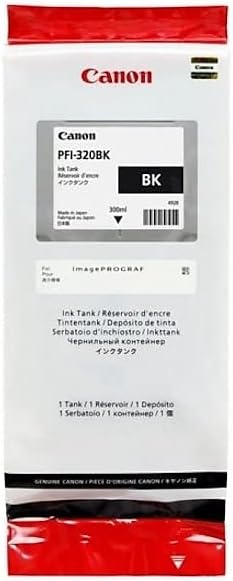
TONER Canon PFI-320 B | High Yield Ink Cartridge
USD
$133.35 $136.00
TONER Canon PFI-320 B
The Canon PFI-320 B is a high-quality ink cartridge designed for Canon’s large-format printers. Specifically, it is part of Canon’s PFI-320 series, ensuring consistent, professional-grade output for businesses and individuals needing precise and vibrant prints. The “B” indicates that this cartridge contains blue (cyan) ink, crucial for creating accurate color blends in prints.
Key Features
- High-Performance Ink: Formulated for consistent color accuracy and long-lasting print quality.
- Large Capacity: Provides a significant volume of ink, ideal for high-volume printing.
- Compatibility: Works seamlessly with Canon’s imagePROGRAF large-format printers.
- Enhanced Durability: Offers UV and water-resistant properties, ensuring prints remain intact for longer periods.
- Environmentally Friendly: Canon’s cartridge recycling program ensures sustainability.
Specifications: Canon PFI-320 B
- Model Name: Canon PFI-320 B
- Ink Color: Blue (Cyan)
- Ink Type: Pigment-based ink
- Cartridge Type: Individual cartridge
- Capacity: 330ml
- Compatibility: Designed for Canon imagePROGRAF series printers such as PRO-2000, PRO-4000, and PRO-6000.
- Weight: Approximately 0.6 kg (1.3 lbs) when full.
- Shelf Life: Typically 24 months when unopened.
Benefits| Canon PFI-320 B
- High-Volume Printing: The large ink capacity reduces the frequency of cartridge replacements, improving productivity.
- Professional-Grade Output: Perfect for producing sharp and vibrant prints for photography, graphic design, and technical applications.
- Cost-Effective: High-yield design reduces cost per print.
- Reliable: Ensures smooth operation with minimal risk of leaks or printer malfunctions.
- Eco-Conscious: Participation in Canon’s recycling initiatives supports environmentally friendly practices.
How to Install the Canon PFI-320 B Cartridge
- Prepare the Printer:
- Turn the printer on and open the ink cartridge access cover.
- Ensure the printer is idle and not actively printing.
- Remove the Old Cartridge (if applicable):
- Locate the empty or low cartridge in the ink bay.
- Press the cartridge release lever and pull it out gently.
- Prepare the New Cartridge:
- Unbox the PFI-320 B and remove all protective seals and packaging.
- Gently shake the cartridge to ensure the ink is evenly distributed.
- Insert the New Cartridge:
- Align the cartridge with its slot, ensuring the label and color code match.
- Push the cartridge firmly until it clicks into place.
- Close the Cover:
- Close the printer’s ink compartment cover securely.
- Wait for the printer to recognize the new cartridge.
- Perform a Test Print:
- Run a test print or nozzle check to confirm proper installation and ink flow.


There are no reviews yet.