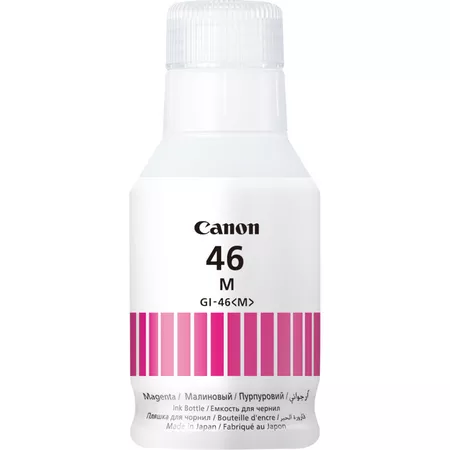
The Canon GI-46M Magenta Ink Bottle is a high-yield ink bottle specifically designed for use with Canon MegaTank printers, offering a cost-effective solution for users with high-volume printing needs. This ink bottle provides vibrant, rich magenta colors that are ideal for printing colorful documents, photos, graphics, and marketing materials. It is designed to provide a long-lasting ink solution, reducing the frequency of ink replacements and offering excellent print yield.
Key Features of Canon GI-46M Magenta Ink Bottle:
High Ink Yield:
The Canon GI-46M Magenta Ink Bottle offers an impressive yield of up to 7,700 pages at 5% page coverage (ISO/IEC 24712 standard), making it ideal for users who print in high volumes.
Dye-Based Ink:
The ink is dye-based, known for delivering vibrant and saturated colors, especially magenta tones, ideal for photo printing and colorful documents.
Compatible with Canon MegaTank Printers:
The GI-46M ink bottle is designed for use with Canon MegaTank printers, such as the PIXMA G6020, PIXMA G5050, PIXMA G7060, and other compatible Canon MegaTank models.
Cost-Effective:
This high-yield ink bottle offers a low cost per page, which reduces overall printing costs for users who need to print large volumes regularly.
Eco-Friendly Design:
The ink bottle is spill-resistant and recyclable, making it an environmentally friendly option compared to traditional ink cartridges.
Easy and Clean Refilling:
The ink bottle is designed with a spill-resistant system, making it easy to refill the ink tank in your printer without mess.
Specifications of Canon GI-46M Magenta Ink Bottle:
Model: Canon GI-46M Magenta Ink Bottle
Ink Type: Dye-based ink
Color: Magenta (M)
Ink Volume: 135 ml
Page Yield: Up to 7,700 pages at 5% coverage (ISO/IEC 24712 standard)
Compatible Printers:
Canon PIXMA G6020
Canon PIXMA G5050
Canon PIXMA G7060
Other compatible Canon MegaTank printers
Dimensions (L x W x H):
Length: 13.5 cm (5.3 inches)
Width: 5.4 cm (2.1 inches)
Height: 14.3 cm (5.6 inches)
Weight: Approx. 150 g (5.3 oz)
Benefits of Canon GI-46M Magenta Ink Bottle:
Longer Printing Duration:
The 7,700-page yield allows users to print for longer periods without needing to replace the ink bottle frequently, ideal for high-volume users like offices or home offices.
Vibrant, Consistent Color Output:
The dye-based ink produces rich, bright magenta tones, perfect for photo printing, presentations, and other documents requiring accurate color reproduction.
Low Cost Per Page:
This ink bottle reduces printing costs significantly, offering excellent value for users who print large volumes.
Eco-Friendly:
The ink bottle is designed to be recyclable, and the MegaTank system produces less waste compared to traditional ink cartridges, contributing to environmental sustainability.
Easy to Refill:
With a spill-resistant design, refilling your printer is a hassle-free process. The ink is automatically transferred into the printer’s ink tank without mess or spills.
How to Use Canon GI-46M Magenta Ink Bottle:
Prepare the Printer:
Ensure your printer is powered on and the ink tank is empty or low. Open the ink compartment of the printer according to your printer’s manual.
Remove the Cap:
Remove the cap from the Canon GI-46M Magenta Ink Bottle.
Refill the Ink Tank:
Align the ink bottle with the refill port in your printer. Gently press the bottle to release the ink. Wait until the ink tank is filled.
Close the Ink Compartment:
Once the ink tank is filled, securely close the ink compartment and replace the ink bottle cap.
Check Ink Levels:
Use your printer’s display or control panel to verify the ink levels and confirm that the refill was successful.
Test Print:
Print a test page to ensure that the magenta ink is dispensed correctly and the print quality is optimal.




There are no reviews yet.