

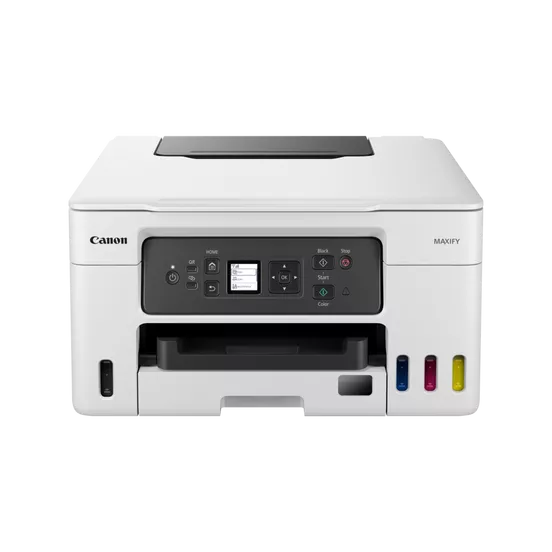
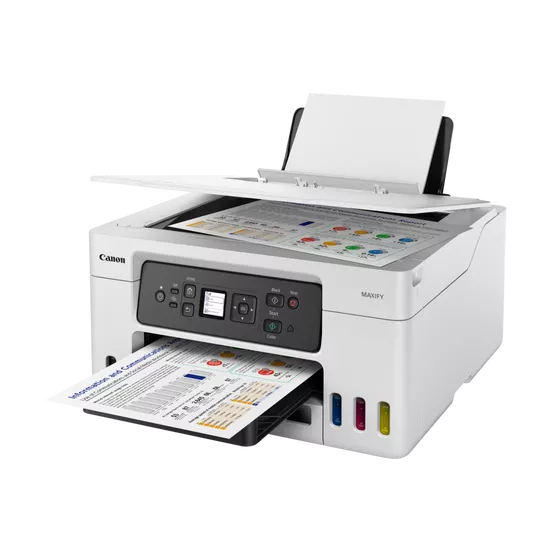


Canon Inkjet MFP GX3040
The Canon Inkjet MFP GX3040 is a multi-function printer (MFP) designed for efficient and high-quality printing, scanning, and copying. It is part of Canon’s MegaTank series, which features a high-capacity ink tank system, designed to provide low-cost, high-volume printing, making it an ideal solution for home offices, small businesses, or individuals who require a reliable and cost-effective printing solution. The GX3040 is also designed to be energy efficient and easy to maintain.
Key Features:
- High-Volume Printing with MegaTank Technology: The GX3040 features Canon’s MegaTank ink system, which allows users to print thousands of pages without needing to replace the ink frequently. This is ideal for users who print in high volumes.
- Low Cost Per Print: The printer offers an extremely low cost per page due to the high-yield ink bottles and refillable tank system. It helps reduce running costs, making it ideal for budget-conscious users.
- Versatile Functionality: As a multi-function printer, the GX3040 supports printing, scanning, and copying, making it an all-in-one solution for personal or office use.
- Wireless and Mobile Printing: The printer supports wireless printing, enabling users to print directly from smartphones, tablets, and computers. It is compatible with various mobile printing services such as Apple AirPrint and Google Cloud Print.
- High-Quality Prints: The GX3040 delivers clear, high-quality prints with crisp text and vibrant colors. It is suitable for both black-and-white and color printing needs.
- Fast Print Speed: This printer has a fast printing speed, allowing users to print documents quickly, which is helpful in busy office environments.
- Compact Design: The printer is designed to be compact and space-saving, which is beneficial for home offices or smaller workspaces.
- Large Ink Tanks: The ink tanks are transparent, making it easy to see when ink levels are low, and are easy to refill, reducing the hassle of changing cartridges frequently.
Specifications: Canon Inkjet MFP GX3040
- Printer Type: Inkjet Multi-Function Printer (MFP)
- Functionality: Print, Scan, Copy
- Ink Type: Refillable MegaTank ink system
- Print Speed:
- Black (Standard A4): Up to 10.8 ipm (images per minute)
- Color (Standard A4): Up to 6.0 ipm
- Print Resolution: Up to 4800 x 1200 dpi (optimized)
- Connectivity:
- Wi-Fi: Yes, supports wireless printing
- USB 2.0: Yes, for direct connection
- Mobile Printing: Supports Apple AirPrint, Google Cloud Print, and Canon PRINT app
- Display: 1.2-inch LCD display for simple operation
- Paper Handling:
- Paper Capacity: 100 sheets (input tray)
- Supported Paper Sizes: A4, A5, B5, Letter, Legal, Envelopes
- Automatic Document Feeder (ADF): No
- Energy Consumption: Low power consumption, energy-efficient design
- Dimensions: 445 x 330 x 161 mm (W x D x H)
- Weight: Approximately 5.8 kg
- Compatible Operating Systems: Windows, macOS, and mobile devices (iOS, Android)
Benefits: Canon Inkjet MFP GX3040
- Cost Efficiency: The MegaTank system provides users with a significantly lower cost per page, making it more economical for users who print frequently. The ink bottles last longer than traditional ink cartridges, reducing overall ink costs.
- High-Yield Ink: With the high-yield ink tanks, users can print thousands of pages before needing a refill, making the printer ideal for businesses and home offices with high print volumes.
- Wireless and Flexible Printing: The ability to print from mobile devices, tablets, or computers without being physically connected to the printer provides convenience and flexibility.
- Compact and Space-Saving: The compact design makes the GX3040 easy to fit into a small workspace or home office, without sacrificing functionality or performance.
- Low Environmental Impact: The refillable ink tank system reduces waste compared to traditional ink cartridges, which is beneficial for environmentally-conscious users.
- Reliable Performance: Canon’s well-known reliability and print quality ensure consistent results for both everyday documents and professional-quality materials.
How to Install Canon Inkjet MFP GX3040
- Unbox the Printer: Remove the printer from its packaging and ensure that all components are included.
- Set Up the Printer: Place the printer on a stable, flat surface. Plug in the power cord and turn on the printer.
- Fill the Ink Tanks: Carefully fill the ink tanks with the supplied ink bottles (black, cyan, magenta, yellow). The tanks are transparent, so it is easy to see when they are full.
- Install Software: If you plan to connect the printer to a computer, install the printer’s software from the Canon website or the included CD.
- Connect to Wi-Fi: Follow the on-screen instructions on the printer’s display to connect it to your wireless network.
- Test the Printer: After installation, print a test page to ensure that the printer is working correctly.
Maintenance Tips:
- Regularly Check Ink Levels: Keep an eye on ink levels using the transparent ink tanks, and refill them when needed.
- Keep the Printer Clean: Regularly clean the exterior of the printer and the scanner glass to ensure consistent print quality.
- Use Genuine Canon Ink: For optimal performance and print quality, always use genuine Canon ink refills.
- Perform Regular Printhead Cleaning: Periodically run printhead cleaning cycles to prevent clogging and maintain optimal print quality.
The Canon Inkjet MFP GX3040 is a highly efficient and cost-effective choice for individuals and businesses looking for an all-in-one printer with low operational costs and the ability to handle high-volume printing. With its MegaTank ink system, wireless connectivity, and compact design, the GX3040 is a versatile and reliable solution for modern work environments.
| Weight | 5.8 kg |
|---|


There are no reviews yet.