

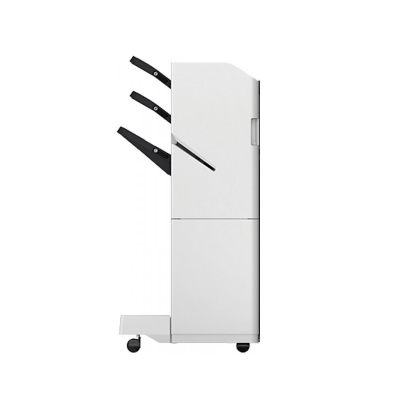
Canon Staple Finisher AC1
The Canon Staple Finisher AC1 is a finishing accessory designed for use with compatible Canon multifunction printers (MFPs) and copiers. It provides essential finishing capabilities such as stapling, enhancing productivity in office environments where document finishing is frequently required.
Canon Staple Finisher AC1 is a stapling unit that can be attached to select Canon printers or MFPs. It is used to automatically staple sets of printed or copied documents, improving the workflow in an office by reducing the need for manual document binding. It supports multiple staple positions and is designed for mid- to high-volume document finishing.
Key Features:
- Stapling Capability:
- The Staple Finisher AC1 provides the ability to staple up to 50 sheets of paper in a single job, streamlining the process of organizing printed or copied documents.
- Multiple Stapling Positions:
- Depending on the configuration, it allows for corner stapling or side stapling, which is ideal for booklets, reports, or any documents that need to be bound together.
- High-Speed Processing:
- Designed to work with high-volume printers and copiers, the Staple Finisher AC1 helps process large batches of documents quickly and efficiently.
- Automatic Stapling:
- It automates the stapling process, allowing for quick and consistent results without the need for manual intervention. This helps save time and improve office productivity.
- Compact Design:
- The unit is designed to be compact, fitting easily into an office setup without taking up too much space, and it integrates seamlessly with compatible Canon printers and MFPs.
- Multiple Output Options:
- In addition to stapling, some models also support other finishing functions, such as hole punching or booklet making, depending on the configuration of the printer.
- Compatibility:
- The Canon Staple Finisher AC1 is compatible with specific Canon devices in the imageRUNNER ADVANCE series and other models that support finisher options. Be sure to check compatibility before purchasing or installing.
Specifications: Canon Staple Finisher AC1
- Staple Capacity: Can staple up to 50 sheets of paper per job.
- Staple Position Options: Offers corner or side stapling, providing flexibility for different document types.
- Stapling Type: Single staple for simple binding, often used for regular documents.
- Paper Size Compatibility: Typically supports A4 and Letter sizes, as well as other common paper sizes.
- Staple Type: Uses standard staples designed for the finisher, usually in a cartridge form.
- Output Capacity: Offers a large output tray to hold the stapled sets of documents.
Benefits: Canon Staple Finisher AC1
- Increased Productivity: Automating the stapling process frees up time for employees to focus on other tasks, improving overall office efficiency.
- Cost-Effective: Reduces the need for manual labor or outsourcing document finishing, lowering costs associated with printing and document handling.
- Convenience: Users can print, copy, and staple documents in one seamless process, which simplifies workflow and reduces the time spent manually binding documents.
- Professional Appearance: Produces neatly stapled documents, which is ideal for creating professional reports, booklets, presentations, and other business materials.
- Space Saving: The compact design of the finisher allows it to fit into smaller office spaces while providing essential finishing features.
- Flexible Stapling Options: The ability to select between corner stapling and side stapling ensures that different types of documents (such as reports or manuals) can be handled as needed.
How to Install Canon Staple Finisher AC1
- Check Printer Compatibility:
- Ensure that your Canon printer or MFP is compatible with the Staple Finisher AC1. Consult the printer’s manual or Canon’s website for compatibility information.
- Unbox the Staple Finisher:
- Remove the Staple Finisher AC1 from its packaging. Be careful when handling the unit to avoid damage.
- Attach the Finisher to the Printer:
- Place the Staple Finisher AC1 onto the appropriate location on the printer or MFP. This usually involves aligning the finisher with the printer’s finishing port and securing it into place.
- Most units will snap into position or require a simple connection to complete the attachment.
- Install Staples:
- Load the staple cartridge into the stapling mechanism of the finisher. Follow the instructions for loading staples correctly.
- Power On the Printer:
- Turn on the printer and make sure that it recognizes the newly installed finisher. Some models may require you to perform a system update or configure the finisher settings through the printer’s display or web interface.
- Test Stapling Function:
- Run a test print job to ensure that the Staple Finisher AC1 is correctly stapling the printed pages. You may need to select stapling options (such as corner or side stapling) through the printer’s control panel.
- Configure Settings:
- If applicable, configure stapling preferences in the printer’s settings to customize how documents are stapled (e.g., number of staples, position, etc.).



There are no reviews yet.